

ClipPro: Video & Photo Editor
Ram Tulugu · Photo & Video
Independent analytics for this App Store listing. AppTracker is not affiliated with Ram Tulugu.
Chart standing · US
What changed · US
Listing changes AppTracker has observed for this app in this storefront — new versions, price moves, rating shifts, and store copy.
Pay Once. Enjoy for a Lifetime. No subscriptions. No recurring charges. We aim to address feedback within 2 business days.
Price & rating history · US
Reconstructed from the listing changes AppTracker has observed in this storefront. A field is charted once it has changed more than once, and each line starts at the value it moved from.
Price · Free now · 8 changes on record
Average rating · ★ 3.67 now · 3 changes on record
In-app purchases · US
No in-app purchases.
Screenshots





About
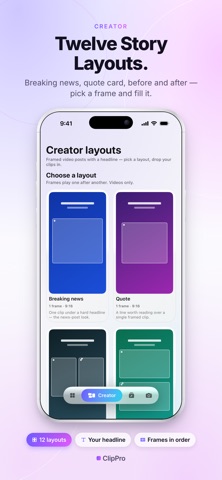
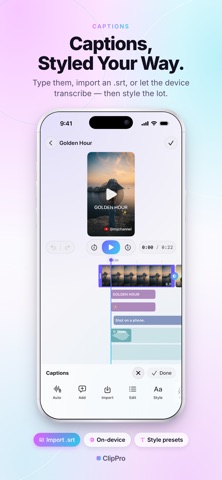
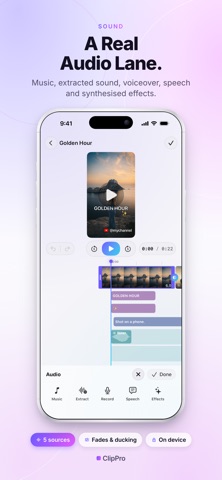
A complete video, photo and collage editor that never leaves your device. Cut on a real timeline, grade with sixteen cinematic looks, add titles, stickers and music, brand it with your own watermark, and export up to 4K. No account, no ads, no subscription, and no internet connection required — ever. WHAT YOU SEE IS WHAT YOU EXPORT ClipPro previews and renders through one engine, so the grade, crop, title or transition you see while editing is exactly what lands in the finished file. No surprises after a long render. A REAL TIMELINE • Multi-clip editing with frame thumbnails • Split, merge, trim, duplicate and reorder • Speed from 0.1x to 16x, with audio kept in sync • Freeze frame from any point • Interactive crop with aspect lock, rotate and flip • Fifteen transitions: fade, dissolve, slides, wipes, iris, zoom, whip pan, flash and blur • Undo and redo, plus autosave — there is no Save button to forget SIXTEEN CINEMATIC GRADES B&W, Warm, Cool, Vivid, Fade, Vintage, Cinema, HDR, Film, Retro, Vlog, Neon, Aesthetic, Portrait and Landscape — each with its own strength dial, and each previewed on your own footage rather than a stock thumbnail. TITLES, STICKERS AND DRAWING • Seven typefaces, colour, outline, shadow, spacing and opacity • Four caption background styles • Eleven in and out animations, including typewriter • Eighteen ready-made title presets • Around 450 emoji stickers across eight groups • Freehand drawing with pen, highlighter, arrow, line, rectangle and oval • Drag anything on the preview; time it on its own timeline lane SOUND • Add music from your files • Extract a clip's own audio onto its own lane • Record a voiceover against the picture • Generate narration with on-device text to speech • Built-in sound effects, synthesised rather than sampled • Volume, fade in, fade out and a real noise reducer • Waveforms drawn on the timeline so you can cut to the beat YOUR BRAND, EVERY VIDEO Save a template once — canvas shape, watermark, intro card and end card — and apply it in a tap. Cards arrive as real, editable clips, and every piece is addressable: tap the subscribe button to edit the button, tap the bell to edit the bell. Five creator presets included. PHOTO EDITOR The same crop, grades, text, stickers and drawing, exported as an image in JPEG, PNG or HEIC. COLLAGE Up to nine photos in one frame across twenty layouts. Pan, zoom, rotate, flip and grade each cell, choose from six frame shapes, adjust spacing, corners and margins, and finish with a flat or gradient background. EXPORT ON YOUR TERMS • 720p, 1080p, 2K or 4K • 24, 30 or 60 fps • MP4, MOV or GIF • Social presets for YouTube, Instagram, TikTok, Facebook and WhatsApp • A live file-size estimate on every option, before you render IPHONE, IPAD AND MAC One app, designed for each. The iPad and Mac layouts use the extra room rather than stretching the phone interface, and full keyboard control is built in. PRIVATE BY DESIGN ClipPro contains no networking code at all. Your footage is never uploaded, there is no account to create, and nothing is tracked. It works in aeroplane mode because it has to — everything renders on your own device. Questions or ideas? Write to contact@dowble.com. We reply within a day.
What's new · 1.0.7
Pay Once. Enjoy for a Lifetime. No subscriptions. No recurring charges. We aim to address feedback within 2 business days.
Details