

AppGlance: Sales at a Glance
keisuke haraguchi · Developer Tools
Independent analytics for this App Store listing. AppTracker is not affiliated with keisuke haraguchi.
Chart standing · US
What changed · US
Listing changes AppTracker has observed for this app in this storefront — new versions, price moves, rating shifts, and store copy.
Fixed a bug where the home screen's past-year total was calculated incorrectly.
In-app purchases · US
No in-app purchases.
Screenshots



About
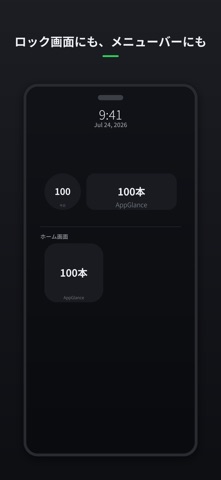
See your app's sales and downloads in 5 seconds — on iPhone AND Mac. AppGlance connects directly to your own App Store Connect account and shows the numbers that matter: units sold and downloaded, right on your Home Screen, Lock Screen, or Mac menu bar. No dashboard to open, no login to remember — just glance and go. WHY APPGLANCE Apple's own App Store Connect app is iPhone/iPad only — there's still no official way to check your numbers from a Mac without opening a browser. AppGlance is a truly native Universal Purchase: buy once, use it on iPhone and Mac both. FEATURES • Home Screen & Lock Screen widgets (iOS) — today's report, always visible • Menu bar item (Mac) — click for a quick summary popover • Per-app breakdown when you manage more than one app • No servers, no accounts, no ads, no subscription YOUR KEYS NEVER LEAVE YOUR DEVICE AppGlance talks directly to Apple's App Store Connect API from your iPhone or Mac. Your API key (Issuer ID, Key ID, and private key) is stored only in your device's Keychain — never sent to any server we operate, never synced anywhere. HONEST ABOUT THE LAG Apple's Sales Reports usually take 1-2 days to finalize. AppGlance always labels the data with its actual report date instead of pretending it's "today" — so you always know exactly how fresh the numbers are. GETTING STARTED 1. Open App Store Connect -> Users and Access -> Integrations -> App Store Connect API 2. Generate a key with the Sales, Finance, Admin, or Account Holder role 3. Enter the Issuer ID, Key ID, Vendor Number, and the downloaded .p8 file into AppGlance 4. That's it - no sign-up, no account creation Free to download. The per-app breakdown and 7-day/30-day views unlock with a single one-time purchase - no subscription, ever.
What's new · 1.4
Fixed a bug where the home screen's past-year total was calculated incorrectly.
Details