

Ham Imaging
Yousif AL Balushi · Utilities
Independent analytics for this App Store listing. AppTracker is not affiliated with Yousif AL Balushi.
Chart standing · US
What changed · US
Listing changes AppTracker has observed for this app in this storefront — new versions, price moves, rating shifts, and store copy.
Decode a saved recording, in more formats — the file button beside Receive used to open a WAV file and nothing else. It now opens what the Tools tab opens: WAV, MP3, M4A, AAC, OGG and FLAC. Pick the recording and its picture is decoded exactly as it would be from the air. A recording longer than any single SSTV picture, a whole pass for example, is handed to Tools with one tap, where you trim the part you want; a video goes there too; and a file that is not a recording is refused by name, in a sentence. OGG recordings of the common kind — the kind a SatNOGS recording of a satellite pass is — now open in Receive and in Tools: where the system has no decoder for them, the app uses its own, offline like everything else. Audio files are now read by the system’s audio-file reader, to the last sample — which matters because the end of a recording is the bottom of its picture. A recording handed from Receive to Tools no longer leaves a copy of itself behind in temporary storage. And the About page now has four links on one row — User Manual, Support, Version History and Privacy Policy — with the Privacy Policy opening in your browser. A message that carries a button, Saved to Ham Imaging Gallery with TO PHOTOS for one, now goes away by itself after seven seconds instead of staying until it is swiped. de A41UX 73
Screenshots




About
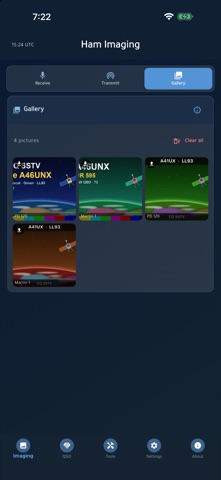
Ham Imaging is the picture side of amateur radio. Hold your phone to any receiver's speaker and watch slow-scan television pictures decode live, or transmit your own with your callsign printed on them — no interface box, no cables, no computer. RECEIVE • Live SSTV decode straight from your radio's audio through the device microphone • Automatic mode detection from the VIS header — leave it on Auto and the picture just appears • 20 modes decoded and encoded: Scottie 1, 2, 3, 4 and DX; Martin 1, 2 and 3; Robot 12, 24, 36 and 72; PD 50, 90, 120, 160, 180, 240 and 290; and Wraase SC2-180 • A live tuning meter and signal-confidence readout so you can peak the audio before the picture starts • Slant correction for the small clock differences that make a picture lean • The picture paints in as it arrives — you do not have to wait for the end of the frame TRANSMIT • Send any photo from your camera or gallery as an SSTV picture • Optional overlay printing your callsign, grid and a free text line onto the image • Pick the mode to suit the band and the time you have • A progress bar tracks the transmission, and you can cancel at any point • Putting a signal on the air stays your decision — the app makes the tones, you key the radio GALLERY & LOGGING • Everything you receive or send is kept together on the device with its mode and UTC time • Share a watermarked copy anywhere • Clean export — a plain copy at 800 px, exactly the format ARISS asks for in award submissions • Copy an ADIF line to paste an SSTV contact straight into Ham Logging or your desktop logger • Delete a single picture or clear the whole gallery. Nothing is ever uploaded BUILT FOR THE SHACK • Works fully offline — decoding and encoding never need an internet connection • Light and dark themes, adjustable font size, weekly tips and in-app version history • Your callsign and grid stay on your device • No account, no ads, no analytics and no tracking PERFECT FOR • Operators working the HF SSTV picture nets • Anyone chasing ISS / ARISS SSTV events and award submissions • Shortwave listeners who want to see what those warbling tones actually are • Newcomers who want to try SSTV without buying an interface • Clubs demonstrating amateur radio to visitors and students PRIVACY • Your callsign, grid and email are stored only on your device. • No account, no sign-up, no ads, no analytics SDKs, no advertising ID and no tracking of any kind. 73 de A41UX Yousuf AL Balushi — Unixeer, Oman
What's new · 4.1.0
Decode a saved recording, in more formats — the file button beside Receive used to open a WAV file and nothing else. It now opens what the Tools tab opens: WAV, MP3, M4A, AAC, OGG and FLAC. Pick the recording and its picture is decoded exactly as it would be from the air. A recording longer than any single SSTV picture, a whole pass for example, is handed to Tools with one tap, where you trim the part you want; a video goes there too; and a file that is not a recording is refused by name, in a sentence. OGG recordings of the common kind — the kind a SatNOGS recording of a satellite pass is — now open in Receive and in Tools: where the system has no decoder for them, the app uses its own, offline like everything else. Audio files are now read by the system’s audio-file reader, to the last sample — which matters because the end of a recording is the bottom of its picture. A recording handed from Receive to Tools no longer leaves a copy of itself behind in temporary storage. And the About page now has four links on one row — User Manual, Support, Version History and Privacy Policy — with the Privacy Policy opening in your browser. A message that carries a button, Saved to Ham Imaging Gallery with TO PHOTOS for one, now goes away by itself after seven seconds instead of staying until it is swiped. de A41UX 73
Details