

Agent Information Companion
Ingo Bohme · Developer Tools
Independent analytics for this App Store listing. AppTracker is not affiliated with Ingo Bohme.
Chart standing · US
Screenshots




About
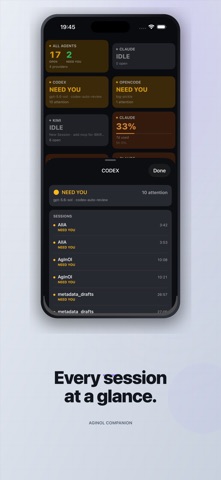
Check which AI coding agents on your Mac are working or waiting for input, wherever you are. IMPORTANT: AgInOl Companion is not a standalone monitor. Before using it, download AgInOl for Mac from https://aiia.li/apps/aginol, install it on the Mac where your agents run, and keep it open. Your Mac and iPhone or iPad must use the same Apple Account with iCloud enabled. Whether you are beside the Mac or 500 km away, the app gives you a read-only view of the latest deck snapshot. The devices do not need to be on the same Wi-Fi network. AT A GLANCE • See which agents are WORKING, IDLE, NEED YOU, or NOT FOUND • Review open sessions, project titles, models, and elapsed time • Check available token and rate-limit usage, including reset times when reported • Open an all-agents summary • See the snapshot age at all times, with stale data clearly indicated HOW IT WORKS AgInOl for Mac reads local session files from supported coding tools and sends a reduced status snapshot through iCloud. The companion does not run or control agents. For current updates, keep the Mac app running and the Mac online. iCloud delivery can take seconds to minutes. Supported tools are Claude Code, Codex, OpenCode, and Kimi Code.
Details