

Mind Map: Smart Mind
Hue Nguyen · Productivity
Independent analytics for this App Store listing. AppTracker is not affiliated with Hue Nguyen.
Chart standing · US
What changed · US
Listing changes AppTracker has observed for this app in this storefront — new versions, price moves, rating shifts, and store copy.
Better images in your mind maps • Full-screen viewer: tap the image of a selected topic to open it full screen. Pinch or double tap to zoom, swipe left or right to browse every image on the map, and swipe down to close. • Share any image right from the viewer. • Works in presentations too: tap an image on the current slide to see it up close. • Tidier maps: tall portrait photos are neatly cropped on the canvas instead of taking over the map. The viewer always shows the whole photo. • Sharper photos when viewed full screen, while large maps use less memory. • Missing images now show a clear placeholder. Tap it to replace or remove the image.
In-app purchases · US
What this app sells inside itself, grouped by kind and priced for this storefront.
Screenshots



About
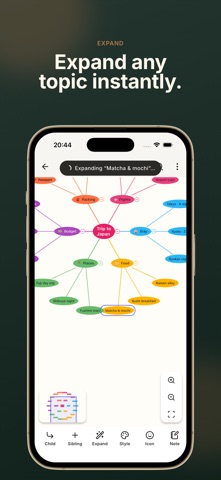
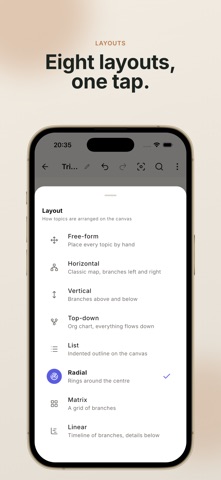
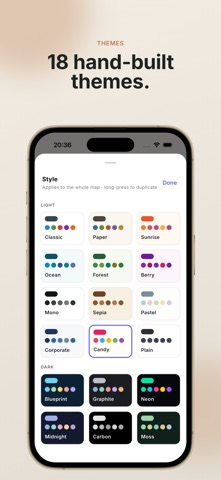
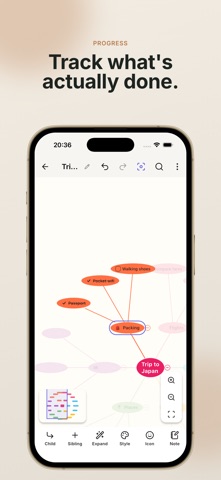
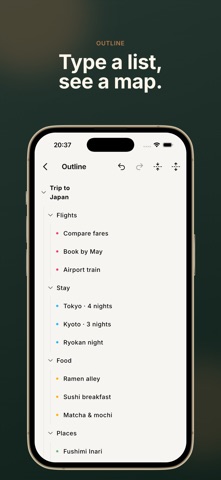
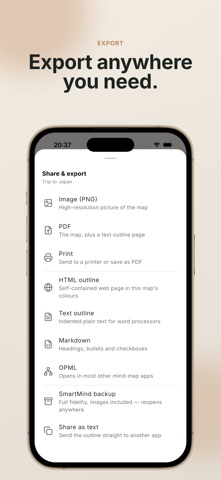
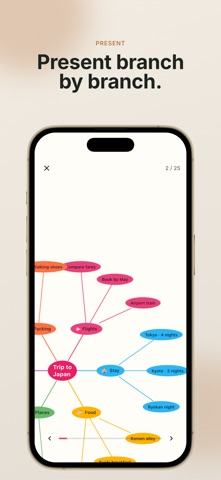
Smart Mind is a fast, private mind mapping app for capturing ideas, planning projects, studying and thinking out loud. Everything you write stays on your device. START WITH AI, FINISH BY HAND Describe what you're thinking about in one sentence and Smart Mind builds a structured map from it. Stuck on a branch? Tap any topic and expand it into sub-topics. Generated topics arrive as ordinary, fully editable text — nothing is locked, nothing is watermarked, and undo works exactly as you'd expect. BUILT FOR REAL MAPS • Unlimited topics and unlimited canvas — the page grows with your thinking • Several mind maps side by side on one canvas • Drag and drop to re-parent a topic or re-order siblings • Checkboxes with progress that rolls up from the branch below • Auto-numbering, crosslinks between any two topics, labels and call-outs • Images from your camera or gallery, notes on any topic, emoji and stock icons • Collapse, hide branches, autofocus a single branch, branch and group borders • Editable outline view — type your map as a list, see it as a map • Search inside a map and across your whole library, organised into folders LAYOUTS AND STYLE Eight layouts: horizontal, vertical, top-down org chart, linear timeline, radial, matrix, list, and free-form where every topic sits where you put it. Eighteen hand-built themes, eight of them dark. Style any topic individually — fill, text, border, shape, font — and any branch line's colour and pattern. TAKE IT ANYWHERE Export to PDF, PNG image, HTML, Markdown, OPML or plain text outline. Print straight from the app. Present a map branch by branch as an animated slideshow. Back up everything to a single file and restore it on another device — importing is free forever, so your maps are never trapped. PRIVACY, PLAINLY No ads. No account. No analytics. No tracking. Your maps are stored on your device and are never uploaded, synced or read by anything. The only network features are the optional AI, purchases, and crash reports you can switch off in Settings. FREE, AND WHAT PRO ADDS The free version is a complete mind mapper: unlimited maps and topics, images, notes, checkboxes, progress, crosslinks, outline, search, image export, text outline export, and every import path including full backup restore. Smart Mind Pro adds: all 8 layouts and all 18 themes plus your own custom themes, PDF/HTML/Markdown/OPML export, printing, slideshow presentation, unmarked image export up to 4x, backup export, and a far larger AI allowance. Pro is available as a subscription or a one-time lifetime purchase. Subscriptions renew automatically unless cancelled at least 24 hours before the period ends; manage or cancel in your App Store account settings. Payment is charged to your Apple ID at confirmation of purchase. Available in English, German, Spanish, French, Italian, Japanese, Korean, Dutch, Portuguese and Chinese. Privacy Policy: https://mygems.app/privacy Terms of Use: https://mygems.app/term
What's new · 1.0.34
Better images in your mind maps • Full-screen viewer: tap the image of a selected topic to open it full screen. Pinch or double tap to zoom, swipe left or right to browse every image on the map, and swipe down to close. • Share any image right from the viewer. • Works in presentations too: tap an image on the current slide to see it up close. • Tidier maps: tall portrait photos are neatly cropped on the canvas instead of taking over the map. The viewer always shows the whole photo. • Sharper photos when viewed full screen, while large maps use less memory. • Missing images now show a clear placeholder. Tap it to replace or remove the image.
Details