

FrameLift: Video to Photo
Renaissance Apps LLC · Photo & Video
Independent analytics for this App Store listing. AppTracker is not affiliated with Renaissance Apps LLC.
Chart standing · US
What changed · US
Listing changes AppTracker has observed for this app in this storefront — new versions, price moves, rating shifts, and store copy.
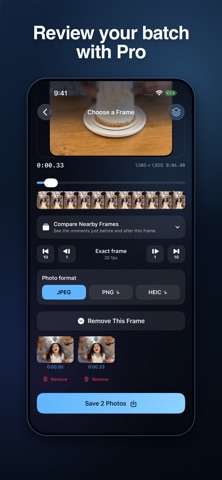
Review selected frames in a thumbnail queue before saving. Keep the original recording date when available, or save with today’s date. Unsaved batch selections now remain available to retry, and frame stepping respects low-frame-rate videos.
In-app purchases · US
What this app sells inside itself, grouped by kind and priced for this storefront.
Screenshots


About
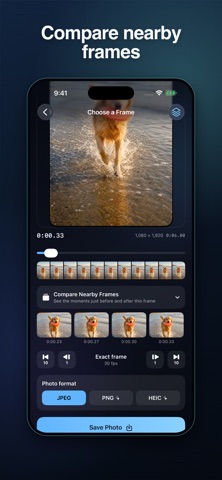
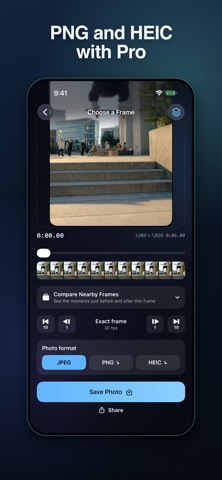
Frame Grabber by FrameLift turns a moment in your video into a photo at the video's original resolution. Find the expression, action or detail you want, compare nearby frames, then save or share it. FIND YOUR EXACT MOMENT • Import a video from Photos or Files • Scrub through visual timeline previews • Step forward or back by one or ten frames • Compare up to seven nearby frames before choosing KEEP THE DETAIL • Export at the source video's resolution, including 4K when present • Save JPEG photos without a watermark • Keep the original recording date when available, or save with today's date • Share a photo or save it directly to Photos REVIEW SEVERAL MOMENTS WITH PRO • Add frames to a thumbnail queue • Review or remove individual selections before saving • Save several frames together • Retry unsaved selections if a batch is interrupted • Choose JPEG, PNG or HEIC export FOR VIDEOS WORTH KEEPING Catch a pet's expression, find a smile in a family video, choose a thumbnail for your next post or inspect a moment from sports footage. Your videos and extracted images are processed on your device. FrameLift does not upload them. Export quality depends on the source video; frame extraction cannot remove existing motion blur. FREE AND PRO FrameLift includes three full-resolution JPEG saves per day. FrameLift Pro adds unlimited saves, batch saving, and PNG and HEIC export. Weekly and annual auto-renewable subscriptions are available. Manage or cancel your subscription in your App Store account. Terms: https://renaissanceapps.com/terms-conditions Privacy: https://renaissanceapps.com/privacy-policy
What's new · 1.1
Review selected frames in a thumbnail queue before saving. Keep the original recording date when available, or save with today’s date. Unsaved batch selections now remain available to retry, and frame stepping respects low-frame-rate videos.
Details