

Dues: Subscription Tracker
Daniel Hinkson · Finance
Independent analytics for this App Store listing. AppTracker is not affiliated with Daniel Hinkson.
Chart standing · US
What changed · US
Listing changes AppTracker has observed for this app in this storefront — new versions, price moves, rating shifts, and store copy.
Free trials: turn on "In a free trial" and set the day it ends. Dues reminds you 2 days before it becomes a charge, and says what that charge will be. Cancel links: open a subscription and, for 30 popular services, a Cancel row takes you straight to that service's own cancel or manage page. Price history: when a price changes, Dues keeps the old one, so you see "was $17.99" under the new price and every change in the editor. On iPad, the subscription editor now sits in a centered column, like Settings. All of it is free, and the widgets show when a trial ends too.
In-app purchases · US
What this app sells inside itself, grouped by kind and priced for this storefront.
Screenshots


About
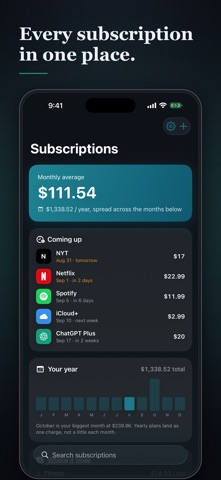
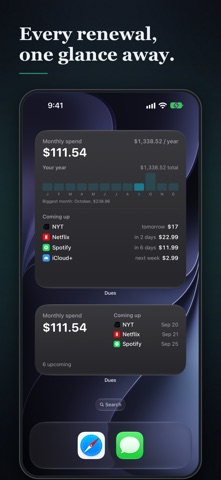
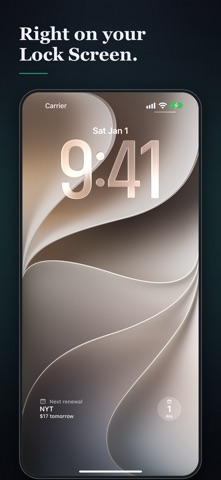
Dues keeps every subscription and recurring bill in one calm place, so a renewal never catches you off guard, and you always know what you're really paying each month. No bank login. No account. No tracking. Everything you add stays on your device. WHAT DUES DOES • Track anything that bills you on repeat from streaming, music, apps, your gym, insurance, cloud storage, memberships, and more. • Get a heads-up before each charge. Choose how many days' notice you want as a default, or per subscription. • Track free trials: set the day a trial ends, and Dues reminds you 2 days before it becomes a charge, with what that charge will be. • Cancel faster: for 30 popular services, open the subscription and tap Cancel to go straight to that service's own cancel or manage page. • See price changes: when a price goes up or down, Dues keeps the old one, so "was $17.99" sits under the new price. • See what you actually spend: your monthly average, your yearly total, and a month-by-month view of when charges really land (so an annual plan shows up as one spike, not a blur). • Add a service in seconds: pick from popular ones with real logos, or add your own in any currency, on any cycle from weekly to every two years. • Widgets for your Home Screen and Lock Screen, free for everyone: your monthly total, your year month by month, and the next renewal at a glance. Tap one to open it. • Keep a backup you control: export your whole list to a file any time, and import it on a new phone. PRIVATE BY DESIGN No ads. No analytics. No account. Dues never asks to connect your bank and never uploads what you pay for. Your list stays on your device and it's yours to export whenever you like. FREE WITH AN OPTIONAL ONE-TIME UPGRADE Track up to 10 subscriptions for free. Dues Plus is a single purchase (never a subscription) that unlocks: • Unlimited subscriptions • Spending by category, so it's clear where to trim Have a question or an idea? We read every message.
What's new · 1.3
Free trials: turn on "In a free trial" and set the day it ends. Dues reminds you 2 days before it becomes a charge, and says what that charge will be. Cancel links: open a subscription and, for 30 popular services, a Cancel row takes you straight to that service's own cancel or manage page. Price history: when a price changes, Dues keeps the old one, so you see "was $17.99" under the new price and every change in the editor. On iPad, the subscription editor now sits in a centered column, like Settings. All of it is free, and the widgets show when a trial ends too.
Details