

TV Remote for Android :RemoteZ
KRISHNA TECHNOWEB · Utilities
Independent analytics for this App Store listing. AppTracker is not affiliated with KRISHNA TECHNOWEB.
Chart standing · US
What changed · US
Listing changes AppTracker has observed for this app in this storefront — new versions, price moves, rating shifts, and store copy.
- minor big fixed - App performance improved
Price & rating history · US
Reconstructed from the listing changes AppTracker has observed in this storefront. A field is charted once it has changed more than once, and each line starts at the value it moved from.
Average rating · ★ 4.91 now · 4 changes on record
Screenshots


Keywords this app targets
Search terms AppTracker associates with this app — estimates, not search volume. ❝ = in the app's title; a highlighted number is its current position for that term.
Similar apps
Competitors and close alternatives, as estimated by AppTracker.
 Universal TV Remote Control ◦
Aalto Studio FZE
Universal TV Remote Control ◦
Aalto Studio FZE
 TV Remote Control · Universal
TrustOneApps L.L.C-FZ
TV Remote Control · Universal
TrustOneApps L.L.C-FZ
 Universal TV Remote Control・
toggle apps
Universal TV Remote Control・
toggle apps
 VIDAA
V America Operations Inc.
VIDAA
V America Operations Inc.
 Universal TV Remote Control*
VISARGERD, S.L.
Universal TV Remote Control*
VISARGERD, S.L.
 Universal TV Remote™ Control
SEAMOBI TECH PTE LTD
Universal TV Remote™ Control
SEAMOBI TECH PTE LTD
 Pimote
Pierre-Marie Biard
Pimote
Pierre-Marie Biard
 SonLink: Remote for BRAVIA TV
Fan Wai Ho
SonLink: Remote for BRAVIA TV
Fan Wai Ho
About
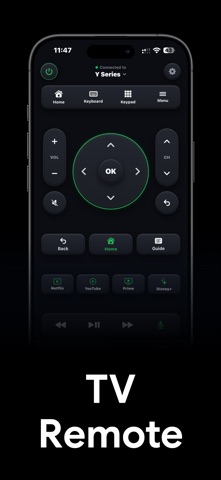
Turn your phone into a powerful remote for your TV. Control your TV over your home Wi-Fi without needing the original remote or worrying about dead batteries. Control Your TV with Ease * Full D-pad navigation with OK, Back, Home, and Menu controls * Volume and channel controls with instant mute * Number pad for quick channel entry * Power control on supported devices Type Faster Searching on a TV keyboard can be slow. Use your phone keyboard to enter text quickly and see it appear instantly on your TV. Voice Search Use your phone to trigger voice search on supported devices, making it easy to find movies, shows, apps, and more. Quick App Shortcuts Launch your favorite streaming apps such as Netflix, YouTube, Prime Video, JioHotstar, and other installed apps with a single tap on supported devices. Easy Setup 1. Connect your phone and TV to the same Wi-Fi network. 2. Open the app and select your TV from the list of available devices. 3. Enter the pairing code displayed on your TV, if prompted. 4. You’re ready to control your TV. Features * Clean and intuitive interface * Optimized for one-handed use * Fast and responsive controls * Simple, clutter-free experience Requirements * Your phone and TV must be connected to the same Wi-Fi network. * Some features may vary depending on your TV model, manufacturer, and device capabilities. Subscription The app may offer optional auto-renewing subscriptions that provide access to premium features and functionality. Payment will be charged to your Apple ID account at confirmation of purchase. Subscriptions automatically renew unless auto-renewal is turned off at least 24 hours before the end of the current subscription period. Your account will be charged for renewal within 24 hours before the current period ends. You can manage or cancel your subscription in your Apple ID account settings after purchase. Privacy Policy https://krishnatechnoweb.com/remotez/privacy/ Terms of Use https://krishnatechnoweb.com/remotez/terms/ Disclaimer This app is an independent remote control application and is not affiliated with, endorsed by, sponsored by, or approved by any TV manufacturer, streaming service, or other third-party brand mentioned in the app. All third-party trademarks, brand names, and logos belong to their respective owners and are used only to identify compatible services or features.
What's new · 1.3
- minor big fixed - App performance improved
Details