

じぶんカルテ - Personal Color
Appricot Co.,Ltd. · Lifestyle
Independent analytics for this App Store listing. AppTracker is not affiliated with Appricot Co.,Ltd.
Chart standing · US
What changed · US
Listing changes AppTracker has observed for this app in this storefront — new versions, price moves, rating shifts, and store copy.
Screenshots


About
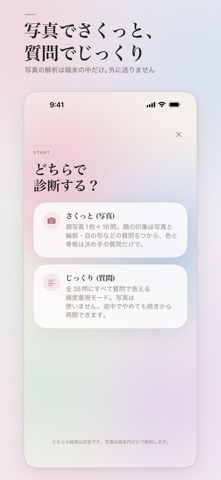
The colors and clothes that suit you, on one card. JibunKarte brings the results of three self-assessments together on one card: personal color, body frame, and facial impression. At a glance, you can see which colors and clothes suit you. Please note: the app is in Japanese only. All screens, questions, and results are shown in Japanese. - Personal color: 4 types (Yellow-base Spring, Blue-base Summer, Yellow-base Autumn, Blue-base Winter) - Body frame: 3 types (Straight, Wave, Natural) - Facial impression: 8 types (Sweet, Pop, Bright, Active, Romance, Grace, Mode, Sharp) WITH A PHOTO, OR WITH QUESTIONS ONLY Quick mode: one face photo plus 16 questions. Personal color (6) and body frame (4) use only the key questions; facial impression uses the photo and 6 questions about your face shape and eyes. The photo is used only for facial impression. Personal color and body frame are decided by your answers, so the lighting or angle of the photo does not change those results. Detailed mode: answer 38 questions. No photo is used. You can stop partway and continue later from where you left off. YOUR FACE PHOTO STAYS ON YOUR IPHONE Photos are analyzed on your device only. The app does not save your photo or send it anywhere. No account or sign-up is needed. The app never gives your face a score or a ranking. 5 COLOR SWATCHES See the colors that suit your type as 5 color swatches, not just color names. HINTS FOR CLOTHES, MAKEUP, HAIR COLOR, AND ACCESSORIES - From personal color: basic colors, the white that suits you, lipstick, blush, eyeshadow, hair color, accessory color - From body frame: silhouette, fabric, neckline, pattern, length, bag, shoes, accessory size - From facial impression: taste, how to combine, makeup finish, eyebrows, glasses, accessory design LOOK BACK ANYTIME, SHARE AS AN IMAGE Your latest card is always shown on the app's home screen. If you take the assessment again, your previous result is kept as your "last result", and you can switch between the two on the home screen. You can share a summary of your card as an image: type names, color swatches, and tips you can use today for color, shape, and mood. Your face photo is never included in the shared image. ADS AND THE NO-ADS VERSION This app shows ads: - A short video ad when you open a new result - A banner ad at the bottom of the home screen - A full-screen ad when you open or return to the app (only after you have finished at least one assessment, and at least one hour apart) If an ad cannot be shown, your result opens anyway. You can buy the no-ads version ("広告なし版") in the app. It is a one-time purchase, not a subscription, and it removes the video, banner, and full-screen ads. To restore a purchase, tap the "i" button at the top right of the home screen, or use the screen shown before you open a new result. If you bought JibunKarte when it was a paid app, it continues to show no ads automatically. No additional payment is needed. PLEASE NOTE - This is a self-assessment. Results are a guide only and are not an in-person consultation with a professional. - The app does not assess hairstyles; for hair color, it only suggests a direction that matches your personal color.
What's new · 1.1.1
- Quick mode results are now less likely to lean toward certain types. - Quick mode questions have been revised (16 in total). Facial impression is now decided by the photo and 6 questions, so your result is less likely to change when you retake it. - When a result is close, the app also shows the nearby type. - New makeup (blush and eyeshadow) and hair color hints. - The result screen has been redesigned to be easier to read: summary, tips you can use today, then details. - You can stop the detailed assessment partway and continue later. - If you take the assessment again, your previous result is kept so you can compare. - The camera now opens with the front (selfie) camera. - Clearer wording for questions and answers. The app's screens are in Japanese only.
Details