

TagSweep
Fogarty Holdings LLC · Productivity
Independent analytics for this App Store listing. AppTracker is not affiliated with Fogarty Holdings LLC.
Chart standing · US
What changed · US
Listing changes AppTracker has observed for this app in this storefront — new versions, price moves, rating shifts, and store copy.
Fixes a device being flagged for the next student in line right after it was handed out. Reads serial numbers and Dell service tags from the bottom of a device, for devices whose asset tag is missing or torn off. Deleting a class roster now also removes its student names from device history and from items waiting for review. Delete confirmations now appear in the middle of the screen, and asset tags read with extra * characters are cleaned up.
Screenshots


About
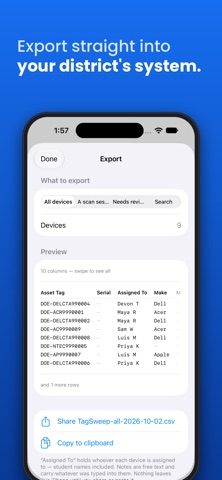
Every school tech coordinator ends up with a spreadsheet. Not because the district's asset system is missing features — because you can't use it standing in a hallway with a cart of Chromebooks. TagSweep is the part that happens before the spreadsheet. Point your camera at an asset tag and it reads the barcode and the printed number at the same time. Walk a cart, sweep across the labels, and the records pile up. Then export a clean CSV into DeviceHub, Incident IQ, Destiny, Google Admin, or whatever your district makes you use. SCAN - Reads barcodes and printed text together — if one is worn off, the other still gets it - Continuous capture, no tapping between devices - Works offline, in a wiring closet, with no signal - Photograph labels now and work through them later at your desk HAND OUT - Import a class roster, then tap a student and scan their device - Handles students with more than one device - Mark absences, resume exactly where you left off - Never moves a device between students without asking first IMPORT AND EXPORT - Import the spreadsheet you already have — messy columns and all - Map your columns once, save the profile, reuse it every time - Export in whatever shape your district's system expects - Preview before anything is written, every single time EVERYTHING STAYS ON YOUR IPHONE No account. No sign-in. No cloud sync. No analytics. Nothing is uploaded — not your inventory, and never a student's name. Delete the app and the data goes with it. PRICING Free for up to 100 devices with every feature included — export always works. $29.99 one-time to remove the limit. No subscription, ever. Built by a K-12 technology coordinator, and tested on a real school's devices.
What's new · 1.2.1
Fixes a device being flagged for the next student in line right after it was handed out. Reads serial numbers and Dell service tags from the bottom of a device, for devices whose asset tag is missing or torn off. Deleting a class roster now also removes its student names from device history and from items waiting for review. Delete confirmations now appear in the middle of the screen, and asset tags read with extra * characters are cleaned up.
Details