

Blanc: Photo Cleaner & Swipe
镜宇 王 · Photo & Video
Independent analytics for this App Store listing. AppTracker is not affiliated with 镜宇 王.
Chart standing · US
What changed · US
Listing changes AppTracker has observed for this app in this storefront — new versions, price moves, rating shifts, and store copy.
• More room to try: after your first 20 free deletes, you still get 5 a day • A first-run hint now shows which way to swipe: left to keep, right to delete • Smarter daily reminder: if you've already done today's 10, it stays quiet that evening • VoiceOver support: each card reads out its type, date and size, with Keep and Delete available as actions • Smoother when returning to the app and when swiping through large libraries • New "Rate on the App Store" option in Settings
In-app purchases · US
What this app sells inside itself, grouped by kind and priced for this storefront.
Screenshots



Keywords this app targets
Search terms AppTracker associates with this app — estimates, not search volume. ❝ = in the app's title; a highlighted number is its current position for that term.
Similar apps
Competitors and close alternatives, as estimated by AppTracker.
 Swipe Wipe Photo Cleaner AI
FlashSoft OU
Swipe Wipe Photo Cleaner AI
FlashSoft OU
 PhotoZap - Clean Camera Roll
Hachiware, LLC.
PhotoZap - Clean Camera Roll
Hachiware, LLC.
 Swipe2Wipe - Camera Roll Clean
Noah Iarrobino
Swipe2Wipe - Camera Roll Clean
Noah Iarrobino
 Swipe to Clean
Vishvajeet Suryawanshi
Swipe to Clean
Vishvajeet Suryawanshi
 Klipsa: Photo Cleaner
umit uregun
Klipsa: Photo Cleaner
umit uregun
 Photo Organizer: FocusClean
Ultra Logic Limited
Photo Organizer: FocusClean
Ultra Logic Limited
 Kept: Photo Declutter
GrowSmarter AI LLC
Kept: Photo Declutter
GrowSmarter AI LLC
 フォトクリーナ
kiyotaka takanishi
フォトクリーナ
kiyotaka takanishi
About
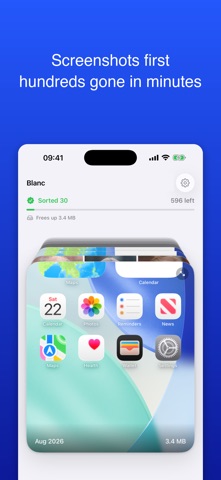
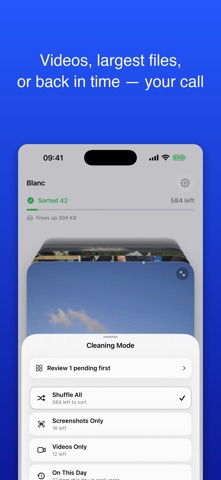
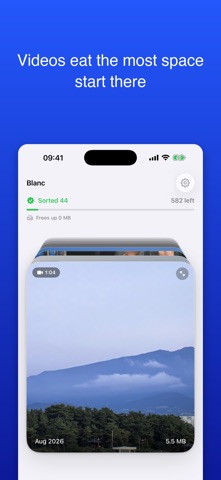
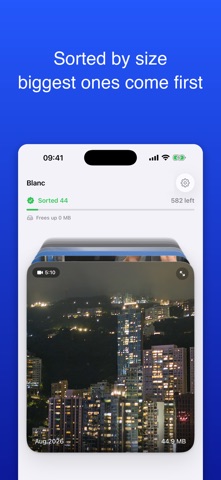
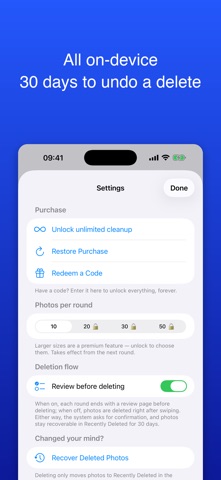
Cleaning your camera roll can work like Tinder: swipe left to keep, swipe right to delete, one photo at a time. The hard part was never deleting — it's remembering where you left off. Most cleanup apps start from scratch every time you open them. You swipe for ten minutes and you're looking at the same photos you already dismissed last week. Blanc solves exactly one problem: what you've seen never comes back. ■ Memory is the whole point Every photo you swipe is remembered. Open the app tomorrow and you pick up where you stopped — never the same photo twice. This is why Blanc exists, and it's the one thing the others don't do. ■ Screenshots first — the easy pile Screenshots are usually the biggest group in your library and the one you hesitate over least. Swipe through only those and you can clear hundreds in a few minutes, and actually watch the space come back. ■ One swipe, one decision Swipe left to keep, right to delete. Ten photos a round, done in under a minute. No long-pressing, no multi-select, no drilling in and out of albums. ■ You always get to change your mind At the end of each round you land on a review screen showing everything queued for deletion. Tap any photo to keep it, or hit "Keep All" to put them all back. Nothing is deleted until you confirm. ■ Deleted photos come back for 30 days Deletion goes through the system, exactly as if you deleted from the Photos app. Everything lands in Recently Deleted and can be restored for 30 days. ■ Clean, no tricks No ads, no tricks. Cancel anytime, and the yearly plan starts with a 7-day free trial — if it's not for you, you pay nothing. ■ Smooth at 20,000 photos Thumbnails are pre-fetched, progress counting is constant-time, and the full-library scan runs off the main thread. Big libraries stay responsive. Blanc isn't clever. It doesn't pretend to know your photos better than you do, and it won't decide what to delete for you. It guarantees one thing: you'll never look at the same photo twice. Free to try: delete 20 photos free. After that you still get 5 free deletes a day, or subscribe for unlimited use — the yearly plan starts with a 7-day free trial. Terms of Use (EULA): https://www.apple.com/legal/internet-services/itunes/dev/stdeula/
What's new · 2.1
• More room to try: after your first 20 free deletes, you still get 5 a day • A first-run hint now shows which way to swipe: left to keep, right to delete • Smarter daily reminder: if you've already done today's 10, it stays quiet that evening • VoiceOver support: each card reads out its type, date and size, with Keep and Delete available as actions • Smoother when returning to the app and when swiping through large libraries • New "Rate on the App Store" option in Settings
Details