

StopSheet Offline
SHINOBU MIYAHIRA · Productivity
Independent analytics for this App Store listing. AppTracker is not affiliated with SHINOBU MIYAHIRA.
Chart standing · US
In-app purchases · US
What this app sells inside itself, grouped by kind and priced for this storefront.
Screenshots


About
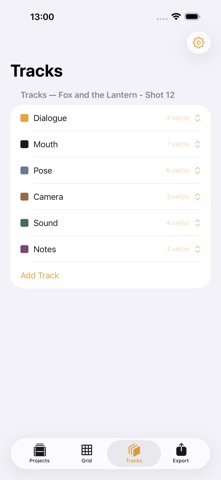
Download free and try every feature for 7 days, a full 168 hours. Build a frame-by-frame exposure sheet with track rows, range copy, and non-destructive fps changes, then export an X-Sheet PDF and CSV. After the trial, one non-consumable purchase permanently unlocks the app with no recurring fee. StopSheet Offline helps stop-motion and 2D animators turn a paper X-sheet habit into a fast, text-based digital exposure sheet. It is a grid editor for frame-by-frame timing notes, not a camera, capture, or playback tool. Create a Project with a frame rate, total frame count, and a default set of Tracks — Mouth, Pose, Camera, Dialogue, Sound, Notes, or any name you choose. The Grid Editor shows rows for tracks and columns for frames, with second markers drawn from your frame rate, so you can enter timing notes cell by cell exactly the way you would on paper. Change a project's frame rate at any time and every existing cell keeps its original frame numbers — only the second marker lines are recalculated, so nothing you have entered moves. Undo works at the level of a single cell edit, Range Copy, or track add or remove, restoring the whole grid to the state one operation back, never a partial rollback. Select a range of cells across tracks and copy it to another point in the sheet. In overwrite mode, any existing cell that collides with the paste range is deleted, trimmed, or split depending on exactly how the ranges overlap, applied automatically and consistently every time. In insert mode, every cell and scene marker at or after the paste point shifts back by the length of the copied range, and the project's total frame count grows to match; overwrite mode never shifts anything. Scene Markers sit above the tracks as frame-wide labels for scenes, shots, or cuts, independent of any track's content. Every cell's content is typed by hand; StopSheet Offline never generates, predicts, or auto-fills timing, motion, or lip-sync content for you. Export an Exposure Sheet (X-Sheet) PDF in landscape US Letter with second-marker frame columns, per-track lanes, and the scene marker band, or a plain CSV with frame_start, frame_end, track, and content columns for import into other software. Both exports always show the frame rate, project name, and whether the range is the full sheet or a selection. StopSheet Offline has no camera, no frame image capture, and no still or video preview playback built in — it is a text-based timing grid, not a camera app. It does not generate, predict, or auto-suggest motion, lip-sync, or timing from your notes, and it has no cloud sync or automatic hand-off to any other animation software; every export stays a plain PDF or CSV file that you move and use however you choose. No account is required. Projects, tracks, frame cells, scene markers, and export history stay on your device with no cloud sync; export before replacing or removing the device. The 7-day trial covers every screen: project setup, grid editing, range copy, and PDF/CSV export. After it ends, a single $9.99 purchase unlocks the app permanently, with no subscription. Use Restore Purchases with the same Apple Account if already purchased. StopSheet Offline turns a stack of paper X-sheets into a fast, non-destructive digital grid, keeping every frame of timing exactly where you put it. Terms of Use: https://www.apple.com/legal/internet-services/itunes/dev/stdeula/ Privacy Policy: https://goonobu-dot.github.io/batch30-pages/stopsheet/privacy
Details