

Stargazer
Kendal Slack · Education
Independent analytics for this App Store listing. AppTracker is not affiliated with Kendal Slack.
Chart standing · US
What changed · US
Listing changes AppTracker has observed for this app in this storefront — new versions, price moves, rating shifts, and store copy.
BUILT FOR iPHONE DUO — AND THE SKY NO LONGER DISAPPEARS WHEN YOU TAP IT. On a big screen — a Duo's inner display, an iPad, a Mac — tapping a star used to slide a card up over the very thing you were looking at. Not any more. A PANEL BESIDE THE SKY, NOT OVER IT Tap anything and its details open in a column down one side. The sky stays live the whole time: keep panning, keep pinching, keep tapping. Everything lands in the panel — objects, constellations, Tonight, Nova, search, the lot. The clever bit is what the sky does about it. As the panel opens, the whole sky quietly re-aims so that what you tapped ends up centred in the part you can still see, rather than hiding behind the panel. Stars keep drifting along behind the glass, because a star field cut off with a straight edge looks like a bug. Left-handed? Settings → Detail panel → Side → Left. Or turn the whole thing off and have your bottom sheet back. FOLD IT AND THE LAYOUT FOLLOWS Half-fold an iPhone Duo and Stargazer reads the hinge and lays itself out along it, so nothing ever sits in the crease. Hold it like a book and the sky takes one page and the details take the other, split exactly on the fold. Stand it on a table like a tiny laptop and it splits the other way: live sky on the half you are looking at, a planetarium console on the half lying flat. The console lists everything above the horizon right now, brightest first, with how high and which way to look. Tap any of it to lock on. Tonight, Search, Nova and time travel sit under your thumb. It is the closest thing to an observatory console you can fit on a camping table, and it is very hard to stop fiddling with. No Duo? Tabletop is a button. Prop any phone or iPad against a mug and you get the same two panes. ALSO • The toolbars, compass and controls now move aside for the panel instead of hiding beneath it • With something locked on, the rest of the app stays reachable rather than greying out • The tool column reshapes itself on short screens instead of running off the bottom edge
Price & rating history · US
Reconstructed from the listing changes AppTracker has observed in this storefront. A field is charted once it has changed more than once, and each line starts at the value it moved from.
Average rating · ★ 3.00 now · 2 changes on record
Ratings breakdown · US
The star breakdown behind this app's rating in this storefront.
In-app purchases · US
No in-app purchases.
Screenshots


About
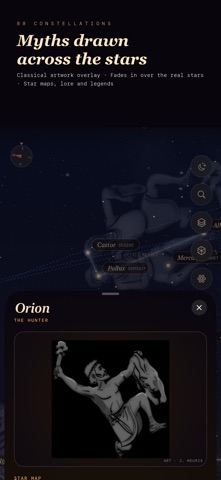
Point your phone at the sky. Stargazer tells you exactly what you're looking at. Free. Genuinely free — no ads, no in-app purchases, no subscription, no account, no tracking. Not "free to start". Free, forever, everywhere. Knowing what's above your head shouldn't cost money. POINT AND KNOW Hold your phone up and the sky moves with you. Every planet, all 88 constellations, thousands of stars, deep-sky wonders, comets, asteroids and the satellites passing overhead right now. Tap anything to find out what it is. ALL 88 CONSTELLATIONS, BEAUTIFULLY DRAWN Not just the famous dozen. Every IAU constellation, each with classic hand-painted artwork warped onto the real stars — so you see the Hunter, the Swan and the Scorpion laid over the sky exactly where they belong. NOVA — PRIVATE AI THAT KNOWS ITS ASTRONOMY Ask anything. "Why does the Moon change shape?" "What's that bright star?" Nova runs on Apple Intelligence, entirely on your device. Your questions never leave your phone — there's no server to send them to. Grounded in a verified knowledge base, so answers are right rather than merely confident. A KIDS MODE THAT DOESN'T TALK DOWN Simpler words, same real science. Ask "how big is the Sun?" and get an answer a seven-year-old understands and an adult won't wince at. WALK AROUND THE SOLAR SYSTEM IN AR Put Saturn on your kitchen table. Walk around it, drag it, pinch to resize it. View planets, moons and the ISS in 3D, then step inside an AR orrery and watch the planets orbit around you. BUILT FOR THE BIG SCREEN Optimised for iPhone Duo. On its inner display — or an iPad or Mac — details open in a panel beside the sky rather than over it, and the sky re-aims so what you tapped stays in view. Half-fold the Duo and the layout splits along the hinge itself. 5,000+ VERIFIED SPACE FACTS A new one every day, every one fact-checked. Share beautiful cards of your favourites. PRINTABLE STAR CHARTS Generate a proper A4 star chart for tonight and your exact spot, then print it. Designed for paper — black on white, sized for a classroom handout. SKY QUIZ Three levels, from Explorer to Astronomer. Every question is built from the real sky, and every answer has a "show me" button that points you at it. NIGHT PHOTOGRAPHY PLANNER When it gets properly dark, when the Moon is out of the way, when the Milky Way core rises, and how long you can expose before the stars trail. ASK SIRI "What's the moon phase?" "What's up tonight?" Answered on your device, without opening the app. TIME TRAVEL Scrub forwards or back — tonight, next month, ten thousand years. Watch the sky wheel, eclipses arrive, and the constellations slowly deform as the stars drift apart. BUILT FOR CLASSROOMS No ads to distract. Nothing to buy. No sign-in, no data collection, nothing to consent to — so it clears school IT review easily. Available free through Apple School Manager and Volume Purchase. Teachers: the whole sky, the phases, the seasons, the scale of the solar system — demonstrable in seconds on any iPhone or iPad in the room. ALSO INSIDE • Tonight — ISS passes, meteor showers, conjunctions, what's up now • A moon-phase view that finally explains why phases happen • Real photography of planets, nebulae and galaxies • Dark-sky finder and live stargazing conditions • Home-screen widget: tonight's sky, moon phase, daily fact • Night-vision red mode to protect your dark adaptation • Metric or imperial, your choice YOUR PRIVACY, PLAINLY We collect nothing. No analytics, no advertising identifiers, no profiles, no third-party SDKs. Your location is used on your device to work out your sky and is never transmitted. There's no account, because there's nothing to store. The AI is on-device. We couldn't sell your data if we wanted to — we don't have it. Made for anyone who has ever looked up and wondered. Kids, teachers, campers, insomniacs, grandparents, and everyone who has pointed at a bright dot and asked what it was. Look up. It's free.
What's new · 1.6
BUILT FOR iPHONE DUO — AND THE SKY NO LONGER DISAPPEARS WHEN YOU TAP IT. On a big screen — a Duo's inner display, an iPad, a Mac — tapping a star used to slide a card up over the very thing you were looking at. Not any more. A PANEL BESIDE THE SKY, NOT OVER IT Tap anything and its details open in a column down one side. The sky stays live the whole time: keep panning, keep pinching, keep tapping. Everything lands in the panel — objects, constellations, Tonight, Nova, search, the lot. The clever bit is what the sky does about it. As the panel opens, the whole sky quietly re-aims so that what you tapped ends up centred in the part you can still see, rather than hiding behind the panel. Stars keep drifting along behind the glass, because a star field cut off with a straight edge looks like a bug. Left-handed? Settings → Detail panel → Side → Left. Or turn the whole thing off and have your bottom sheet back. FOLD IT AND THE LAYOUT FOLLOWS Half-fold an iPhone Duo and Stargazer reads the hinge and lays itself out along it, so nothing ever sits in the crease. Hold it like a book and the sky takes one page and the details take the other, split exactly on the fold. Stand it on a table like a tiny laptop and it splits the other way: live sky on the half you are looking at, a planetarium console on the half lying flat. The console lists everything above the horizon right now, brightest first, with how high and which way to look. Tap any of it to lock on. Tonight, Search, Nova and time travel sit under your thumb. It is the closest thing to an observatory console you can fit on a camping table, and it is very hard to stop fiddling with. No Duo? Tabletop is a button. Prop any phone or iPad against a mug and you get the same two panes. ALSO • The toolbars, compass and controls now move aside for the panel instead of hiding beneath it • With something locked on, the rest of the app stays reachable rather than greying out • The tool column reshapes itself on short screens instead of running off the bottom edge
Details