

Skippa: Skip Cookie Banners
Raphael Monteiro · Utilities
Independent analytics for this App Store listing. AppTracker is not affiliated with Raphael Monteiro.
Chart standing · US
What changed · US
Listing changes AppTracker has observed for this app in this storefront — new versions, price moves, rating shifts, and store copy.
You asked, we fixed. • Skippa no longer follows a link labelled "X" — on some sites that meant being carried off the page you were reading. It now only clicks controls that act in place. • Consent walls that ask you to accept or subscribe are now skipped on more news sites. • Tighter matching, so Skippa closes the banner and leaves the rest of the page alone. Keep them coming: tap Report Site in the Skippa popup, or write to rapps.sup@gmail.com. Every report goes straight into the next update.
In-app purchases · US
No in-app purchases.
Screenshots

About
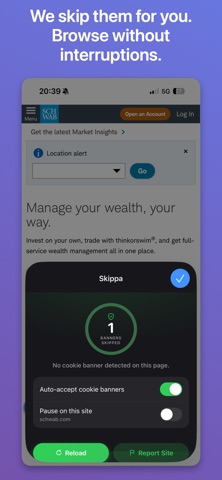
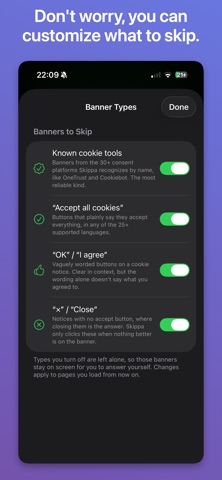
Every website asks the same question. Skippa answers it for you — cookie banners are dismissed the moment they appear, so pages open ready to read. No taps. No interruptions. Just the page you came for. HOW IT WORKS • Watches every page — Skippa looks for cookie consent prompts on every site you visit, including the ones hidden inside frames and pop-ups. • Answers for you — it recognizes 30+ consent platforms (OneTrust, Cookiebot, Didomi, Quantcast, TrustArc, Usercentrics, Sourcepoint and more) and accept buttons in 25+ languages, then dismisses them instantly. • You stay in control — pause Skippa anytime, globally or on a single site, right from the Safari toolbar. CAREFUL BY DESIGN Skippa only ever presses accept and close. It never touches "Manage settings", "Reject", "Learn more" or sign-in buttons, and it stops working on a page once it is clear — no endless clicking in the background. PRIVATE BY DESIGN • No account. No sign-up. No ads. • No analytics, no tracking, no third-party SDKs. • Your skipped-banner count never leaves your device. • Found a site that slips through? One tap reports the domain — the rest of the address is stripped away before anything is sent. SET UP IN 30 SECONDS 1. Open the Settings app 2. Go to Apps → Safari → Extensions 3. Turn on Skippa 4. Set All Websites to Allow Then just browse. Watch your counter climb. Free. No subscription. Works on iPhone, iPad and Mac. Questions, or a site that needs fixing? rapps.sup@gmail.com
What's new · 1.0.2
You asked, we fixed. • Skippa no longer follows a link labelled "X" — on some sites that meant being carried off the page you were reading. It now only clicks controls that act in place. • Consent walls that ask you to accept or subscribe are now skipped on more news sites. • Tighter matching, so Skippa closes the banner and leaves the rest of the page alone. Keep them coming: tap Report Site in the Skippa popup, or write to rapps.sup@gmail.com. Every report goes straight into the next update.
Details