

GymMacros
Crystal Interactive Entertainment LLC · Health & Fitness
Independent analytics for this App Store listing. AppTracker is not affiliated with Crystal Interactive Entertainment LLC.
Chart standing · US
What changed · US
Listing changes AppTracker has observed for this app in this storefront — new versions, price moves, rating shifts, and store copy.
• Better meal edits: Change a portion, an ingredient, or the date of a meal, and everything else stays just as you logged it. • Redesigned Lock Screen widgets: Clearer calorie and macro gauges, plus new Macros and Macro Rings widgets. • No more banner ads: Banner ads are gone, so screens feel cleaner while you track. • Fixes itself: If your saved data gets damaged, the app can now restore it from your cloud backup on its own. • Smoother sign-in: Opening your account is less likely to get stuck, even on a shaky connection. • Clearer help: If something goes wrong, you'll see a short, calm message with one clear way to fix it.
Ratings breakdown · US
The star breakdown behind this app's rating in this storefront.
Screenshots



About
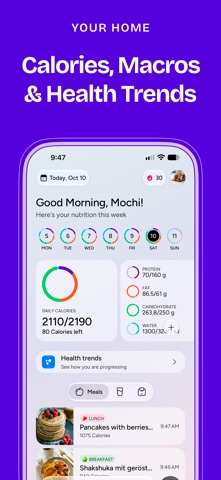
Track calories and macros for free with fast meal logging, AI food scans and adaptive nutrition goals. Understand protein, carbs, fat, water and weight trends in one clear daily view. NEW WAYS TO SEE YOUR PROGRESS Explore health and weight trends, including where your weight may be heading, on a redesigned Stats page. Refreshed home cards and Home Screen widgets make daily progress easier to see. Swipe to delete meals or manually logged metrics with undo, choose colors for macros, water and meal types, and see your monthly ranking. Pro includes unlimited* AI meal scans. Your first AI meal revision is free; later revisions use a scan. *Subject to reasonable use and safeguards. TAKE A PHOTO OR ADD IT YOURSELF Take a photo to estimate a meal’s calories, protein, carbs, and fat. Review the results and adjust portions or ingredients before logging. You can also scan barcodes and nutrition labels, or enter food manually. A NUTRITION PLAN THAT ADAPTS Start with calorie and macro targets based on your measurements, routine, goal, and preferred pace. As you record meals and weigh-ins, Macros AI gradually adjusts your targets based on your progress. SEE WHAT’S LEFT FOR TODAY See your meals, calories, macros, and water in one place. Check how much you’ve logged and what’s left before your next meal. Check calories, macros, and water from your Home Screen or Lock Screen with widgets. Log meals and water quickly with widgets and app shortcuts. As you build your meal history, Macros AI gets better at suggesting whether you’re logging breakfast, lunch, dinner, or a snack. FOLLOW YOUR WEIGHT TREND View your weight, body measurements, and nutrition history by day, week, or month. Compare weigh-ins over time instead of relying on one reading. REMINDERS, BACKUP, AND THEMES Set meal reminders, back up your history with optional cloud sync, and choose your own themes and avatar. Connect Apple Health to include supported health and activity data. It’s optional. Some features require a Pro subscription. Terms of Use: https://crystalinteractiveentertainment.com/terms Privacy Policy: https://crystalinteractiveentertainment.com/privacy
What's new · 3.6.1
• Better meal edits: Change a portion, an ingredient, or the date of a meal, and everything else stays just as you logged it. • Redesigned Lock Screen widgets: Clearer calorie and macro gauges, plus new Macros and Macro Rings widgets. • No more banner ads: Banner ads are gone, so screens feel cleaner while you track. • Fixes itself: If your saved data gets damaged, the app can now restore it from your cloud backup on its own. • Smoother sign-in: Opening your account is less likely to get stuck, even on a shaky connection. • Clearer help: If something goes wrong, you'll see a short, calm message with one clear way to fix it.
Details