

Image Color Counter
CAEN Co., Ltd. · Graphics & Design
Independent analytics for this App Store listing. AppTracker is not affiliated with CAEN Co., Ltd.
Chart standing · US
In-app purchases · US
No in-app purchases.
Screenshots



Similar apps
Competitors and close alternatives, as estimated by AppTracker.
 What Color?
Valgy
What Color?
Valgy
 ColorMeter RGB Colorimeter
White Marten GmbH
ColorMeter RGB Colorimeter
White Marten GmbH
 ColorID: Color Identifier
Zeisoft Yazilim Limited Sirketi
ColorID: Color Identifier
Zeisoft Yazilim Limited Sirketi
 Color Picker: Palette & HEX
MOCHA, LIMITED LIABILITY CO.
Color Picker: Palette & HEX
MOCHA, LIMITED LIABILITY CO.
 Count Helper
Masako Sakanashi
Count Helper
Masako Sakanashi
 Colorimeter: Color Meter
Sebastin Michael
Colorimeter: Color Meter
Sebastin Michael
 Color Identifier. Camera
327APPS, LLC
Color Identifier. Camera
327APPS, LLC
 ColorAssist
FTLapps LLC
ColorAssist
FTLapps LLC
About
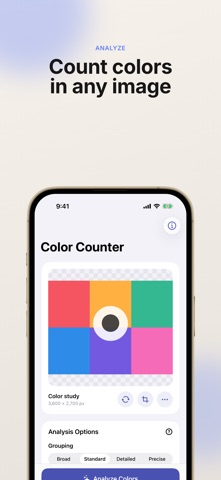
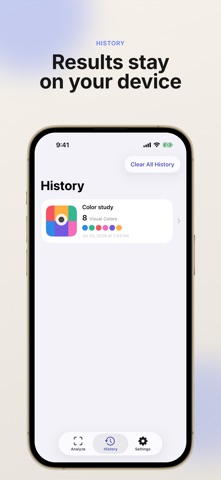
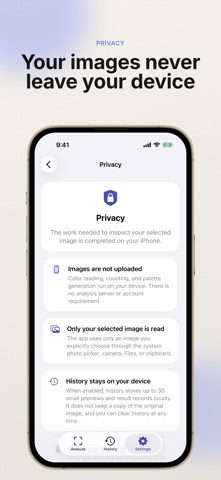
How many colors are in an image? Image Color Counter analyzes photos, illustrations, and screenshots on your device using two clear definitions. VISUAL COLOR COUNT Similar-looking shades are grouped together. This practical count is less affected by tiny lighting and compression differences, making it useful for understanding a palette. EXACT RGB COLOR COUNT Pixels with identical RGB values are counted as the same color. See the actual number of distinct RGB values in the selected area. FEATURES • Import from Photos, Camera, Files, or the clipboard • Analyze the full image or a selected area • Choose from four visual grouping levels • Exclude tiny color regions and compression noise • Ignore transparency or composite on white or black • View usage share, HEX, RGB, HSL, and pixel count • Check contrast against black and white text • Sort colors by amount, hue, or lightness • Share a result image, CSV, or text summary • Keep up to 30 results in local history PRIVACY Images are read and analyzed on your device. They are not uploaded to an analysis server. There are no ads, accounts, subscriptions, or additional in-app purchases. The app interface is available in English and Japanese.
Details