

Klavia
Ngoc Huynh · Education
Independent analytics for this App Store listing. AppTracker is not affiliated with Ngoc Huynh.
Chart standing · US
What changed · US
Listing changes AppTracker has observed for this app in this storefront — new versions, price moves, rating shifts, and store copy.
- Turn your iPhone sideways: the score becomes one long line that slides left as you play - Improve menu bar display
Screenshots


About
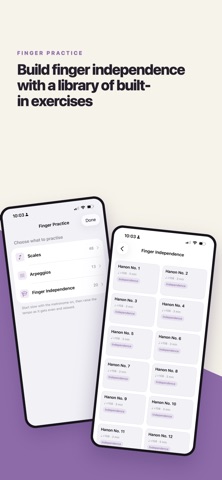
You have the sheet music. Klavia helps you play it. Bring in a PDF or a MusicXML file and Klavia turns it into a score you can hear, slow down, loop and practice against — with finger numbers worked out for you. PRACTICE, DON'T JUST LISTEN In practice mode Klavia waits until you play the right note, then moves on. No rushing, no guessing. BEST WITH A MIDI KEYBOARD Connect a MIDI keyboard by USB, Bluetooth or network, and Klavia hears every note exactly, including chords and fast passages. With an acoustic piano you can use the microphone instead. It works well for single notes, but several notes at once are harder to detect, so some chords may be missed. We keep improving microphone detection — for the most accurate results, use MIDI. READ IT MORE EASILY - Letter names on the notes while you are still learning the staff - Falling notes, so you can see what is coming - One hand at a time, or both together - Loop the two bars you keep missing - Metronome and count-in, at any tempo you choose FINGER NUMBERS, WORKED OUT Klavia can add finger numbers 1–5 to music you import, so you are not guessing which finger starts the run. BUILT-IN PRACTICE Scales, arpeggios and 20 finger-independence drills, all with fingering printed on them. WHAT WORKS BEST Klavia reads PDFs exported from notation software — MuseScore, Finale, flat.io — and MusicXML files most accurately. Scans and photographs of printed music are not supported. If you have the MusicXML, use it for the best notation. WHAT'S FREE - 3 PDF conversions and 2 MusicXML uploads - A library that stores up to 5 songs - All scales and arpeggio exercises, plus the first finger-independence exercise - Note names, falling notes, looping, metronome, hands-separate practice, MIDI and microphone practice KLAVIA PREMIUM - Unlimited PDF conversions, XML Upload - Keep as many songs as you like - Smart fingering on the music you import - Transpose to any key - All 20 finger-independence drills Klavia Premium is an auto-renewing subscription, available monthly or yearly. The yearly plan includes a 7-day free trial for new subscribers. Prices are shown in the app in your local currency. Payment is charged to your Apple Account at confirmation of purchase, and renews automatically unless cancelled at least 24 hours before the period ends. Manage or cancel in your Apple Account settings. Works on iPhone and iPad. Your library is stored on your device. PDFs are sent to our server only to be converted, then deleted. Terms of Use (EULA): https://www.apple.com/legal/internet-services/itunes/dev/stdeula/ Privacy Policy: https://klavia-piano.com/privacy.html
What's new · 1.0.4
- Turn your iPhone sideways: the score becomes one long line that slides left as you play - Improve menu bar display
Details