

MagicReader: Hands-Free Books
Leo Rivas-Micoud · Books
Independent analytics for this App Store listing. AppTracker is not affiliated with Leo Rivas-Micoud.
Chart standing · US
What changed · US
Listing changes AppTracker has observed for this app in this storefront — new versions, price moves, rating shifts, and store copy.
MagicReader now opens like a real book. NEW • iPhone Duo — unfold it and your book becomes a two-page spread, with the spine right on the fold. Head, hand and voice control all work, and read-aloud keeps its place when you fold or unfold. • Landscape — rotate to read two pages side by side on iPad and most iPhones. Works with EPUB, PDF and comics, including vertical Japanese books. • Flip page turns — pages turn over like paper and follow your finger. Choose Slide or Flip in the reader's settings. • Read-aloud now highlights the sentence being spoken. • Split View on iPad and iPhone Duo. • Free Books now opens on 36 classics in Spanish, French or German when your device is set to one of those languages. • Books in Spanish, French and German are now read aloud, by the system voice for that language. • MagicReader itself now speaks Spanish, French and German: the menus, the guided tour and the voice commands. • A roomier bookshelf in landscape, and the status bar steps aside while you read. FIXED • Aozora Bunko books download again. • The PDF and comics reader's controls are easier to reach and to dismiss.
In-app purchases · US
No in-app purchases.
Screenshots

About
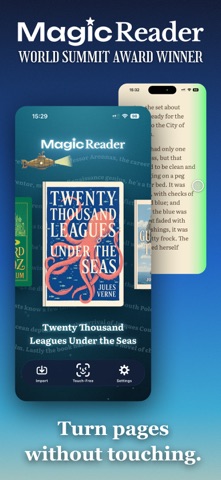
Read without touching the screen. MagicReader is a hands-free reader for EPUB, PDF and comics: turn your head, wave a hand, wink, or just say "next page" — and the page turns. Or sit back and let a natural voice read to you. Whether your hands are busy, wet, full, or simply resting — or touching the screen is difficult for you — MagicReader keeps the story going. NEW: OPENS LIKE A REAL BOOK • Ready for iPhone Duo — unfold it and your book becomes a two-page spread, with the spine right on the fold • Landscape reading — two pages side by side on iPad and most iPhones, for EPUB, PDF and comics, including vertical Japanese books • Flip page turns — pages turn over like paper and follow your finger • Split View on iPad and iPhone Duo TOUCH-FREE READING • Head control — turn your head left or right to flip pages; look up to open or close a book • Wink control — wink your right eye to go forward, your left to go back (Face ID devices) • Hand control — a cursor follows your hand; close your hand to grab a book, swipe from the screen edge to flip • Voice control — say "next", "back", "open", "read aloud" and more, in English, Japanese, Spanish, French or German • A guided tour teaches every gesture with live practice NATURAL READ-ALOUD • Natural, expressive voices read your EPUB books aloud — in English and Japanese • The sentence being spoken is highlighted, and pages turn in step with the narration • English narration powered by Kokoro; Japanese voices powered by VOICEVOX (VOICEVOX:No.7, VOICEVOX:四国めたん, VOICEVOX:青山龍星, VOICEVOX Nemo) • Books in Spanish, French and German are read by your device's system voice for that language, with nothing to download • Natural voices are downloaded once, then work fully offline — all speech is generated on your device YOUR LIBRARY, YOUR WAY • EPUB and PDF books, plus CBZ/CBR comics and manga • Beautiful animated bookshelf themes — drifting watercolour clouds, a starry cosmos, and story worlds that come alive behind special books • Japanese vertical text (縦書き) done right, with optional automatic furigana (ふりがな) above kanji • Comfortable reading themes, adjustable fonts (including OpenDyslexic for dyslexia-friendly reading), and remembered positions THOUSANDS OF FREE CLASSICS • Browse and download public-domain classics from Project Gutenberg and Aozora Bunko (青空文庫) — from Alice in Wonderland to 銀河鉄道の夜 — right inside the app PRIVATE BY DESIGN • The camera and microphone are used only to recognize your gestures and commands, entirely on your device • Nothing is recorded, nothing is uploaded, and there are no accounts, no ads, and no tracking — ever MagicReader began in 2012 as one of the first face-controlled book readers on the App Store. It has been rebuilt from the ground up for today's devices — same magic, new tricks. Reading is best when nothing comes between you and the story. Not even your hands.
What's new · 2.0.2
MagicReader now opens like a real book. NEW • iPhone Duo — unfold it and your book becomes a two-page spread, with the spine right on the fold. Head, hand and voice control all work, and read-aloud keeps its place when you fold or unfold. • Landscape — rotate to read two pages side by side on iPad and most iPhones. Works with EPUB, PDF and comics, including vertical Japanese books. • Flip page turns — pages turn over like paper and follow your finger. Choose Slide or Flip in the reader's settings. • Read-aloud now highlights the sentence being spoken. • Split View on iPad and iPhone Duo. • Free Books now opens on 36 classics in Spanish, French or German when your device is set to one of those languages. • Books in Spanish, French and German are now read aloud, by the system voice for that language. • MagicReader itself now speaks Spanish, French and German: the menus, the guided tour and the voice commands. • A roomier bookshelf in landscape, and the status bar steps aside while you read. FIXED • Aozora Bunko books download again. • The PDF and comics reader's controls are easier to reach and to dismiss.
Details