

Video Compressor: Size Down
Zhe Wu · Photo & Video
Independent analytics for this App Store listing. AppTracker is not affiliated with Zhe Wu.
Chart standing · US
What changed · US
Listing changes AppTracker has observed for this app in this storefront — new versions, price moves, rating shifts, and store copy.
• Find large videos faster with Newest and Largest sorting, and manage the videos shared through limited Photos access. • Type an exact maximum output size in MB, or use the slider. • Preview the original and compressed videos before saving or sharing. • Improved cancellation, protection against duplicate saves, and checks for duration, audio, and picture shape.
Ratings breakdown · US
The star breakdown behind this app's rating in this storefront.
In-app purchases · US
No in-app purchases.
Screenshots

About
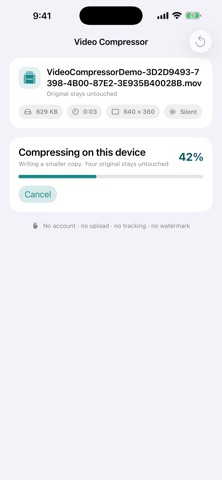
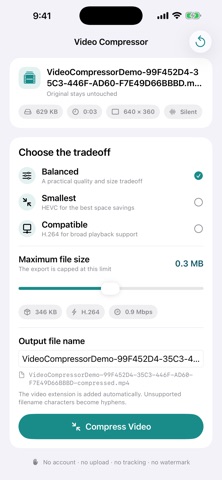
Make large videos smaller while keeping control of quality and output size. Video Compressor works entirely on your iPhone. Your videos are not uploaded to a server, the original stays untouched, and the finished copy is ready to save or share. Every compression feature is included. There are no ads, subscriptions, in-app purchases, accounts, or watermarks. CHOOSE VIDEOS QUICKLY • Browse your library in a uniform grid with file size and duration on every video • Sort by Newest or Largest to find the videos worth compressing first • Manage the videos available when using limited Photos access • Use Apple’s private picker when you prefer to share access to only one video • Import compatible videos from Files CONTROL THE RESULT • Balanced mode for a practical quality and size tradeoff • Smallest mode using HEVC for stronger space savings • Compatible mode using H.264 for broad playback support • Set a maximum output file size with precise MB entry or the slider • Rename the output file before compressing SEE WHAT IS HAPPENING • Loading and import progress for videos that need preparation • Live compression progress • Clear before-and-after file sizes and percentage saved • Preview the original and compressed videos to compare the result • Checks for the expected duration, audio track, and picture shape SAVE OR SHARE • Save the compressed copy to Photos, with confirmation to avoid duplicate saves • Share it to Files, Messages, Mail, or another compatible app • Keep the original unchanged PRIVATE BY DESIGN Compression happens on your device. Video Compressor includes no account system, developer analytics, advertising SDK, or tracking.
What's new · 1.1
• Find large videos faster with Newest and Largest sorting, and manage the videos shared through limited Photos access. • Type an exact maximum output size in MB, or use the slider. • Preview the original and compressed videos before saving or sharing. • Improved cancellation, protection against duplicate saves, and checks for duration, audio, and picture shape.
Details