

Rithmatic
MADE WITH BEST PRACTICE LLC · Music
Independent analytics for this App Store listing. AppTracker is not affiliated with MADE WITH BEST PRACTICE LLC.
Chart standing · US
What changed · US
Listing changes AppTracker has observed for this app in this storefront — new versions, price moves, rating shifts, and store copy.
Rithmatic 1.2.1 makes the tip jar clearer. And in case you missed them: 1.2 brought dark mode, five tunings, resizable keys and easy-to-find help, and 1.1 put Rithmatic inside your DAW as an AUv3 instrument. NEW IN 1.2.1 - The tip jar in Settings shows each tier at the store's own price and takes one tip at a time. It says when a tip is waiting for approval, when you cancel, and when the store can't be reached (with Try Again), and the thank-you card thanks you properly NEW IN 1.2 - Dark mode: Rithmatic follows your device's appearance, or choose Light or Dark in Settings > Look. The black screen at the top stays the same in both - Tuning, in Settings > Sound: equal temperament, just intonation, or Wendy Carlos's Alpha, Beta and Gamma scales, which never return to the octave. With thanks to her in About - Drag the handle on top of the on-screen keys to make them taller or shorter; double-tap it to reset - The bar above the pads slides back the moment you scroll up, from anywhere in the grid - Settings > Help & support has Keys and shortcuts (play from a hardware keyboard: A to K for the white keys, W E T Y U for the black, by position, so German and French keyboards play the same notes) and Synth terms, every plain-words explanation in one place - Blend results play on the built-in synth, no hardware needed - The Patch Builder keeps your edits when you switch tabs and come back - Recordings catch pad and catalog auditions, and leave 1 dB of headroom for a DAW or an editor - Patch info from a pad shows its tags, similar sounds, Blend and Share - Volume and the patch sets you switch off are remembered - Banks you export or send to a synth keep the names you give patches - Side panels fill the screen edge to edge on iPhone and share one header; they open below the header, so Record and Stop stay in reach - Easier to read and use: stronger contrast in dark mode, clearer icons, switches beside their labels on iPhone, and VoiceOver names every control - Record, mapped to a MIDI controller, now starts and stops recording STILL NEW FROM 1.1 - AUv3 instrument: put Rithmatic on a track in GarageBand on iPad, or in an Audio Unit host on the Mac. Its window is the app's own Patches screen and Patch Builder, with your library; your bank is its presets, and Brightness, Attack, Decay, Release and Feedback can be automated - Essentials: the DX7 sounds you know from records, each with why it is famous and the songs to hear it in - Patch Builder: each operator's envelope and tuning, the LFO and the pitch envelope, and FEEL for thickness, touch and brightness in plain words - Blend: pick two patches and get eight new ones, each with its own play button - Arpeggiator: up, down, up and down, random or as played, over one to three octaves, with Latch - Every MIDI keyboard plays: pitch bend, mod wheel, breath, sustain and aftertouch - Mono, legato, glide and glissando, and a truer DX7 sound: exact timing, feedback in every algorithm, the hardware's detune - The waveform follows what you play, with a Scope look; Patch of the day, in the app and as a widget - Open .syx banks from Files, Mail or AirDrop, export your bank as .syx, and Share Sound as a short clip
Price & rating history · US
Reconstructed from the listing changes AppTracker has observed in this storefront. A field is charted once it has changed more than once, and each line starts at the value it moved from.
Average rating · ★ 4.00 now · 6 changes on record
Ratings breakdown · US
The star breakdown behind this app's rating in this storefront.
In-app purchases · US
What this app sells inside itself, grouped by kind and priced for this storefront.
Screenshots




About
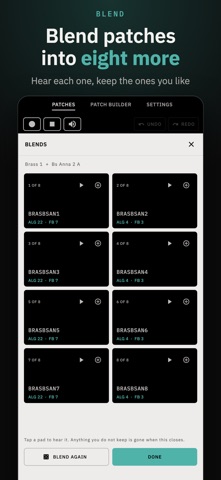
Rithmatic is an FM synthesizer with 36,118 classic DX7 voices built in, and an AUv3 plugin for GarageBand on iPad and your DAW on the Mac. Browse them by family and by character, learn how FM works by watching it shape each one, build and blend your own, and play them from the on-screen keys or a MIDI keyboard. No account, no ads, nothing locked. IN YOUR DAW • Put it on a track in GarageBand on iPad, or in an Audio Unit host on the Mac such as Ableton Live. • Its window is the app's own Patches screen and Patch Builder, with your library. • Your bank appears as the plugin's presets, and Brightness, Attack, Decay, Release and Feedback can be automated. The patch is saved with your project. A LIBRARY THAT SHIPS FULL • 36,118 unique DX7 voices come with the app: no download, no account, no network. • Start with Essentials: the famous sounds and the songs they're on. • Browse by family, or by character: percussive, plucked, metallic, bright, sustained, swell, evolving, mellow. Or search by name. • Patch of the day: one classic voice each day, in the app and in a widget for iPhone, iPad and Mac. • Every voice is credited to the archive it came from, and to its designer where a bank names one. PLAY IT • A DX7-compatible synthesis engine runs inside the app, so every patch plays with nothing plugged in. • Play from the on-screen keys, your Mac's keyboard, or any MIDI keyboard you connect. • Pitch bend, mod wheel, breath, sustain and aftertouch, with aftertouch set to vibrato, tremolo or swell. • Velocity from a MIDI keyboard, or turn it off and choose how hard every note plays. • An arpeggiator (up, down, up and down, random or as played, over up to three octaves) and a latch that holds each key. • Record what you play and share it as a WAV. • Five tunings: equal, just, and Wendy Carlos's Alpha, Beta and Gamma scales. • Light or dark, as your device is set or as you choose. Drag the keys taller or shorter. • Keys, shortcuts and every synth term, explained under Help. SEE THE SOUND The waveform follows what you play: each operator's envelope, how hard you hit, the pitch, the LFO's wobble, and a chord as one layer per note. Resize it, go full screen, or watch the output itself in the Scope look. PATCH BUILDER: LEARN HOW FM WORKS FM is famous for being hard to program. The Patch Builder shows you why a sound sounds the way it does. • All six operators on a graph, each cable carrying its wave: see a modulator reshape its carrier as you drag. • Draw a cable and the builder snaps to the nearest of the 32 algorithms, so you learn routing by doing it. • Plain words beside the jargon. Edit each operator's ratio, level, envelope and tuning, the LFO and pitch envelope, or use FEEL: thickness, touch and brightness. BLEND Pick two patches and Rithmatic blends them into eight new ones. Play each, and keep the ones you like. YOUR BANK AND FILES • Gather patches from anywhere into your bank, then drag pads to swap or reorder them. • Export the bank as standard DX7 .syx files. Open .syx banks, or a .zip of them, from Files, Mail, AirDrop or the Finder. • Share a sound as a short clip of it playing, with a card and a code that brings the patch into anyone's Rithmatic. WITH A SYNTH, IF YOU HAVE ONE Hardware is optional. Choose your synth in Settings: • Korg Volca FM2 (firmware 1.10 or later, over MIDI): read its current patch, write to any of its 64 memory slots, back up and restore all 16 sequencer patterns, and capture the whole instrument to a snapshot. • DX7 family: send patches and 32-voice banks to a DX7 (mkI/II), TX7, TX802 or the original Volca FM over standard Yamaha voice dumps. FREE AND PRIVATE Every feature is free; tips are optional and unlock nothing. Rithmatic works offline and collects no personal data: no account, no analytics, no ads. KORG and volca are trademarks of Korg Inc. DX7 and TX are trademarks of Yamaha Corporation. Rithmatic is an independent app and is not affiliated with or endorsed by either.
What's new · 1.2.1
Rithmatic 1.2.1 makes the tip jar clearer. And in case you missed them: 1.2 brought dark mode, five tunings, resizable keys and easy-to-find help, and 1.1 put Rithmatic inside your DAW as an AUv3 instrument. NEW IN 1.2.1 - The tip jar in Settings shows each tier at the store's own price and takes one tip at a time. It says when a tip is waiting for approval, when you cancel, and when the store can't be reached (with Try Again), and the thank-you card thanks you properly NEW IN 1.2 - Dark mode: Rithmatic follows your device's appearance, or choose Light or Dark in Settings > Look. The black screen at the top stays the same in both - Tuning, in Settings > Sound: equal temperament, just intonation, or Wendy Carlos's Alpha, Beta and Gamma scales, which never return to the octave. With thanks to her in About - Drag the handle on top of the on-screen keys to make them taller or shorter; double-tap it to reset - The bar above the pads slides back the moment you scroll up, from anywhere in the grid - Settings > Help & support has Keys and shortcuts (play from a hardware keyboard: A to K for the white keys, W E T Y U for the black, by position, so German and French keyboards play the same notes) and Synth terms, every plain-words explanation in one place - Blend results play on the built-in synth, no hardware needed - The Patch Builder keeps your edits when you switch tabs and come back - Recordings catch pad and catalog auditions, and leave 1 dB of headroom for a DAW or an editor - Patch info from a pad shows its tags, similar sounds, Blend and Share - Volume and the patch sets you switch off are remembered - Banks you export or send to a synth keep the names you give patches - Side panels fill the screen edge to edge on iPhone and share one header; they open below the header, so Record and Stop stay in reach - Easier to read and use: stronger contrast in dark mode, clearer icons, switches beside their labels on iPhone, and VoiceOver names every control - Record, mapped to a MIDI controller, now starts and stops recording STILL NEW FROM 1.1 - AUv3 instrument: put Rithmatic on a track in GarageBand on iPad, or in an Audio Unit host on the Mac. Its window is the app's own Patches screen and Patch Builder, with your library; your bank is its presets, and Brightness, Attack, Decay, Release and Feedback can be automated - Essentials: the DX7 sounds you know from records, each with why it is famous and the songs to hear it in - Patch Builder: each operator's envelope and tuning, the LFO and the pitch envelope, and FEEL for thickness, touch and brightness in plain words - Blend: pick two patches and get eight new ones, each with its own play button - Arpeggiator: up, down, up and down, random or as played, over one to three octaves, with Latch - Every MIDI keyboard plays: pitch bend, mod wheel, breath, sustain and aftertouch - Mono, legato, glide and glissando, and a truer DX7 sound: exact timing, feedback in every algorithm, the hardware's detune - The waveform follows what you play, with a Scope look; Patch of the day, in the app and as a widget - Open .syx banks from Files, Mail or AirDrop, export your bank as .syx, and Share Sound as a short clip
Details