

Buzzord: Word Alarm & Counter
ANDREW WILFRIED,EDWARD MCDONALD · Entertainment
Independent analytics for this App Store listing. AppTracker is not affiliated with ANDREW WILFRIED,EDWARD MCDONALD.
Chart standing · US
What changed · US
Listing changes AppTracker has observed for this app in this storefront — new versions, price moves, rating shifts, and store copy.
Buzzord is now free with two phrases, unlimited foreground listening, the Fire Alarm, Input Gain and confidence controls, and a built-in tutorial. The one-time $2.99 Buzzord Full unlock adds up to 100 phrases, every alert, Background Listening, Match History, and optional External Noise Filtering. Previous paid-download customers receive Full automatically.
In-app purchases · US
What this app sells inside itself, grouped by kind and priced for this storefront.
Screenshots



Keywords this app targets
Search terms AppTracker associates with this app — estimates, not search volume. ❝ = in the app's title; a highlighted number is its current position for that term.
Similar apps
Competitors and close alternatives, as estimated by AppTracker.
 Quiz Buzzer & Sounds : BUZZIN
Aneesh Pradeep
Quiz Buzzer & Sounds : BUZZIN
Aneesh Pradeep
 Sound ID · Baro
Euiseok Kim
Sound ID · Baro
Euiseok Kim
 The Ultimate Buzzer Pro
Makens Apps, LLC
The Ultimate Buzzer Pro
Makens Apps, LLC
 Shut Up?!
Praesto Logica LLC
Shut Up?!
Praesto Logica LLC
 Voice Count Pro: Tally & Score
Gilad Tal
Voice Count Pro: Tally & Score
Gilad Tal
 Hearing Buddy - Speech To Text
Krager Labs LLC
Hearing Buddy - Speech To Text
Krager Labs LLC
 Wordmate: Learn 44 Languages
Guan Feng Lai
Wordmate: Learn 44 Languages
Guan Feng Lai
 Game Night Buzzer
Metal Mirror Inc
Game Night Buzzer
Metal Mirror Inc
About
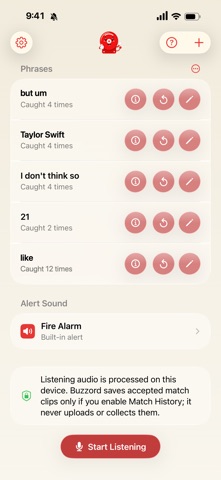
Catch the words you choose. Start free with Like and Um, configure up to two words or short phrases, and tap Start Listening. Whenever Buzzord hears a match, the Fire Alarm sounds, Buzzord pulses, and the app keeps count. Live speech processing happens on your iPhone using on-device recognition. USE BUZZORD FOR • Party and family games • Watch-party catchphrases • Speech habit awareness while you practice a talk • Words you are trying to stop saying • Classroom challenges and family swear jars • Counting how often a commentator says that phrase • Any game where hearing a word changes the rules FREE FOREVER • Two words or short phrases • The half-second Fire Alarm • Unlimited foreground listening and counts • Per-phrase recognition languages • Adjustable Input Gain and minimum classification confidence • Adjustable alert volume • A built-in tutorial with setup and recognition tips BUZZORD FULL: ONE PURCHASE • Up to 100 phrases • Eleven built-in alerts, Quiet mode, recorded alerts, and System Voice alerts • Background Listening, off by default • Match History, off by default, with local replay and user-directed export • External Noise Filtering for sustained, steady background noise, off by default and possibly at the expense of matching performance PRIVATE BY DESIGN Buzzord processes speech live on your iPhone. It does not upload your audio, show or store a transcript, or send your speech to a Buzzord server. There is no account, analytics, advertising, or tracking. Full listening sessions are never recorded. Accepted match clips are saved only when you explicitly enable Match History, and a custom alert is stored only when you deliberately record and accept one. Buzzord Full is a one-time USD 2.99 in-app purchase. No subscription. Existing paid-download customers receive Full automatically. Recognition accuracy and timing can vary with distance, overlapping speech, accents, music, television audio, the installed language model, and background noise. Buzzord is designed for games and awareness, not critical or emergency monitoring.
What's new · 4.0
Buzzord is now free with two phrases, unlimited foreground listening, the Fire Alarm, Input Gain and confidence controls, and a built-in tutorial. The one-time $2.99 Buzzord Full unlock adds up to 100 phrases, every alert, Background Listening, Match History, and optional External Noise Filtering. Previous paid-download customers receive Full automatically.
Details