

Audio Extractor: MP3 Convertor
Muhammad Awais Younas · Utilities
Independent analytics for this App Store listing. AppTracker is not affiliated with Muhammad Awais Younas.
Chart standing · US
Screenshots




About
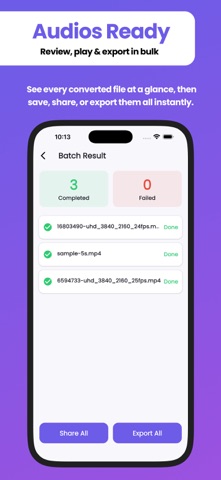
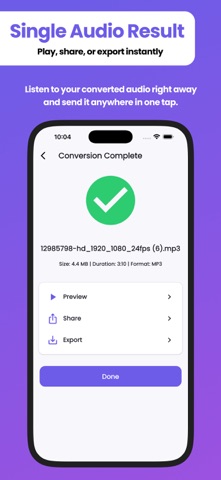
Audio Extractor: MP3 Convertor — Turn Any Video Into High-Quality Audio Need just the sound from a video — a song, a lecture, a podcast clip, a recorded meeting? Audio Extractor: MP3 Convertor pulls clean, high-quality audio out of any video in seconds, right on your iPhone or iPad. COMMON THINGS PEOPLE USE THIS FOR - Saving a podcast or interview from a video as a standalone audio file - Turning a recorded lecture or meeting into audio you can listen to later - Pulling music or a soundtrack out of a video clip - Making a custom ringtone or notification sound from a video - Getting just the audio from a long video without the file size of the video ENTIRELY ON YOUR DEVICE Audio Extractor: MP3 Convertor processes every conversion locally, using your device's own media engine — nothing is uploaded to a server. Your videos and the audio you pull from them stay private, and conversion works even without an internet connection. 5 OUTPUT FORMATS, REAL QUALITY CONTROL Choose exactly the format and quality you want: - AAC (M4A), WAV, MP3, FLAC, or OGG - Bitrate control — 64, 128, 192, 256, or 320 kbps, or match the source - Sample rate control — 22.05, 44.1, or 48 kHz, or match the source - Mono or stereo output Most video-to-audio apps hand you one format and no real options. This app gives you the kind of control a dedicated audio converter would, without needing a second app. TRIM BEFORE YOU CONVERT Only need part of the video? Preview it right in the app and use the filmstrip-style trim slider — drag the in and out points, scrub through thumbnails, tap anywhere to jump to that moment — and convert only the exact section you want. No separate cutting step required. CONVERT MULTIPLE VIDEOS AT ONCE Select several videos, apply the same format and quality settings, and convert them together. You'll see an overall progress indicator plus the real status of every individual file — and if one file can't be converted (no audio track, unsupported content), the rest of the batch keeps going instead of stopping. A COMPLETE AUDIO WORKFLOW - Built-in player — play any converted file with seek and 10-second skip forward/back, right inside the app - Share any converted file, or a bundled batch, through the share sheet - Save converted files to any location you choose - History — every past conversion, searchable and sortable by date, name, or size - Recent conversions shown right on the home screen for quick access WORKS WITH VIRTUALLY ANY VIDEO Supports MP4, MOV, AVI, MKV, WMV, FLV, 3GP, WEBM, and M4V as input. Corrupted or protected files are handled with a clear message instead of a crash. CLEAN, SIMPLE DESIGN Light, Dark, and System theme support. See how much storage your converted files are using, and clear them in a tap when you want the space back. WHO IT'S FOR - Anyone who wants the audio from a video — music, interviews, lectures, podcasts, voice memos, or clips - People who need a specific format for compatibility or quality, not a one-size-fits-all output - Anyone converting a batch of videos at once instead of one at a time - Anyone who wants to trim first and convert only the part they need Download Audio Extractor: MP3 Convertor and turn any video into exactly the audio file you need — fast, flexible, and entirely on your device. Terms of use: https://codifyappsprivacy.blogspot.com/p/terms-of-use.html
Details