
Chart standing · US
What changed · US
Listing changes AppTracker has observed for this app in this storefront — new versions, price moves, rating shifts, and store copy.
Minor bugs fixed
Screenshots


About
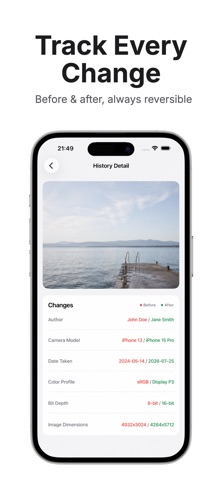
EXIF+ is a photo metadata viewer, editor, and remover for iPhone and iPad. Open a photo from your library, inspect EXIF, IPTC, and GPS-style fields, then edit or strip them and save a cleaned copy in Photos. The original stays. HEIC, HEIF, and PNG are kept when that is the source format; other types may save as JPEG. Use it before you send or post a photo: check GPS, camera data, capture date, author, and copyright. Marketplace, dating, and social posters strip location and device details. Others fix a wrong date or GPS pin, or keep a cleaned copy and leave the original untouched. FEATURES • Photos: Recents, Favorites, Screenshots, Selfies, user albums; import one image from Files • Viewer: Overview, Date & Time, Location, Camera, Camera Settings, Author & Copyright, Description, Image Information, Additional Info • Copy any value; GPS map preview and Open in Maps • Remove all metadata from one photo (new Photos item) or edit dates, GPS, camera, author/copyright, title, description, comment, keywords, camera settings • Location: type coordinates, pick on the map with search, or Remove Location • Select / Select All for batch remove or batch edit (Premium if more than one photo); share a stripped file from the photo screen (Premium) • History before/after (up to 50); Settings restore; on-device PhotoKit/ImageIO; iOS 17+ HOW TO 1. Allow Photos access, then open an album or import one image from Files. 2. Tap a photo to view the metadata sections. 3. Remove Metadata to save a stripped copy, or Edit Metadata to change dates, location, camera, or copyright. 4. Select or Select All to batch-remove or batch-edit more than one photo (Premium). 5. Share from the photo screen (Premium), or share the new Photos item. DESIGN / CONTROLS Tabs: Photos, History, Settings. Editors: Date & Time, Location, Camera, Camera Settings, Author, Additional Info. Map picker with search. No account and no cloud sync. EXPORT / SAVE / SHARE Save a cleaned or edited photo as a new Photos item. The original is not overwritten. Copy a field to the clipboard. Open GPS in Apple Maps. Premium: share a stripped file via the iOS share sheet to Messages, Mail, Notes, Files, and other apps on your device. No JSON, CSV, or XML export. ORGANIZE Browse albums or import one photo from Files. History stores up to 50 before/after entries; swipe to delete. WHO IT IS FOR People who do not want GPS in photos they send; photographers checking camera data and adding copyright; marketplace, dating, and social posters stripping location before upload; anyone fixing a wrong date or GPS pin. WHY EXIF+ EXIF+ views, edits, and strips photo metadata in one iOS app and writes a new Photos item, instead of view-only apps or turning off Location in Settings, which does not clean photos you already took. Batch and stripped share are Premium; single-photo view, edit, and remove are available to start. FAQ Q: Does EXIF+ work on iPhone and iPad? A: Yes. It is an iOS 17+ app for iPhone and iPad. Q: Can I view EXIF, GPS, and camera data? A: Yes. The viewer shows curated EXIF, IPTC, and GPS-style fields — not a raw dump of every tag. Q: Does removing metadata overwrite the original? A: No. Cleaned and edited photos are saved as new Photo Library items. The original stays. Q: Is EXIF+ free? A: Single-photo view, edit, and remove are available without Premium. Batch for more than one photo and stripped share are Premium. Q: How do I share a photo without GPS? A: Use Share on the photo screen (Premium) via the iOS share sheet, or remove metadata first and share the new Photos item. Q: Does EXIF+ edit video metadata? A: No. It works with photos from your library, not videos. Q: Does it strip metadata when I share from the Photos app? A: No. Use Share inside EXIF+ or save a cleaned copy and share that item. Get EXIF+ on the App Store. Terms of Use: https://www.apple.com/legal/internet-services/itunes/dev/stdeula/ Privacy Policy: https://emilsvetlichnyy.github.io/exif-privacy/
What's new · 3.0
Minor bugs fixed
Details