

マッスルレーダー
Sangi Iwane · Health & Fitness
Independent analytics for this App Store listing. AppTracker is not affiliated with Sangi Iwane.
Chart standing · US
What changed · US
Listing changes AppTracker has observed for this app in this storefront — new versions, price moves, rating shifts, and store copy.
- On an iPhone set to English, the app name on the Home Screen now reads "Muscle Radar" (it used to show in Japanese). - Your logs, settings and saved data are unchanged.
In-app purchases · US
What this app sells inside itself, grouped by kind and priced for this storefront.
Screenshots



Keywords this app targets
Search terms AppTracker associates with this app — estimates, not search volume. ❝ = in the app's title; a highlighted number is its current position for that term.
Similar apps
Competitors and close alternatives, as estimated by AppTracker.
 铁磁健身
贻瑾 张
铁磁健身
贻瑾 张
 Forge Strength Trainer
Kevin Gillespie
Forge Strength Trainer
Kevin Gillespie
 Fitness Workout Log Calendar
isao utsumi
Fitness Workout Log Calendar
isao utsumi
 Styrka - Gym Tracker
Miki Piispanen
Styrka - Gym Tracker
Miki Piispanen
 Fitleo: Fitness Coach
Alexandre Henrotte
Fitleo: Fitness Coach
Alexandre Henrotte
 Liftin: Show Up. Get Strong.
Liftin App Inc.
Liftin: Show Up. Get Strong.
Liftin App Inc.
 RepX Workout
SAN DIEGO-IMPERIAL COUNCIL, BOY SCOUTS OF AMERICA
RepX Workout
SAN DIEGO-IMPERIAL COUNCIL, BOY SCOUTS OF AMERICA
 REPR: Gym Workout Tracker
REPR FITNESS LIMITED
REPR: Gym Workout Tracker
REPR FITNESS LIMITED
About
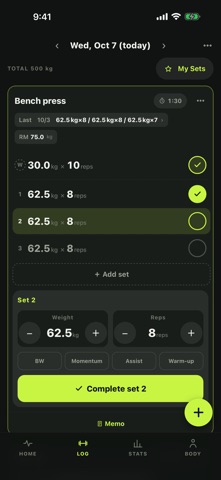
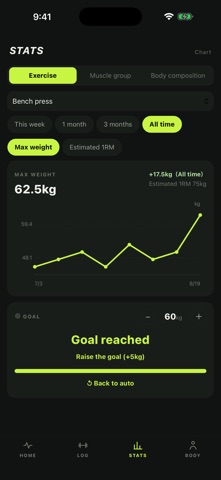
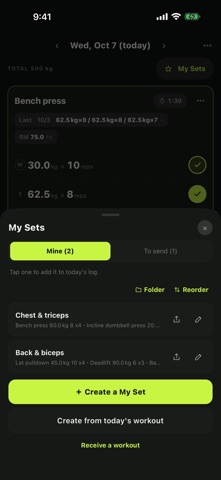
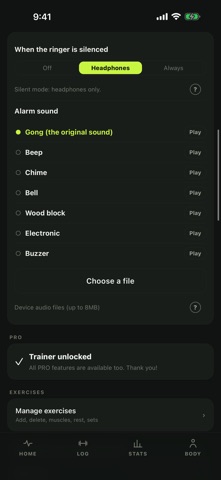
Open it, and the colors on your body tell you what to train today. Muscle Radar shows your training log as colors on a body map. A muscle group you just trained turns red, fades to yellow as it recovers, and turns green when it's ready again. Green means go. WHY COLORS Most logging apps only show "days since". A number is something you have to read and work out. A color is something you understand the instant the app opens. That difference is the whole point of this app. The colors follow the idea of supercompensation: a muscle needs time to recover before it gets stronger. Recovery days are set per muscle group, and you can change them anytime to match your own pace. HARD DAYS TAKE LONGER After a workout, tap "Today's load" on the log screen and rate how hard you pushed each muscle: Light, Normal or Hard. Rating is optional. The harder you push a muscle, the longer it takes to turn green again. Two chest days are not the same day — one you cruised through, one you went to failure — and the gap before you can train it again should not be the same either. How much each level changes the recovery days is up to you, in Settings. WHAT YOU CAN DO - Log sets with weight and reps, or minutes for cardio — in kilograms or pounds - Tap a muscle group to see its recovery state and past sessions - Mark a set with a check to confirm it. Only checked sets count - Each set row shows just weight x reps and a check. Adjust with the large +/- buttons on the control panel and tap "Complete" to move to the next set - Build routines in My Sets and add them to a day in one tap - See your estimated 1RM, and work out which plates to load - Turn a day into an image you can share - Track body weight, body fat, and muscle mass - Set a goal per exercise and watch the bar fill - Weekly volume by muscle group helps you spot overtraining before it leads to injury PRO (one-time purchase) - Recovery forecast: move the body map up to 7 days ahead and plan your week - Estimated 1RM trend: see progress even when the weight stays the same - Monthly and yearly recap images - Extra share card designs - Chart period filters and detailed analysis - Accent colors - CSV export FOR TRAINERS (one-time purchase) Hand the routines you build straight to your clients. - Prescribe weight, reps, sets, and rest time for each exercise - Send one link. Email, messaging app, anything works - Your client stays on the free version. No account needed - No limit on how many people you can send to - Received routines show who sent them and when You never hold your clients' logs or personal details. Only the routine is shared. Everything in PRO is included. Trainer also includes Session credits, a simple counter for how many sessions each person has left — a memory aid for you, with no field for names. ALSO ON IPAD AND MAC Muscle Radar runs on iPhone, iPad, and Macs with Apple silicon (M1 or later). On a wider screen the body map and the calendar sit side by side, and the workout log lays your exercises out in two columns. Less scrolling back and forth when you plan a session or look back at it. YOUR DATA STAYS ON YOUR DEVICE No account, no sign-in — ever. Everything stays on your device and nothing is sent anywhere. Back up and restore your logs yourself, and move to a new phone without creating an account. Japanese and English are both supported. Switch anytime in Settings. The colors are an estimate based on a general training idea. They are not medical advice.
What's new · 2.6.1
- On an iPhone set to English, the app name on the Home Screen now reads "Muscle Radar" (it used to show in Japanese). - Your logs, settings and saved data are unchanged.
Details