

ReleaseDeck Pro
Michael Caklec · Developer Tools
Independent analytics for this App Store listing. AppTracker is not affiliated with Michael Caklec.
Chart standing · US
In-app purchases · US
What this app sells inside itself, grouped by kind and priced for this storefront.
Screenshots




About
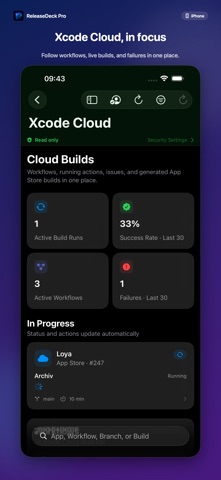
Take control of every app release. ReleaseDeck Pro brings your App Store Connect workflow into one focused, native workspace for iPhone, iPad, and Mac. See what is live, what is in review, what needs attention, and what changed—without jumping between pages. ONE PORTFOLIO, EVERY PLATFORM • See apps and platform versions for iOS, macOS, tvOS, and visionOS • Distinguish the version currently on the store from an update in progress • Track version status, builds, TestFlight groups, Xcode Cloud runs, and review feedback • Identify removed apps, expiring beta builds, failed cloud builds, and release blockers INSIGHTS THAT STAY USEFUL • Explore sales, downloads, proceeds, impressions, product page views, sessions, and active devices • Switch between portfolio-wide and per-app trends • Compare flexible presets or choose your own date range • Keep recent account data available through a local offline cache PREPARE AND MANAGE YOUR STORE PRESENCE • Review and edit app names, subtitles, descriptions, keywords, promotional text, “What’s New,” URLs, release settings, and App Review information • Work with localizations, screenshots, In-App Purchases, subscription groups, plans, prices, introductory offers, and Custom Product Pages • Stage metadata changes locally before sending them to App Store Connect • Use the Release Cockpit to bring builds, metadata, review information, and release readiness together SCREENSHOTS, WITHOUT ANOTHER TOOL Turn iPhone, iPad, or Mac captures into polished App Store images. Add headlines, backgrounds, device or Mac window frames, and optional two-image panoramas. Export PNG files locally or upload them when write access is enabled. SAFE BY DEFAULT ReleaseDeck Pro connects directly to Apple’s official App Store Connect API. Your API key is stored in the system Keychain, short-lived authentication tokens are created on your device, and there is no ReleaseDeck intermediary server. The global read-only mode starts enabled and centrally blocks every modifying request until you deliberately turn it off. Destructive and publishing-related actions require an additional confirmation. PRIVATE BY DESIGN No advertising. No trackers. No third-party analytics SDK. Your account data is processed locally and is never sold. TRY IT WITHOUT AN ACCOUNT Explore the complete interface with realistic local demo data. The demo requires no App Store Connect credentials and makes no network changes. The free version includes the demo, account connection, the 30-day dashboard, app and platform overview, version status, and security settings. Advanced workflows are available with an optional monthly or yearly subscription or a one-time Lifetime purchase. ReleaseDeck Pro is an independent product and is not affiliated with or endorsed by Apple. Terms of Use: https://www.apple.com/legal/internet-services/itunes/dev/stdeula/
Details