

Substitute Teacher Log
Neobile LLC · Finance
Independent analytics for this App Store listing. AppTracker is not affiliated with Neobile LLC.
Chart standing · US
What changed · US
Listing changes AppTracker has observed for this app in this storefront — new versions, price moves, rating shifts, and store copy.
A smoother first save, and a clearer start for new installs. • Fixed: saving a day no longer leaves an "unsaved draft" notice behind, and the next day you log starts blank. • Fixed: the Accept Again / Maybe / Avoid choices are readable on every screen size. • New installs see a sample month and a sample year before logging their first day. • Share the app with another sub from the More tab. • Privacy Policy links open the right page.
Price & rating history · US
Reconstructed from the listing changes AppTracker has observed in this storefront. A field is charted once it has changed more than once, and each line starts at the value it moved from.
Average rating · ★ 5.00 now · 3 changes on record
In-app purchases · US
What this app sells inside itself, grouped by kind and priced for this storefront.
Screenshots


Keywords this app targets
Search terms AppTracker associates with this app — estimates, not search volume. ❝ = in the app's title; a highlighted number is its current position for that term.
Similar apps
Competitors and close alternatives, as estimated by AppTracker.

About
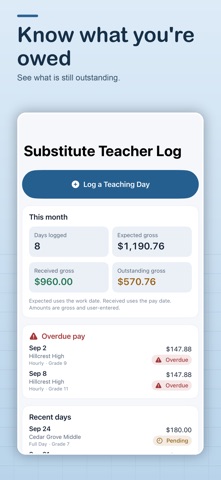
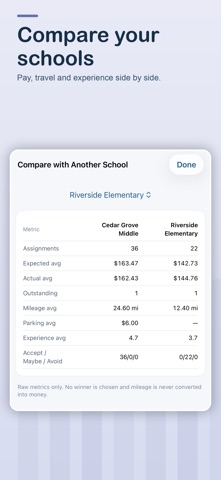
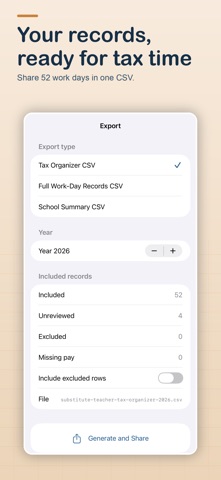
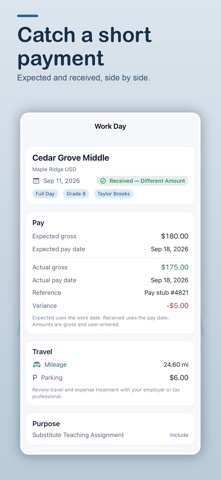
You taught the day. Did the pay ever arrive? Substitute teachers work across many schools and districts, get paid weeks later, and see one lump sum on the pay statement. This app keeps the record your district does not hand you: every day you worked, what you expected, what actually arrived, and what is still owed. KNOW WHAT EVERY SCHOOL STILL OWES YOU • Each day carries a clear status: outstanding, due today, overdue, or received. • Overdue pay is called out on your log, so nothing slips past a pay period. • Mark a day received, enter the actual gross amount from your pay statement, and see the difference from what you expected. • Settle a whole pay period at once: select the days on one statement and mark them received together. • Get a reminder on the day your pay is due. YOUR WHOLE YEAR, READY WHEN YOU NEED IT • Month and year totals: days worked, expected gross, received gross, outstanding pay, mileage, and parking. • Pick any date range — a school year, a semester, a pay period. • Export spreadsheet-ready CSV files: a mileage organizer for tax time, your full work-day records, and a summary of every school. • Working after retirement under an earnings limit? Your gross for the year is always one tap away. SEE WHICH SCHOOLS ARE WORTH GOING BACK TO • Every school gets its own summary: days, pay, mileage, parking, your rating, and your notes. • Compare two schools side by side. • Set a private return preference — Accept Again, Maybe, or Avoid — and have it in front of you the next time that school calls. LOG A DAY IN SECONDS • School, grade, teacher, and assignment type: full day, half day, or hourly. • The gross pay you expect and the date you expect it. • Mileage as total miles or as odometer start and end, plus parking. • School presets fill in your usual rate, miles, and parking; copy an earlier day with one tap. • Private classroom notes for routines, materials, and who to ask for help. PRIVATE BY DESIGN • Everything stays on your device. No account, no cloud, no ads, no analytics, and location is never requested. • The app keeps factual records only. It does not calculate deductions, withholding, net pay, or worker classification, and it is not tax or payroll advice. • Classroom notes are for context only — never enter student names or protected student information. Made for substitute teachers, guest teachers, retired teachers taking occasional assignments, and paraeducators who keep their own records. Available in English and Spanish. Terms of Use (EULA): https://www.apple.com/legal/internet-services/itunes/dev/stdeula/
What's new · 1.2
A smoother first save, and a clearer start for new installs. • Fixed: saving a day no longer leaves an "unsaved draft" notice behind, and the next day you log starts blank. • Fixed: the Accept Again / Maybe / Avoid choices are readable on every screen size. • New installs see a sample month and a sample year before logging their first day. • Share the app with another sub from the More tab. • Privacy Policy links open the right page.
Details