

Cruise FM
JESSICA ARROYO · Music
Independent analytics for this App Store listing. AppTracker is not affiliated with JESSICA ARROYO.
Chart standing · US
What changed · US
Listing changes AppTracker has observed for this app in this storefront — new versions, price moves, rating shifts, and store copy.
Your widgets can be pinned to a station now. Press and hold any Cruise FM tile, choose Edit Widget, and pick the mood you want it to show — including a station you made yourself. Leave it as it is and nothing changes: it still follows your last drive. Also in this update: • The mirror ball tile finally takes its station's colour instead of always being pink • The Last Played widgets show the song's album cover rather than the station's photograph • The CD, record and mirror ball tiles are drawn in far more detail • Tapping a widget now counts toward your streak and your stats
Ratings breakdown · US
The star breakdown behind this app's rating in this storefront.
Screenshots



About
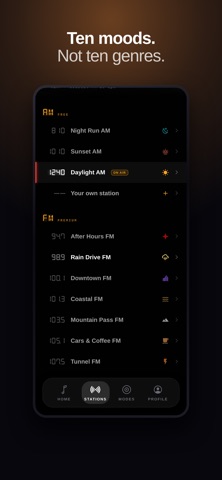
Cruise FM turns your iPhone into the dashboard your music deserves. Apple organizes music by artist. Cruise FM organizes it by how a drive feels. Pick a mood station, tap Start Drive, and the screen becomes a cassette deck, a turning record, a mirror ball scattering light around the car. BUILT FOR APPLE MUSIC Connect Apple Music and play your own playlists with full control inside Cruise FM — play, pause, skip, scrub the track, pick a song from the queue. Album art lands on the record and the disc. Your Music app keeps the lock screen and CarPlay controls, exactly as it should. Spotify Premium works the same way; on anything else, press play in your own app and Cruise FM runs the visuals alongside it. TEN MOOD STATIONS Night Run. Sunset. Daylight. Rain Drive. Coastal. Mountain Pass. After Hours. Cars & Coffee. Downtown. Tunnel. Each one is a feeling rather than a genre — link any playlist you own to any station, and the drive takes care of itself. EIGHT FULL-SCREEN MODES • Mirror Ball — a slow-turning ball scattering light around the room • Vinyl — your album art on a turning record, tonearm riding the grooves • Cassette — living tape reels that wind as the song plays • CD — a mirrored disc under jewel-case plastic • Equalizer — a segmented LED meter lit in your station's colours • Circular EQ — a spectrum wrapped into a glowing ring • Tuner — a dot-matrix head unit; drag the dial to glide between moods • Horizon — an endless grid rolling into a sliced sun BUILT FOR THE DRIVE • One-tap Start Drive from the home screen • Auto-dim while you're moving, so the screen never shouts at you • Drive stats kept honest — an "Are you driving?" check quietly pauses the clock when the music is playing, and you're not • Badges and streaks, free forever • Share a card of what you're listening to FREE TO START, PREMIUM IF YOU WANT MORE The AM band, the Cassette and Equalizer modes, badges, streaks and share cards are free, with no account and no ads. Premium unlocks the FM stations, the Vinyl, Tuner, Horizon, Mirror Ball and CD modes and unlimited custom stations — try it free for 7 days, then monthly or yearly. Cancel any time in your Apple ID settings. GOOD TO KNOW Cruise FM controls your own Apple Music — it does not stream, download or store any music itself. Full in-app playback needs an Apple Music subscription or Spotify Premium; without either, Cruise FM runs as the visual layer while you play music in your own app. Nothing about you leaves your phone: no account, no sign-up, no tracking. ON YOUR HOME SCREEN Six widgets. The station that's on air right now, a one-tap Start Drive, the record you were last on, and the last song you played drawn as a CD player, a pocket player or a ticket stub. The Mode draws a mirror ball, a jewel case or a pressing in your station's own colours. Pin any of them to a mood you choose, or let them follow your last drive. There's a Lock Screen widget too. Please don't watch the screen while you're driving. That's what passengers are for. Cruise FM is made by Strofi Technologies. Terms of Use (EULA): https://www.apple.com/legal/internet-services/itunes/dev/stdeula/ Privacy Policy: https://cruisefm.netlify.app/privacy/
What's new · 1.4.2
Your widgets can be pinned to a station now. Press and hold any Cruise FM tile, choose Edit Widget, and pick the mood you want it to show — including a station you made yourself. Leave it as it is and nothing changes: it still follows your last drive. Also in this update: • The mirror ball tile finally takes its station's colour instead of always being pink • The Last Played widgets show the song's album cover rather than the station's photograph • The CD, record and mirror ball tiles are drawn in far more detail • Tapping a widget now counts toward your streak and your stats
Details