

Kitchen Ledger
B's Boys LLC · Food & Drink
Independent analytics for this App Store listing. AppTracker is not affiliated with B's Boys LLC.
Chart standing · US
In-app purchases · US
No in-app purchases.
Screenshots



About
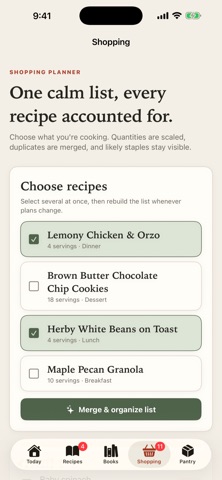
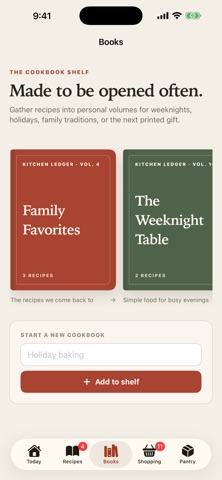
Kitchen Ledger is a calm, beautiful home for the recipes you actually cook — and every one of them stays on your device. PASTE A RECIPE, GET A CLEAN CARD Copy a recipe from anywhere — a website, a text from your mom, notes you typed out — paste it in, and Kitchen Ledger formats it into a tidy card. Ingredients, steps, timings, and headings are sorted out for you. Messy fractions and stray bullet points are welcome. SCALE THE SERVINGS INSTANTLY Cooking for two tonight and twelve on Sunday? Change the serving count and every ingredient amount re-scales at once. US OR METRIC, YOUR CHOICE Flip any recipe between its original units, US customary, or metric with a single tap. Volume-to-weight metric conversions are density-aware, so a cup of flour becomes the right number of grams. ONE SMART SHOPPING LIST Choose the recipes you're making this week and Kitchen Ledger merges them into a single grocery list — quantities combined, duplicates collapsed, and everything sorted by store aisle. It's pantry-aware, too: staples you've marked as "always have" are quietly set aside so the list stays short. Nothing is ever hidden — every item is one tap away from being added back. YOUR OWN COOKBOOKS Gather favorites into cookbooks you build yourself, each with its own cover, contents page, and printable booklet. COOK MODE A distraction-free, full-screen, step-by-step view with oversized type, built-in step timers, and a screen that stays awake while your hands are busy. PRINT ANYTHING Print a single recipe, your shopping list, or a whole cookbook through the standard system print panel — AirPrint to any printer, or save as a PDF. 100% ON YOUR DEVICE Kitchen Ledger has no account and no sign-in. It works entirely offline and never sends your data anywhere. Your recipes and photos never leave your iPhone or iPad — there is no cloud, no analytics, and no tracking of any kind. It works the same in airplane mode as it does anywhere else.
Details