

NetInspector
Siu Lun Corley Chan · Utilities
Independent analytics for this App Store listing. AppTracker is not affiliated with Siu Lun Corley Chan.
Chart standing · US
What changed · US
Listing changes AppTracker has observed for this app in this storefront — new versions, price moves, rating shifts, and store copy.
In-app purchases · US
No in-app purchases.
Screenshots


About
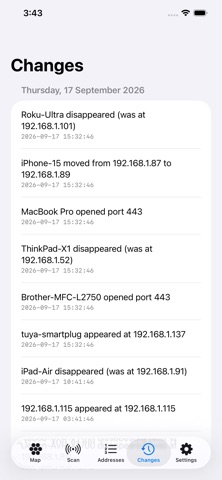
NetInspector shows you what is answering on your Wi-Fi, and remembers it, so you can see what changed. Tap Scan and every device that responds appears on an interactive 3D map: your router at the centre, the Internet above it, and everything else grouped around it by what it looks like — computers, phones, smart-home gadgets, cameras, printers and TVs. Every one shows its address at a glance. Tap for details, pinch to zoom, drag to turn the map around. WHAT YOU SEE • The name a device reports, from Bonjour or reverse DNS • Its IP address, and the open ports it answers on • How fast it replied • A best guess at what kind of device it is • Exactly when it was last seen, to the second WHAT CHANGED NetInspector keeps every scan and compares each one with the one before, so you can see when an address started answering, stopped answering, changed the name it reports, or opened and closed ports. New and changed entries are highlighted on the map, and ones you have not seen for a while drift towards its edge. The Addresses tab is the longer view: every address that has ever answered on this network, when it was first and last seen, and how many scans it appeared in — which is how you tell a fixture from a visitor. WHAT iOS DOES NOT ALLOW, AND WHY IT MATTERS Apple does not give apps on iPhone or iPad access to hardware (MAC) addresses. No app can read them, and NetInspector will not pretend otherwise. That has two consequences worth knowing before you buy into anything: • There is no manufacturer column. Manufacturer is looked up from the hardware address, so without it there is nothing to look up. • Devices are identified by IP address alone. If your router gives a device a new address, it appears as a new entry; if it reuses an old address for something else, that looks like the same entry. The app says so on screen rather than quietly guessing. If you want a device followed across address changes, that needs a Mac. The macOS version of NetInspector reads hardware addresses and tracks devices properly. FINDS DEVICES OTHERS MISS Discovery combines ping, TCP connection checks and Bonjour, so devices that ignore ping still show up. You choose which ports to check and how many addresses to test at once. PRIVATE BY DESIGN Everything stays on your device. No account, no analytics, no advertising, and nothing is sent to us or to anyone else. Erase your history whenever you like.
What's new · 1.5
TOOLS, NOT JUST A LIST Tap any address for tools that answer "what is this, and is it working?": ping it and watch response time, jitter and packet loss; check whether one port is open; see the Bonjour services it advertises. A new Network Tools screen adds four more. Look up a DNS record on your own resolver or one you type in. Time several public resolvers side by side to see which answers fastest from where you are. Work out a subnet without leaving the app. And Link Quality: leave it running and it charts the latency, jitter, loss and dropouts between this device and your router. Every one of them runs only while you are looking at it and stops when you leave the screen. The resolver benchmark contacts public servers only when you press Run, and says so before you do. TAKE IT WITH YOU Save your addresses, a single scan, or the change log as CSV or JSON, to a file you choose. Nothing is uploaded anywhere.
Details