

Mottai: Expiry & Stock
ChienHsiang Yin · Productivity
Independent analytics for this App Store listing. AppTracker is not affiliated with ChienHsiang Yin.
Chart standing · US
What changed · US
Listing changes AppTracker has observed for this app in this storefront — new versions, price moves, rating shifts, and store copy.
Halfway through a bottle and want to remember how much is left? Any in-use unit can now switch on "remaining amount" — drag a slider to log roughly how much is left. It's great for shampoo, detergent and other slow-burn items, works for personal and shared items, and stays out of the way on items you don't turn it on for. Consumption history details now have "Restock": add a finished item to your to-buy list in one tap, even if the original item has been deleted. When someone adds to a shared shopping list, other members get a notification, and tapping it jumps straight to that group's shopping list. Also: a "running low" tag on item details, clearer rating stars in Dark Mode, custom reminder days you can type in directly, and capacity now defaults to g when adding items.
In-app purchases · US
What this app sells inside itself, grouped by kind and priced for this storefront.
Screenshots






About
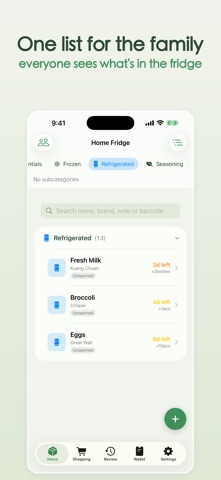
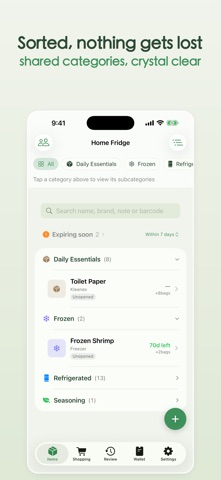
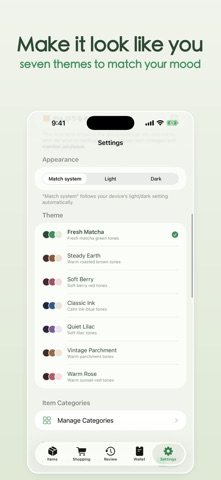
Mottai tracks when things expire and how much you have left. ■ Scan to log in seconds (free) Scan a barcode to fill in the name, then add expiry, quantity, place and source. The camera can also read name and expiry — on-device. ■ Scan to check stock (free) Scan in the store to see how many you have across items and shared groups — never double-buy. No match? Add it, from Control Center or Lock Screen too. ■ Shopping list (free) Keep a list solo or shared. Add by hand, from low-stock suggestions, or tap "Restock" on any item. Entries show brand, size, barcode and photo and clear themselves once restocked. ■ Reminders before it expires Multi-stage reminders (same day, 3 or 7 days before…) at times you set, with per-category defaults. The "Expiring soon" section collapses with an adjustable day threshold and an "In use / Unopened" tag. Swipe to "Handle" a batch; search covers brand and notes. ■ Running-low reminders (Full Version) Mottai estimates how long each item lasts and nudges you before it runs out, shared members too. ■ Track items unit by unit (batches) Buy the same item in separate lots with different dates — each tracked and priced on its own. Switch on a gauge for an in-use unit to log roughly how much is left with a slider. ■ Review tab: history & stats (free) A "Review" tab unites history and stats: a timeline of what you used or discarded, plus overviews, categories and expiry views. Re-add or restock finished items from history in one tap. ■ Rate what you buy (free) Rate items 1–5 stars when you finish them to remember what's worth rebuying, stored on your device. ■ Spending insights (Full Version) Add price and capacity to see inventory value, monthly spend and a "Consumption by category" ranking. ■ Custom categories & widgets (Full Version) Two-level categories with custom icons and colors; personal categories can be imported from a shared space. Expiry and inventory widgets (Home and Lock Screen) switch spaces and page for more. A new "To Restock" widget lists what to buy and taps into Shopping. ■ Wallet Keep your Taiwan e-invoice carrier and loyalty cards here: swipe, tap to enlarge, scan to add. Carrier widget free; card widget Full Version. ■ Family Sharing with real-time alerts (Cloud plan) Subscribe to the Cloud plan to share one inventory — invited family join free. Everyone gets a real-time alert (with a nickname) when an item changes. Adding to the shared shopping list alerts everyone too; tap to open that group's list. ■ Dark Mode Light, Dark, or System. Plans • Free: up to 20 items, with scanning, stock check, shopping list, ratings, review and expiry reminders. • Full Version (one-time): unlimited items, running-low reminders, spending insights, custom categories, expiry + card widgets. • Cloud plan (subscription, free first month): all of Full Version plus Family Sharing — owner subscribes, family free. Privacy: item records sync in your own iCloud. Scan contributions are anonymous product facts only, never personal records. Family Sharing alerts go via Firebase (push token + nickname only). Crashlytics collects crash diagnostics and Firebase Analytics anonymous usage stats — not linked to you, no ads or tracking. ——— Subscription details Mottai Cloud (Family Sharing) • Price: NT$60 / month (approx. US$1.99), an auto-renewable subscription • Free trial: first month free; then auto-renews at NT$60 / month, cancel anytime. • What you get: shared groups with real-time member notifications; invited family join free. • The Full Version is a one-time purchase, not a subscription. Payment is charged to your Apple ID at confirmation. After any free trial, it auto-renews unless turned off at least 24 hours before the period ends, charged within that 24-hour window. Manage or turn off auto-renewal in App Store account settings. Privacy Policy: https://seanseanyin.github.io/mottai-site/privacy-policy.html Terms of Use (EULA): https://www.apple.com/legal/internet-services/itunes/dev/stdeula/
What's new · 1.13.0
Halfway through a bottle and want to remember how much is left? Any in-use unit can now switch on "remaining amount" — drag a slider to log roughly how much is left. It's great for shampoo, detergent and other slow-burn items, works for personal and shared items, and stays out of the way on items you don't turn it on for. Consumption history details now have "Restock": add a finished item to your to-buy list in one tap, even if the original item has been deleted. When someone adds to a shared shopping list, other members get a notification, and tapping it jumps straight to that group's shopping list. Also: a "running low" tag on item details, clearer rating stars in Dark Mode, custom reminder days you can type in directly, and capacity now defaults to g when adding items.
Details