

Reci - レシート経費・確定申告
Hajime Nakamura · Finance
Independent analytics for this App Store listing. AppTracker is not affiliated with Hajime Nakamura.
Chart standing · US
What changed · US
Listing changes AppTracker has observed for this app in this storefront — new versions, price moves, rating shifts, and store copy.
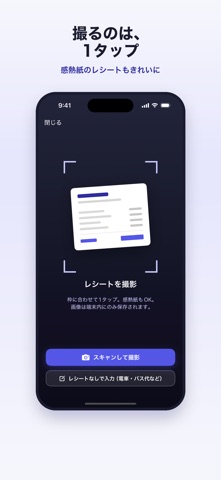
An update for tax season. - Export a whole year (January to December) at once. CSV, accounting-software formats and the receipt PDF bundle can all be exported by year as well as by month. - The yearly summary is listed in the same order as the expense section of the Japanese blue return statement (Aoiro Shinkoku Kessansho) or the income and expenditure statement (Shushi Uchiwakesho), so you can copy it line by line. You can also export just the per-category totals as CSV. - Record payments that have no receipt, such as train and bus fares, without taking a photo. Tap "レシートなしで入力" on the capture screen. - Fixed: the "カテゴリ" column of the generic CSV was missing the expense category, which shifted the columns after it one place to the left.
Screenshots


About
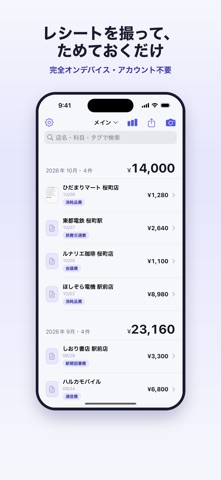
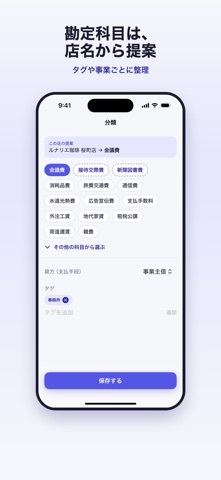
Reci is a receipt log for sole proprietors, freelancers and people with side income who file a Japanese income tax return (kakutei shinkoku). Snap a receipt, check the amount, and export everything when tax season comes. Please note: Reci is built for the Japanese tax system (yen, Japanese consumption tax rates, Japanese expense categories), and the app's interface is in Japanese only. SNAP AND CHECK - Scan paper receipts with the document scanner - On-device text recognition reads the date, store, total, tax rate (8% / 10%) and the qualified invoice registration number - Recognition is a starting point, not magic: the amount field is focused as soon as the screen opens, so you can confirm or retype it in a second - No receipt? Enter train and bus fares by hand, with a note SORT - Suggests a Japanese expense category (勘定科目) from the store name - Tags, search, and separate businesses or projects EXPORT BY MONTH OR BY YEAR - Export one month, or a whole year (January to December) at once - The yearly summary follows the order of the expense section of the blue return statement or the income and expenditure statement, so you can copy it straight onto the form - Generic CSV is free - Journal CSV in the import formats of freee, Money Forward and Yayoi (Pro, beta) - One PDF containing the summary and every receipt (Pro) - UTF-8 or Shift-JIS EVERYTHING STAYS ON YOUR DEVICE - Receipt images, amounts and text are processed and stored on your iPhone - The developer runs no server, and there is no account to create - Anonymous usage statistics and crash reports are collected; they never include receipt contents - Back up to a file whenever you like FREE, WITH A ONE-TIME UPGRADE - Free: up to 20 records per month, generic CSV export - Reci Pro (one-time purchase): unlimited records, accounting-software formats, multiple businesses, PDF export - Not a subscription Reci records and exports your expenses. It does not prepare or file your tax return, and it is not a substitute for advice from a tax professional. The accounting-software formats are in beta: category and tax-code names may need to be mapped when importing, so please try a few entries first.
What's new · 1.2.0
An update for tax season. - Export a whole year (January to December) at once. CSV, accounting-software formats and the receipt PDF bundle can all be exported by year as well as by month. - The yearly summary is listed in the same order as the expense section of the Japanese blue return statement (Aoiro Shinkoku Kessansho) or the income and expenditure statement (Shushi Uchiwakesho), so you can copy it line by line. You can also export just the per-category totals as CSV. - Record payments that have no receipt, such as train and bus fares, without taking a photo. Tap "レシートなしで入力" on the capture screen. - Fixed: the "カテゴリ" column of the generic CSV was missing the expense category, which shifted the columns after it one place to the left.
Details