

CodePad!
JIN SIK CHOI · Developer Tools
Independent analytics for this App Store listing. AppTracker is not affiliated with JIN SIK CHOI.
Chart standing · US
What changed · US
Listing changes AppTracker has observed for this app in this storefront — new versions, price moves, rating shifts, and store copy.
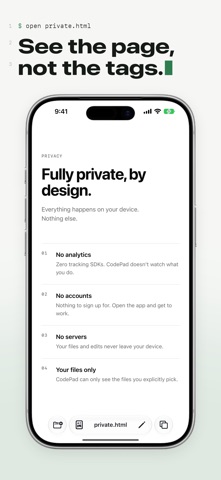
• A fresh first-run look, set like a source file — line numbers, a prompt, one quiet green. • A redesigned Welcome page. • Toolbar icons now share one consistent weight. • Fixed page scripts failing to load in files without a head section.
In-app purchases · US
No in-app purchases.
Screenshots



About
CodePad is a lightweight code viewer and editor for your iPhone and iPad that opens your files directly — not a copy. Browse to any code or text file (HTML, JSON, Swift, Python, JS, and more), view it instantly, and edit it in place with a single tap. Changes save straight back to the original file, so what you edit is what stays on disk. • Open files directly from the Files app — no copying, no import step • Instant syntax-aware viewing for common code and markup files • One-tap edit mode with clear save/cancel controls • Saves changes directly to the source file • Simple, distraction-free interface built for quick edits CodePad is built for anyone who needs to peek at or tweak a code file on the go — students, developers, and anyone managing text-based files on their iPhone or iPad.
What's new · 1.2
• A fresh first-run look, set like a source file — line numbers, a prompt, one quiet green. • A redesigned Welcome page. • Toolbar icons now share one consistent weight. • Fixed page scripts failing to load in files without a head section.
Details