

ZPLora: ZPL Label Viewer
Mehmet Sisoglu · Utilities
Independent analytics for this App Store listing. AppTracker is not affiliated with Mehmet Sisoglu.
Chart standing · US
What changed · US
Listing changes AppTracker has observed for this app in this storefront — new versions, price moves, rating shifts, and store copy.
ZPLora now draws more of your labels, and tells you what's wrong in plainer words. • Graphic fields (^GF, ~DG, ^XG) show up in the preview. Anything unsupported is flagged instead of silently dropped. • PDF417 and Data Matrix barcodes are drawn and can be verified. ^SN serial numbers work too. • Preflight now tells you which field runs off which edge, and by how many dots. • Every finding has a fixed code (ZPL001, ZPL006…) you can quote to support or your team. • Press and hold an element in the Inspector to copy its ^FO position. View Raw Source jumps to the element's line, and tapping a line selects the element. • Open a file that looks like EPL or CPCL and ZPLora tells you it isn't ZPL. • On devices with Apple Intelligence, tap “Explain in simple words” on a finding. It runs on your device and your label never leaves it. • New Settings screens: Command Coverage (what's fully, partly or not supported) and What's Next. • Batch import stays smooth with big folders. • Ready for iOS 27, and the app works at the largest text size. • Some translations now read more naturally.
Screenshots




About
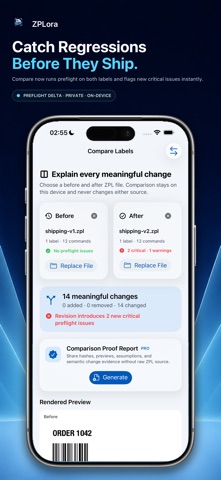
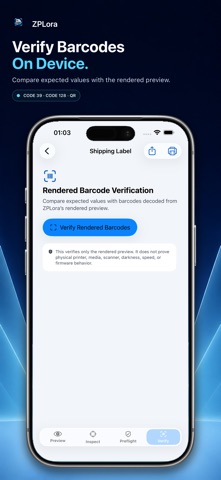
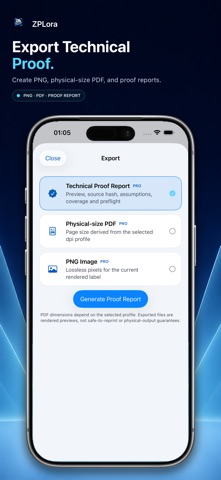
See the label before it prints. ZPLora is a private, read-only ZPL preview and preflight workspace for people who need to inspect label files before they reach production. Open a .zpl or text file, paste ZPL commands, import a ZIP archive of labels, or start with an included offline sample. Your label content stays on your device. PREVIEW WITH CONTEXT • Graphic fields (^GF, ~DG, ^XG), PDF417 and Data Matrix barcodes, and ^SN serial numbers are now drawn • Sharper text and more accurate barcode, box, and font sizing that track real 203 dpi print output • Render supported ZPL labels on iPhone and iPad, including wrapped text inside ^FB field blocks • Review multi-label streams one label at a time • Switch between 203, 300, and 600 dpi profiles, or a saved printer profile for common Zebra models • See renderer notes and font approximations instead of silent substitutions IMPORT AND CHECK IN BULK • Open a ZIP archive or select multiple label files at once — no need to import one at a time • Run Batch Preflight across an entire folder of labels in one pass • Review a clear pass/fail summary with per-file findings, including files that failed to import COMPARE LABEL REVISIONS • Choose before-and-after .zpl or compatible text files without changing either source • Review rendered previews, meaningful semantic changes, and source context side by side • See a preflight result and a critical-issue delta for both sides of the comparison • Create a private comparison proof report without including raw ZPL source PRINT AND OPEN FROM OTHER APPS • Send the rendered preview to any AirPrint-compatible printer, right from ZPLora • Send a compatible label document to ZPLora from the iOS Share sheet • Continue previewing privately on device FIND PROBLEMS EARLY • Run deterministic checks for structure, bounds, clipping, quiet zones, unsupported commands, and unresolved resources • Inspect label dimensions, elements, positions, commands, and support coverage • Jump from a finding to the related label element • See which field runs off which edge, and by how many dots • Every finding has a fixed code (like ZPL001), handy when you talk to support or your team • Check in Settings which commands are fully, partly or not supported • Spot files that look like EPL or CPCL instead of ZPL • On devices with Apple Intelligence, get a finding explained in simple words, right on your device VERIFY AND DOCUMENT • Compare expected barcode values with Code 39, Code 128, QR, PDF417, and Data Matrix codes decoded from ZPLora’s rendered preview • Export a PNG image, physical-size PDF, or technical proof report • Keep a clear record of assumptions, source hash, coverage, and preflight findings PRIVATE BY DESIGN ZPLora has no account, analytics SDK, advertising SDK, or hidden label upload. Processing happens on device. ZPLora is a preview and inspection tool, not a printer driver or print guarantee. Physical output can vary with printer model, firmware, media, darkness, speed, resident fonts, and supported commands. ZPLora is not affiliated with or endorsed by any printer manufacturer. Privacy Policy and EULA: https://www.mehmetsisoglu.com/zplora/legal
What's new · 1.4
ZPLora now draws more of your labels, and tells you what's wrong in plainer words. • Graphic fields (^GF, ~DG, ^XG) show up in the preview. Anything unsupported is flagged instead of silently dropped. • PDF417 and Data Matrix barcodes are drawn and can be verified. ^SN serial numbers work too. • Preflight now tells you which field runs off which edge, and by how many dots. • Every finding has a fixed code (ZPL001, ZPL006…) you can quote to support or your team. • Press and hold an element in the Inspector to copy its ^FO position. View Raw Source jumps to the element's line, and tapping a line selects the element. • Open a file that looks like EPL or CPCL and ZPLora tells you it isn't ZPL. • On devices with Apple Intelligence, tap “Explain in simple words” on a finding. It runs on your device and your label never leaves it. • New Settings screens: Command Coverage (what's fully, partly or not supported) and What's Next. • Batch import stays smooth with big folders. • Ready for iOS 27, and the app works at the largest text size. • Some translations now read more naturally.
Details