

My Bookshelf: Book Catalog
Izmir Soft · Utilities
Independent analytics for this App Store listing. AppTracker is not affiliated with Izmir Soft.
Chart standing · US
What changed · US
Listing changes AppTracker has observed for this app in this storefront — new versions, price moves, rating shifts, and store copy.
• Print book labels: title, shelf/address code and a QR code (QR icon on the book page) • PDF for A4 label sheets or label printers: print, download or share • Long-press a book in your library to select several and print their labels at once • Scan a label with your phone camera to open the book right in the app
In-app purchases · US
No in-app purchases.
Screenshots




About
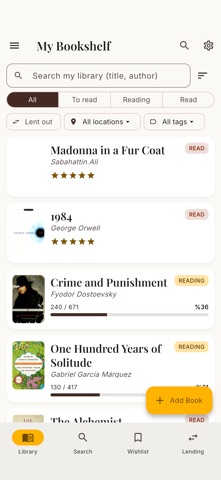
My Bookshelf is a personal book catalog and reading tracker that keeps every book you own and read in one place. Use it free, offline, and without an account. ADD BOOKS IN SECONDS • Scan the barcode (ISBN) and the book is added instantly • Search by title or author • Cover, author and page count filled in automatically • Add manually when you're offline TRACK YOUR READING • To read · Reading · Read statuses • Page-by-page progress and percentage • Rate books (5 stars) • See re-reads and your reading history ORGANIZE & FIND • Group with tags (Favorite, Classic, Work...) • Mark the physical spot with location/shelf and address code • Fast search and sorting across your library LENDING TRACKER • Know who borrowed which book and when • Due-date reminders (a gentle nudge when overdue) • Never lose track of a lent book WISHLIST • Collect the books you want to buy STATISTICS • Total books, pages read, library value • Reading status breakdown and your most-read authors OPTIONAL CLOUD BACKUP • Sign in with Google or Apple to back up your library • Restore your data when you switch phones • Signing in is optional — everything stays on your device if you prefer 26 LANGUAGES · WORKS OFFLINE · FREE For book lovers, collectors and anyone with a reading goal. Organize your library, track what you read, and never lose a book.
What's new · 1.4
• Print book labels: title, shelf/address code and a QR code (QR icon on the book page) • PDF for A4 label sheets or label printers: print, download or share • Long-press a book in your library to select several and print their labels at once • Scan a label with your phone camera to open the book right in the app
Details