

Embroidery Digitizing & Viewer
MTTenterprise Inc. · Graphics & Design
Independent analytics for this App Store listing. AppTracker is not affiliated with MTTenterprise Inc.
Chart standing · US
What changed · US
Listing changes AppTracker has observed for this app in this storefront — new versions, price moves, rating shifts, and store copy.
Saving embroidery files is more reliable, with distinct filenames and the correct file extensions, including EXP. A clearer unlocking animation shows when your machine file is ready to save. History now loads when you open it, with thumbnails loaded as you browse. Preview loading is clearer, with a retry option. Improved file saving and unlocking feedback.
Price & rating history · US
Reconstructed from the listing changes AppTracker has observed in this storefront. A field is charted once it has changed more than once, and each line starts at the value it moved from.
Average rating · ★ 4.38 now · 15 changes on record
In-app purchases · US
What this app sells inside itself, grouped by kind and priced for this storefront.
Screenshots




Similar apps
Competitors and close alternatives, as estimated by AppTracker.
 DRAWings Snap
Wings Systems (one-party) Company of Limited Liability
DRAWings Snap
Wings Systems (one-party) Company of Limited Liability
 AcuDesign
Janome America, Inc.
AcuDesign
Janome America, Inc.
 Cross Stitch Patterns
Bo Kalvslund
Cross Stitch Patterns
Bo Kalvslund
 StitchPal - Embroidery Guides
PIXELCELL.LIMITED
StitchPal - Embroidery Guides
PIXELCELL.LIMITED
 PulseIQ
Tajima Software Solutions Inc.
PulseIQ
Tajima Software Solutions Inc.
 Design Maker for Cricut •
Farzana Kausar Javed Iqbal
Design Maker for Cricut •
Farzana Kausar Javed Iqbal
 ThreadCam: 3D Clothing Mockups
Ruvix Ltd
ThreadCam: 3D Clothing Mockups
Ruvix Ltd
 Stichara Embroidery
Mike Alexander Reyes Gamboa
Stichara Embroidery
Mike Alexander Reyes Gamboa
About
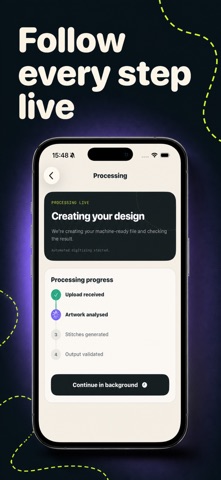
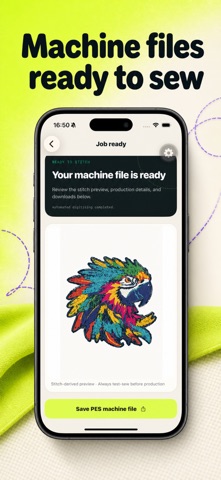
Turn images and logos into machine-ready embroidery files with Embroidery Digitizer. Create PES, DST, and JEF stitch files, convert existing machine formats, and preview every stitch before you sew. IMAGE TO EMBROIDERY Take a photo, choose artwork from your photo library, or browse Files. Select your machine format and finished size, then follow live progress while your embroidery design is created. CONVERT AND VIEW MACHINE FILES Convert popular embroidery formats including PES, DST, JEF, EXP, VP3, PEC, and HUS. Open supported machine files in the built-in stitch viewer without using conversion credits. PREVIEW EVERY STITCH Open the stitch-derived preview full screen and zoom in to inspect fine details before saving your finished machine file. Sign in to keep jobs and downloads organized in History, or complete an immediate private workflow as a guest. Automatic digitizing works best with clean logos and flat-color artwork. Always test-sew a new design before production. Terms: https://embroideryfileconverter.com/terms
What's new · 1.0.9
Saving embroidery files is more reliable, with distinct filenames and the correct file extensions, including EXP. A clearer unlocking animation shows when your machine file is ready to save. History now loads when you open it, with thumbnails loaded as you browse. Preview loading is clearer, with a retry option. Improved file saving and unlocking feedback.
Details