

Activity Grid
Takaaki Onishi · Health & Fitness
Independent analytics for this App Store listing. AppTracker is not affiliated with Takaaki Onishi.
Chart standing · US
What changed · US
Listing changes AppTracker has observed for this app in this storefront — new versions, price moves, rating shifts, and store copy.
- Show Value can now be limited to days at or above, or below, a reference (a fixed value, the average, or the median). - Choose the number of decimal places for each column. The summary row follows the same setting. - Long-press a column header to open that column's settings directly.
Screenshots
About
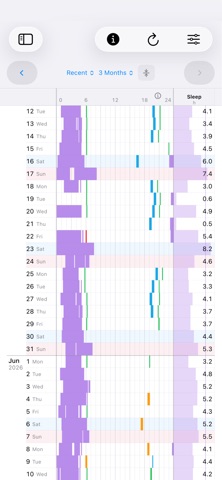
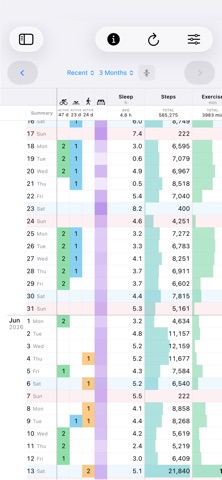
Activity Grid color-codes sleep, workouts, and other data stored in the Health app on your iPhone, helping you see your daily rhythm at a glance. “I track my sleep and workouts with my iPhone or Apple Watch—but what does my routine look like over time?” Activity Grid helps you answer that question. See when you were active with the 24h Timeline, alongside columns for sleep duration, step count, and other values—all organized by day. You can freely choose which items to display and customize the grid around the information that matters to you. PLEASE NOTE Activity Grid does not record sleep, workouts, or other health data itself. It simply organizes and presents information already stored in the Health app. If you already have data in Health, there is no need to import anything. Just open Activity Grid and get started.
What's new · 1.0.003
- Show Value can now be limited to days at or above, or below, a reference (a fixed value, the average, or the median). - Choose the number of decimal places for each column. The summary row follows the same setting. - Long-press a column header to open that column's settings directly.
Details