

MIDI Recorder: Chord Pads
倩 罗 · Music
Independent analytics for this App Store listing. AppTracker is not affiliated with 倩 罗.
Chart standing · US
Screenshots




About
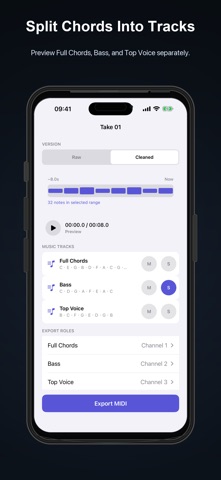
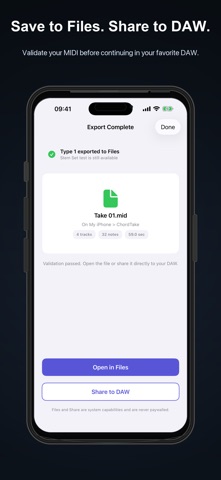
Capture MIDI after you play, turn chord ideas into editable Takes, and export clean files to your DAW. MIDI Recorder: Chord Pads is a focused songwriting and music production tool for iPhone and iPad. Play the built-in chord pads or connect a USB or Bluetooth MIDI keyboard. The app keeps your recent foreground MIDI performance ready, so you can rewind and save the take you meant to keep. PLAY FIRST, CAPTURE LATER • Trigger built-in chord pads or play an external MIDI controller • Rewind recent MIDI without pressing Record first • Select the range, tempo, and time signature before creating a Take • Keep a local library of captured and imported Takes EDIT WITHOUT LOSING THE ORIGINAL • Preserve the raw MIDI snapshot • Repair incomplete note events and trim leading silence • Quantize timing at adjustable strength and grid values • Preserve chord strums when cleaning timing • Review, remove, and restore chord events • Import compatible .mid and .midi files for further work EXPORT MIDI FOR YOUR DAW • Export unlimited single-track Standard MIDI Files for free • Create a Type 1 MIDI file with conductor and music tracks • Split a chord performance into Full Chords, Bass, and Top Voice • Create separate MIDI stem files for flexible DAW import • Save exported MIDI to the Files app • Follow built-in guides for common DAW import workflows ADVANCED EXPORT CONTROL • Choose root or lowest-note bass behavior • Preserve, bake, or remove sustain • Assign track names and MIDI channels • Shift octaves and align the timeline to bar one • Include or remove MIDI metadata • Validate generated MIDI files before saving FREE TO START Chord pads, MIDI capture, Takes, editing, MIDI import, and unlimited single-track export stay free. One Type 1 compatibility test and one Stem Set compatibility test are included for the same Take. A one-time Lifetime purchase unlocks unlimited advanced exports. No subscription. No account required. MIDI note and controller data is processed on your device. This app records MIDI data, not microphone audio.
Details