

DIYホイールアライメント
KOJI OGUCHI · Utilities
Independent analytics for this App Store listing. AppTracker is not affiliated with KOJI OGUCHI.
Chart standing · US
What changed · US
Listing changes AppTracker has observed for this app in this storefront — new versions, price moves, rating shifts, and store copy.
- Camber and toe now save separately. Entering toe no longer overwrites your camber reading. - Saving camber freezes the displayed value. Tap "Remeasure" to take a new reading. - Toe values are now saved automatically as you type. - The display switches at the bottom are now labelled "Toe mm" and "Toe angle", so it is clear what the numbers are. - Caster screen wording is now consistent: "back angle" and "front angle" throughout. - The app now correctly declares support for English, Japanese, Chinese, Korean, German, Italian and Arabic.
Screenshots



Keywords this app targets
Search terms AppTracker associates with this app — estimates, not search volume. ❝ = in the app's title; a highlighted number is its current position for that term.
Similar apps
Competitors and close alternatives, as estimated by AppTracker.


About
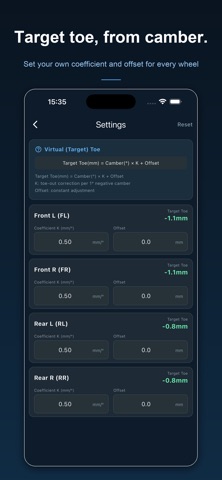
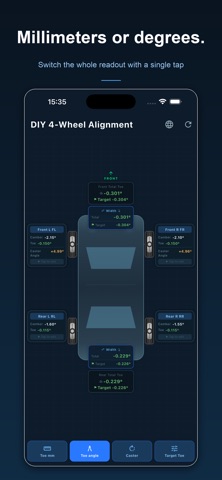
Check your car's wheel alignment at home, with your phone and a tape measure. WHAT THE SENSOR MEASURES Camber Rest the side of your phone against the wheel or rotor face. The tilt sensor reads the angle directly. Set a zero reference first so an uneven floor does not throw the reading off, and the app waits for the value to settle before you record it, so a shaky hand does not end up in your data. Caster Steer 20 degrees left, record the camber. Steer 20 degrees right, record the camber. The app calculates caster from the two readings using the standard workshop formula. WHAT YOU MEASURE BY HAND Toe Toe cannot be read from a phone sensor. You measure it with a tape and enter the numbers - the app does the rest, working out the toe amount, the angle, and whether you are toe-in or toe-out. String method: run a string parallel to the car and measure the gap to the front and rear edge of the tire. Width method: measure between the left and right tires, at the front of the tread and at the rear. Rear wider than front means toe-in. OTHER FEATURES - All four wheels on one screen, with a top-down car view - Camber and toe save separately, so re-measuring one never overwrites the other - Sensor mode or manual entry - type in numbers from a shop printout if you prefer - Hold function: freeze a reading taken in an awkward position and read it later - Target toe calculator: derive a target from camber using your own coefficient and offset - Adjustable measurement span to match your tire diameter - Values stay on the device - no account, no network, no ads - 7 languages: English, Japanese, Chinese, Korean, German, Italian, Arabic WHO IT IS FOR - Anyone who lowered their car or fitted coilovers and wants to check the alignment afterwards - Drivers chasing uneven tire wear before it eats another set of tires - Drift, track day, gymkhana and autocross drivers adjusting setup between sessions - Home mechanics who would rather understand their own suspension than guess Accuracy depends on a level surface and careful technique. This app is a measuring aid for personal maintenance - always have safety-critical work checked by a qualified shop.
What's new · 1.0.1
- Camber and toe now save separately. Entering toe no longer overwrites your camber reading. - Saving camber freezes the displayed value. Tap "Remeasure" to take a new reading. - Toe values are now saved automatically as you type. - The display switches at the bottom are now labelled "Toe mm" and "Toe angle", so it is clear what the numbers are. - Caster screen wording is now consistent: "back angle" and "front angle" throughout. - The app now correctly declares support for English, Japanese, Chinese, Korean, German, Italian and Arabic.
Details