

Monefic
Nikita Nesporov · Utilities
Independent analytics for this App Store listing. AppTracker is not affiliated with Nikita Nesporov.
Chart standing · US
What changed · US
Listing changes AppTracker has observed for this app in this storefront — new versions, price moves, rating shifts, and store copy.
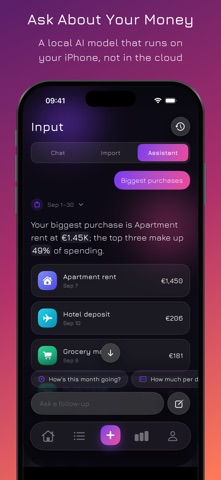
Monefic 2.1 introduces the spending assistant, today's budget on the Lock Screen, and many new widgets. SPENDING ASSISTANT Pick a question about your money: how your month is going, what's left to spend today, whether you're within your limits, which subscriptions got pricier, where your money went, how a category or tag changed month by month, and where you could save. The app calculates every number from your records, and a local AI model built into iOS puts the answer into words right on your iPhone. Nothing is sent to a server. Answers come with charts and lists that show where the numbers come from, and your conversations stay in a searchable history. The assistant is part of Monefic Premium and works on devices that support Apple Intelligence. TODAY ON THE LOCK SCREEN See what's left of today's budget on the Lock Screen and in the Dynamic Island. The Live Activity starts with your first transaction of the day and stays up to date as you add more. Turn it on in Settings. It's part of Monefic Premium. NEW WIDGETS - More than 20 new Home Screen widgets: net worth, cash flow, income breakdown, the year at a glance, subscriptions, budget rings, a category treemap, a large spending heatmap, and a summary for iPad. - New Lock Screen widgets: next payment, savings rate, no-spend streak, refunds, this week compared with last week, payments in the next 7 days, and the month total above the clock. - In StandBy, see your net worth, budget rings, and spending by day. APPLE WATCH - The Today screen shows a ring for what's left to spend, and a new History page lists your transactions with details. - Open a category to see its spending week by week. - Budget alerts arrive on your iPhone and on your watch. - New watch face complications: the last 7 days, income and expenses, average per day, a goal, an account, and upcoming payments. ALSO NEW - A guided tour on first launch helps you choose your main currency, theme, and notifications, then shows what Monefic can do. Replay it anytime from Settings. - Your first account is created in the currency you choose during setup. - Month totals of zero on the home screen no longer show a plus sign. - Long refund labels no longer cut off transaction amounts.
Screenshots




About
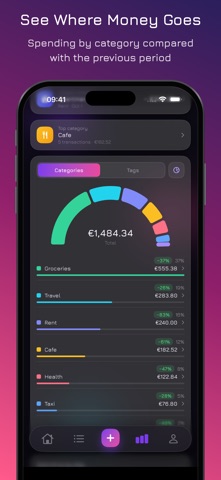
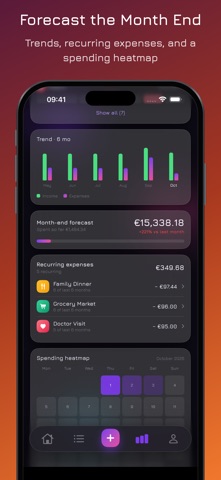
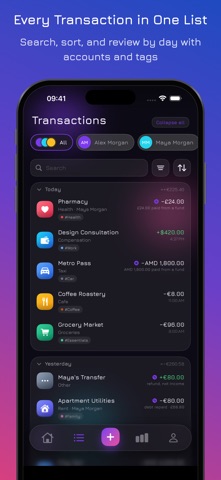
Monefic helps you track personal and household finances. Record income and expenses, organize accounts, plan budgets and savings goals, and see where your money goes. Start with the free everyday tools and choose Monefic Premium when you need more. EVERYDAY MONEY TRACKING, FREE Track transactions across accounts, categories, tags, and participants. Use a guided entry flow, search your history, and combine or exclude categories and tags with flexible filters. Pick a default account for each participant and currency. Follow balances, income, expenses, budgets, and goals from your home screen. Reorder its blocks and hide the ones you do not use. Basic statistics help you follow your spending over time. Keep multiple currencies in the same workspace. Set conversion rates for combined totals, see when a value is approximate, and get a warning when a rate is missing. Review account balance adjustments before applying them. Optional iCloud sync, CSV, JSON, and text exports, and quick transaction entry from widgets, Control Center, and Apple Watch are included in the free tools. MONEFIC PREMIUM An optional monthly or yearly subscription unlocks: - Spending assistant. Ask how your month is going, whether you're within your limits, which subscriptions got pricier, and where you could save. The app calculates every number from your records, and a local AI model built into iOS explains them right on your iPhone. Nothing is sent to a server. Available on devices that support Apple Intelligence. - Text import. Paste a list of purchases and let the model built into iOS read amounts, currencies, categories, and tags. Recognition runs on your iPhone, with nothing uploaded. Available on supported devices. - Period recaps. Look back at a completed period, explore what changed, open the transactions behind each figure, and share the highlights as an image. - Collections. Group transactions for a trip, renovation, or event, with cover images and totals for spending, refunds, and final cost. - Funds. Set money aside and use it to cover all or part of an expense, including across currencies. - Reimbursements and debts. Track money you expect back, link repayments, and set due dates and reminders. - Advanced statistics. Explore forecasts, heatmaps, cash flow, average purchases, and comparisons between periods. - PDF reports and export presets. Prepare reports with the period, accounts, filters, and grouping you need. - Widgets with your numbers. See balances, budgets, goals, forecasts, categories, and recent transactions on your Home Screen and Lock Screen. - Apple Watch views. Follow your balance, spending, budgets, and expected refunds on your wrist, and add widgets to your watch face. - Accent colors. Choose colors for the app's light and dark appearance. Eligible new subscribers can start with a free trial. Your local price, trial eligibility, and renewal terms are shown before you subscribe. Subscriptions renew automatically unless canceled in your Apple Account settings. ON YOUR WRIST Add an expense from Apple Watch for free. With Premium, see your money at a glance and customize which pages appear and in what order from your iPhone. Continue on your iPhone with Handoff. Watch face widgets show today's allowance, a selected budget, refunds, the forecast, and spending through the week. YOUR DATA, YOUR CHOICE Keep your data on your device or enable optional iCloud sync. Export selected records as text, CSV, or JSON, and choose the period, accounts, and notes to include. Hide amounts when you need privacy, including on widgets and your watch. Monefic can open with balances already hidden. Terms of Use: https://www.apple.com/legal/internet-services/itunes/dev/stdeula/ Privacy Policy: https://nesporov.dev/apps/monefic/privacy-policy.html
What's new · 2.1.0
Monefic 2.1 introduces the spending assistant, today's budget on the Lock Screen, and many new widgets. SPENDING ASSISTANT Pick a question about your money: how your month is going, what's left to spend today, whether you're within your limits, which subscriptions got pricier, where your money went, how a category or tag changed month by month, and where you could save. The app calculates every number from your records, and a local AI model built into iOS puts the answer into words right on your iPhone. Nothing is sent to a server. Answers come with charts and lists that show where the numbers come from, and your conversations stay in a searchable history. The assistant is part of Monefic Premium and works on devices that support Apple Intelligence. TODAY ON THE LOCK SCREEN See what's left of today's budget on the Lock Screen and in the Dynamic Island. The Live Activity starts with your first transaction of the day and stays up to date as you add more. Turn it on in Settings. It's part of Monefic Premium. NEW WIDGETS - More than 20 new Home Screen widgets: net worth, cash flow, income breakdown, the year at a glance, subscriptions, budget rings, a category treemap, a large spending heatmap, and a summary for iPad. - New Lock Screen widgets: next payment, savings rate, no-spend streak, refunds, this week compared with last week, payments in the next 7 days, and the month total above the clock. - In StandBy, see your net worth, budget rings, and spending by day. APPLE WATCH - The Today screen shows a ring for what's left to spend, and a new History page lists your transactions with details. - Open a category to see its spending week by week. - Budget alerts arrive on your iPhone and on your watch. - New watch face complications: the last 7 days, income and expenses, average per day, a goal, an account, and upcoming payments. ALSO NEW - A guided tour on first launch helps you choose your main currency, theme, and notifications, then shows what Monefic can do. Replay it anytime from Settings. - Your first account is created in the currency you choose during setup. - Month totals of zero on the home screen no longer show a plus sign. - Long refund labels no longer cut off transaction amounts.
Details