

Pumpkinly: Pumpkin Stencil
Jhomar Maravillas · Productivity
Independent analytics for this App Store listing. AppTracker is not affiliated with Jhomar Maravillas.
Chart standing · US
What changed · US
Listing changes AppTracker has observed for this app in this storefront — new versions, price moves, rating shifts, and store copy.
Get ready for Halloween: see your whole stencil before you print. Every stencil now shows in full with a PREVIEW watermark that you can save and share; the one-time unlock prints the clean stencil and the PDF.
Screenshots


About
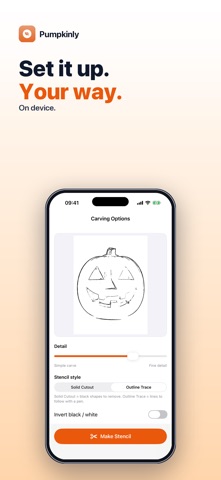
Want to carve your dog, your kid's face or a favorite logo into a Halloween pumpkin? Pumpkinly turns a photo into a black-and-white carving stencil you can print, tape to the pumpkin and follow. Pick a photo, choose a stencil style and detail level, and tap Make Stencil. You get a print-ready PDF plus an image you can save to Photos. • TWO STENCIL STYLES — Solid Cutout gives bold black shapes to carve away; Outline Trace gives clean lines to follow with a pen or pin before you carve. • DETAIL SLIDER — slide from Simple carve for chunky, beginner-friendly shapes to Fine detail for more features. • INVERT BLACK / WHITE — flip which areas are marked, so you can choose what gets carved out and what stays. • PRINT-READY PDF — one page in Letter or A4 with the stencil centered inside a margin, ready to print and tape on. • IMAGE TOO — save the stencil to Photos or share it as an image. • A WHOLE PATCH AT ONCE — with the unlock, select up to 50 photos and make a stencil from each in one go. Honest scope: Pumpkinly converts your photo to high-contrast black and white; it does not recognize faces or add carving bridges, so check that the parts you keep stay connected before you start cutting. Photos with one clear subject, a plain background and strong light work best. Carving tools are sharp — adults should do the cutting. Your photos are processed on your iPhone. Nothing is uploaded and no account is needed. Try it free: every stencil appears in full with a PREVIEW watermark, and you can save that preview. A one-time purchase unlocks the clean stencil, the print-ready PDF and stencils from many photos at once. No subscription, no ads. Questions: overlapmarr@gmail.com
What's new · 1.0.7
Get ready for Halloween: see your whole stencil before you print. Every stencil now shows in full with a PREVIEW watermark that you can save and share; the one-time unlock prints the clean stencil and the PDF.
Details