

AtenaPrint: Japanese Address
Jhomar Maravillas · Productivity
Independent analytics for this App Store listing. AppTracker is not affiliated with Jhomar Maravillas.
Chart standing · US
What changed · US
Listing changes AppTracker has observed for this app in this storefront — new versions, price moves, rating shifts, and store copy.
Localized App Store screenshots for every language.
In-app purchases · US
What this app sells inside itself, grouped by kind and priced for this storefront.
Screenshots

About
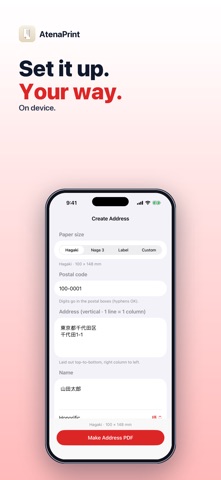
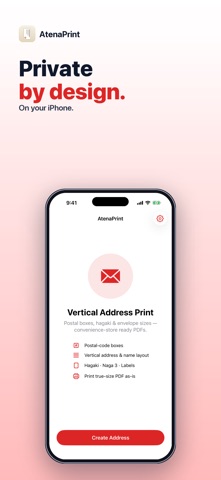
Addressing a New Year card, hagaki or envelope to someone in Japan? AtenaPrint lays out the address the Japanese way — top to bottom, in columns — with the 〒 postal-code boxes, and gives you a true-size PDF ready to print. Pick the paper size, type the postal code, address and name, choose an honorific, and create the PDF. Print it with AirPrint or share it to print elsewhere. • VERTICAL (TATEGAKI) LAYOUT — the address runs top to bottom, right column to left. Each line you type becomes one column, so you control where the address breaks. The name sits to the left in a larger Mincho typeface. • 〒 POSTAL-CODE BOXES — the 7-digit postal code is placed one digit per box in red 〒 frames. Type it with or without the hyphen. • HONORIFICS — 様 (sama), 御中 (onchū), 先生 (sensei) or none, added after the name. The name field takes several lines, e.g. a company and a contact person. • PAPER SIZES — hagaki postcard (100 × 148 mm), naga 3 envelope (120 × 235 mm), label (70 × 36 mm), or a custom size from 30 to 300 mm. • TRUE-SIZE PDF — the page matches the paper, so it prints without scaling. Share, print or save it to Files. Good to know: the red postal-code boxes are printed with the address and are not aligned to boxes already printed on a card or envelope, so check your first print. Digits and hyphens are stacked exactly as typed (no conversion to kanji numerals), and a line too long for its column is cut off — break it into two lines. Each PDF is one recipient; there is no sender block and no address-book import. The address should be typed in Japanese. Everything is processed on your iPhone — nothing is uploaded and no account is needed. Try it free — 3 address PDFs. A one-time $4.99 purchase unlocks unlimited PDFs. No subscription, no ads. Questions: overlapmarr@gmail.com
What's new · 1.0.5
Localized App Store screenshots for every language.
Details