

My LoopCal
Neobile LLC · Utilities
Independent analytics for this App Store listing. AppTracker is not affiliated with Neobile LLC.
Chart standing · US
What changed · US
Listing changes AppTracker has observed for this app in this storefront — new versions, price moves, rating shifts, and store copy.
• Verify this loop: go straight from the calculator into a three-point check — the range you entered comes with you. • Your worksheet now appears right on the result screen after a check. • A fuller example worksheet: five points, as-found and as-left. • Cleaner worksheets: sections with nothing to show are no longer printed. • “Start check” stays within reach at the bottom of the screen. • Share LoopCal with a colleague from the More tab. • More dependable when you work without a signal.
In-app purchases · US
What this app sells inside itself, grouped by kind and priced for this storefront.
Screenshots



About
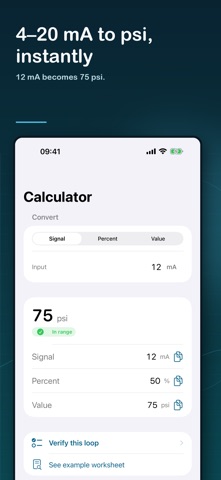
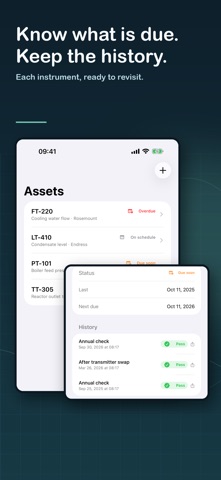
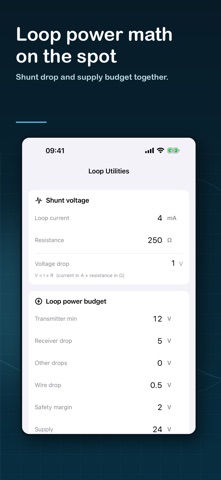
LoopCal turns a 4–20 mA loop check into a calibration worksheet you can hand over, and it is the quickest way to convert a signal in the field. Built for instrumentation and calibration technicians. Fully offline. FROM CHECK TO WORKSHEET • Guided three-point, five-point, and custom 2–21-point checks • As-found and as-left runs, with the error and pass/fail at every point • Up-scale and down-scale readings with hysteresis • Tolerance as percent of span, signal units, or engineering units • Worst point and maximum error summarized for you • A clean PDF worksheet with your company name and logo, in US Letter or A4, plus CSV for your records CONVERT IN SECONDS • 4–20 mA, 0–20 mA, 0–10 V, 1–5 V, and your own custom signal endpoints • Direct-acting and reverse-acting ranges • Linear and square-root (flow) transfer functions • Engineering ranges with any unit, including negative and offset spans • Percent, signal, and engineering values update as you type, with the substituted formula shown • Verify this loop: take the range you just entered straight into a check EVERY INSTRUMENT ON RECORD • Save instruments with their ranges and calibration history • See what is coming due, and get a reminder before the next calibration • Reopen a saved instrument and start its next check without retyping the range LOOP POWER MATH • Shunt resistor voltage drop • Required supply voltage and remaining compliance • Maximum loop and wire resistance PRIVATE BY DESIGN • Everything runs on your device. No account, no ads, no tracking, no network. LoopCal is a calculation aid and field worksheet — not a calibrator, an accredited calibration service, or a replacement for manufacturer procedures. Always follow site lockout/tagout, operations authorization, device manuals, and approved procedures. Terms of Use (EULA): https://www.apple.com/legal/internet-services/itunes/dev/stdeula/
What's new · 1.3
• Verify this loop: go straight from the calculator into a three-point check — the range you entered comes with you. • Your worksheet now appears right on the result screen after a check. • A fuller example worksheet: five points, as-found and as-left. • Cleaner worksheets: sections with nothing to show are no longer printed. • “Start check” stays within reach at the bottom of the screen. • Share LoopCal with a colleague from the More tab. • More dependable when you work without a signal.
Details