

HELIO Morse Messenger
ge-nie inc. · Utilities
Independent analytics for this App Store listing. AppTracker is not affiliated with ge-nie inc.
Chart standing · US
What changed · US
Listing changes AppTracker has observed for this app in this storefront — new versions, price moves, rating shifts, and store copy.
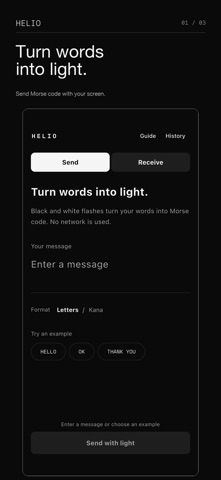
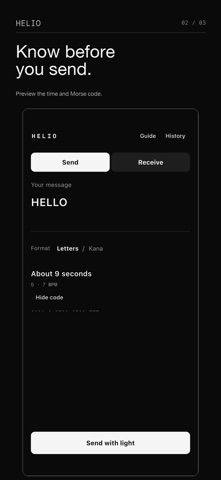
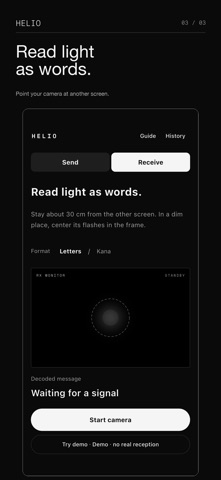
Sending and receiving are easier to find from one screen. Start with an example, then check the estimated send time and Morse code. Pause, resume, and stop states are clearer, and the receiver demo is clearly separate from real reception.
Screenshots
About
HELIO turns text into Morse code and sends it as flashes of light. Choose International Morse or Japanese Morse and use two devices to communicate with letters, numbers, hiragana, and katakana. KEY FEATURES • Switch between International and Japanese Morse code • Normalize hiragana, katakana, voiced, and semi-voiced marks for Japanese Morse • Transmit at a steady 7 WPM • Receive and decode light signals with the camera • Resend messages from your history • Try the receiving flow with Demo Mode when a camera is unavailable HOW TO USE 1. On the sending device, choose a Morse mode and enter a message. 2. On the receiving device, choose the same mode and start listening first. 3. Start transmission and point the flashing screen toward the receiving camera. SAFETY HELIO uses flashing light. Do not use the app if you are sensitive to flashing lights. Check your surroundings and never use it while driving or in unsafe situations.
What's new · 1.1.0
Sending and receiving are easier to find from one screen. Start with an example, then check the estimated send time and Morse code. Pause, resume, and stop states are clearer, and the receiver demo is clearly separate from real reception.
Details