

tone - photos, printed
Shikaka, Inc. · Graphics & Design
Independent analytics for this App Store listing. AppTracker is not affiliated with Shikaka, Inc.
Chart standing · US
What changed · US
Listing changes AppTracker has observed for this app in this storefront — new versions, price moves, rating shifts, and store copy.
Improved artwork editing with text and drawings. - Add up to 16 objects to one artwork, including text and drawings (up to 8 photos) - New text remembers your last font, alignment, effects, letter spacing, and line spacing - Text keeps a crisper outline when you increase its ink bleed effect - Moving, scaling, and rotating drawings now feels more responsive - Refined control icons and menus - Improved cropping of rotated photos and linked rounded corners - Fixed minor issues
Price & rating history · US
Reconstructed from the listing changes AppTracker has observed in this storefront. A field is charted once it has changed more than once, and each line starts at the value it moved from.
Average rating · ★ 4.95 now · 5 changes on record
Ratings breakdown · US
The star breakdown behind this app's rating in this storefront.
In-app purchases · US
What this app sells inside itself, grouped by kind and priced for this storefront.
Screenshots



Keywords this app targets
Search terms AppTracker associates with this app — estimates, not search volume. ❝ = in the app's title; a highlighted number is its current position for that term.
Similar apps
Competitors and close alternatives, as estimated by AppTracker.
 ToneStencil - Stencil Maker
Steve Mitchell
1 shared topic
ToneStencil - Stencil Maker
Steve Mitchell
1 shared topic
 Printed - Vintage Design Photo
Maxim Chernousov
1 shared topic · 1 shared title word
Printed - Vintage Design Photo
Maxim Chernousov
1 shared topic · 1 shared title word
 Trelma
Ute Wedde
1 shared topic
Trelma
Ute Wedde
1 shared topic
 Posterific
Arctic Surf Designs
2 shared topics
Posterific
Arctic Surf Designs
2 shared topics
 Colourtone: Photo Editor
CEE ENTERPRISES PTY LTD
1 shared topic
Colourtone: Photo Editor
CEE ENTERPRISES PTY LTD
1 shared topic
 Stenci Ink
Matias Torres Alegre
Stenci Ink
Matias Torres Alegre
 Print Photo to Size
Carlos Manso
1 shared topic
Print Photo to Size
Carlos Manso
1 shared topic
 Tattoo Printer & Stencil Maker
Felix Brix
Tattoo Printer & Stencil Maker
Felix Brix
About
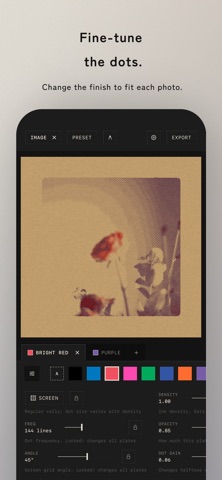
tone is a photo app that gives your pictures the character of stencil printing. Pick a photo, and fine halftone dots and overlapping inks turn it into something like a two-color poster or zine page. Layer photos together in one printed composition. Drawings and text can also be added as material for the overprint. In Simple mode, tap the random buttons to explore combinations of colors, halftones, and frames. A guided tour walks you from loading an image to exporting it. Inks that fit your photo can be chosen automatically. Export right away, or fine-tune dot frequency, screen angle, density, and print behavior for each color. Move, scale, and rotate photos directly on the preview. Crop each image and edit its corners and margins on the canvas. Add rounded corners, hand-cut edges, and paper grain to finish it like a poster or card. Save finished artwork to your photo library. For physical production, export print-ready artwork or a separate file for each ink with finished dimensions, bleed, Standard / Japanese crop marks, true-size imposition, and PNG / JPEG / PDF output. tone supports iPad in portrait, landscape, and Split View. On a wide screen, keep the preview and controls side by side and adjust their widths for your workspace. Your latest artwork and editing settings are saved on device and restored automatically the next time you launch tone. Features: - Give photos the character of stencil printing - Layer multiple photos in one overprinted composition - Simple, Customize, and Advanced modes - Two screening methods: halftone dots and grain - Automatic ink selection that fits your photo - Per-color dot, angle, density, and print controls - Five paper stocks, including white, natural, gray, and kraft - Direct move, scale, rotate, crop, corner, and margin editing - Built-in presets and whole-composition custom presets - Step-by-step views of separation, screening, and overprint - Print-ready and per-ink separation export - Bleed, crop marks, and true-size imposition - iPhone and iPad, portrait, landscape, and Split View - Automatic editing-session save and restore - Available in Japanese, English, Korean, and Chinese (Simplified, Traditional, Hong Kong) 7 extra inks, custom preset saving, and 2x/3x high-resolution artwork export are unlocked with the one-time purchase “Ink Set 02”.
What's new · 2.0.1
Improved artwork editing with text and drawings. - Add up to 16 objects to one artwork, including text and drawings (up to 8 photos) - New text remembers your last font, alignment, effects, letter spacing, and line spacing - Text keeps a crisper outline when you increase its ink bleed effect - Moving, scaling, and rotating drawings now feels more responsive - Refined control icons and menus - Improved cropping of rotated photos and linked rounded corners - Fixed minor issues
Details