

StoneDocket: Cemetery Map
Robert Corbin · Reference
Independent analytics for this App Store listing. AppTracker is not affiliated with Robert Corbin.
Chart standing · US
What changed · US
Listing changes AppTracker has observed for this app in this storefront — new versions, price moves, rating shifts, and store copy.
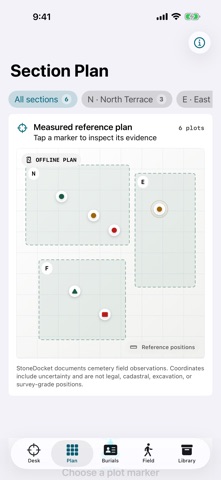
StoneDocket 2.0 is an independent native rebuild for serious cemetery field documentation. - New Survey Desk with project readiness, source coverage, review priorities, and field metrics. - Offline section plan with plot positions and clear non-survey boundaries. - Expanded burial and monument register with evidence confidence, citations, inspections, restrictions, and condition findings. - Field Rounds for planning and recording on-site follow-up. - Protected local project library with verified import and backup archives. - Internal and redacted PDF reports, CSV, GeoJSON with horizontal accuracy, and SHA-256 integrity manifests. - User-initiated camera, Photos, Files, location, and sharing workflows. - Purpose-built iPad navigation, Dynamic Type, VoiceOver improvements, widget, and App Shortcuts. There are still no accounts, ads, subscriptions, tracking, analytics, or developer servers.
In-app purchases · US
No in-app purchases.
Screenshots



About
StoneDocket turns an iPhone or iPad into a private, offline cemetery documentation desk. Build an evidence-linked record of sections, rows, plots, burials, monuments, inscriptions, condition findings, sources, and field work without depending on an account or remote service. FIELD DOCUMENTATION - Organize independent cemetery projects and protected local records. - Map sections and plot positions on an offline reference plan. - Capture a requested location fix together with its timestamp and horizontal accuracy. - Record names, dates, inscriptions, monument form and material, citations, confidence, and research notes. - Attach photos or documents only when you choose. CONDITION AND FOLLOW-UP - Document cracking, erosion, staining, vegetation, displacement, and other controlled findings. - Compare dated inspections and identify records that need review. - Build field rounds with queued, active, completed, and skipped stops. - Keep unresolved and restricted records visible without treating uncertainty as fact. DELIBERATE HANDOFFS - Export a verified project archive for backup and transfer. - Create an internal field-report PDF or a redacted public-register PDF. - Produce a burial-index CSV, GeoJSON field points with accuracy metadata, and a SHA-256 integrity manifest. - Nothing is uploaded or shared automatically. PRIVATE BY DESIGN StoneDocket has no account, advertising, subscription, analytics SDK, tracking SDK, or developer-operated backend. Project records and imported artifacts remain in the app's protected local storage. Camera, photo picker, Files, location, and sharing interfaces appear only for actions you initiate. NATIVE ON IPHONE AND IPAD The app includes a purpose-built iPad sidebar, Dynamic Type support, VoiceOver labels, non-color status cues, widgets, App Shortcuts, sample data, and a field-reference guide. IMPORTANT BOUNDARY StoneDocket creates field documentation. It does not provide legal, cadastral, navigation, or survey-grade positions. Every coordinate handoff preserves the reported uncertainty so professional judgment remains with the user. Pay once. Keep the work under your control.
What's new · 2.0
StoneDocket 2.0 is an independent native rebuild for serious cemetery field documentation. - New Survey Desk with project readiness, source coverage, review priorities, and field metrics. - Offline section plan with plot positions and clear non-survey boundaries. - Expanded burial and monument register with evidence confidence, citations, inspections, restrictions, and condition findings. - Field Rounds for planning and recording on-site follow-up. - Protected local project library with verified import and backup archives. - Internal and redacted PDF reports, CSV, GeoJSON with horizontal accuracy, and SHA-256 integrity manifests. - User-initiated camera, Photos, Files, location, and sharing workflows. - Purpose-built iPad navigation, Dynamic Type, VoiceOver improvements, widget, and App Shortcuts. There are still no accounts, ads, subscriptions, tracking, analytics, or developer servers.
Details