

Live Cue Player
Robert Carpenter · Music
Independent analytics for this App Store listing. AppTracker is not affiliated with Robert Carpenter.
Chart standing · US
What changed · US
Listing changes AppTracker has observed for this app in this storefront — new versions, price moves, rating shifts, and store copy.
Big news! Script Music Player is now available for Mac. Use your iPhone or iPad to control your Mac over Wi-Fi. Keep your script in hand while your Mac handles the music. MAC CONTROL FROM YOUR iPHONE OR iPAD • Control Play, Pause, Stop, Advance, Loop, Fade, Echo and master volume. • Follow the Mac’s script and see live playback updates. • Pair using the code on your Mac. Your pairing is remembered for next time. • The Apple connection button is always visible and opens a clearer Connect to Mac screen. Green shows a live connection; red means it has dropped. ALSO INCLUDED FROM OUR RECENT UPDATES • Easier folder browsing in Live Cues and Playlist Player, with a tappable path showing exactly where you are. • Import a whole music folder and its subfolders for offline playback. Look inside before adding it, or cancel and return straight to the player. • Keep the current song playing while you browse, add or replace playlist music. • Organize your Music Library with Move, Rename and Delete actions for folders. • Yellow Cue 1 and blue Cue 2 pads let you start different parts of the same song. • Zoom into detailed multicolor waveforms, drag to browse and move the playhead precisely using its handle. Playback follows the playhead as it reaches the edge. • Choose Fade or Echo Out for Live Cue Advance. Playlist Advance fades out before starting the next song. • More space between the master fader and volume shortcuts, plus full project names and simpler Save and Delete controls. Wi-Fi control requires Script Music Player for Mac 1.0 or later. Keep both apps open on the same network with Local Network access allowed. Audio plays from the Mac; remote control does not transfer music or project files. Each app also works independently. Your existing projects, imported music and purchases are preserved. • Cue 1 and Cue 2 now move the playhead to the saved point while keeping the current playback state. Playing music continues from that point; stopped or paused music waits until you press Play.
In-app purchases · US
What this app sells inside itself, grouped by kind and priced for this storefront.
Screenshots



About
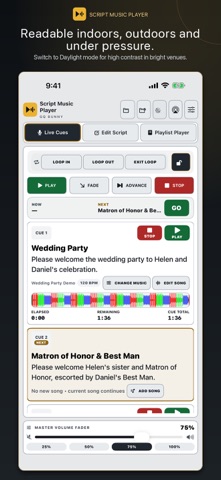
A complete iPad player and an optional wireless remote for the full Mac app. Use this app independently, or pair with Script Music Player for Mac 1.0 or later to control the Mac’s playback, volume, Advance, Loop, Fade and Echo. Audio plays on the Mac. Pairing is remembered for reconnection when you reopen the app. Both devices need local-network permission and a network that allows communication. Keep the remote active while controlling the show. Project files and music are not transferred by remote control. The room is ready. You say the line, tap GO, and the right song starts from the exact point you chose. Script Music Player puts your script and music cues on one screen. Each cue card holds the words you need to say—an introduction, reading, speaker note, or stage direction—beside the song that follows. You can stay focused on the people in front of you instead of switching between notes and a music app. READ THE CUE. TAP GO. • Start each song from the point you choose. • Give every cue its own start and stop point. • Use different sections of the same full recording for different moments. • Tap Advance to fade the current song to silence and begin the next cue. • See what is playing, what is next, and elapsed, remaining, and total time. PREPARE BEFORE THE EVENT Save each ceremony, reception, show, recital, class, presentation, or production as its own project. Reopen it on the day you need it with the script, cue order, song settings, playlist, and imported music together. MUSIC READY ON YOUR DEVICE Import audio files from Files into organized music folders so the songs you need are available offline. Daylight mode adds contrast for outdoor work, and the app keeps the display awake while active. iOS may still reduce screen brightness if the device gets hot. PLAYLIST PLAYER FOR DOWNTIME When no one is reading from a script, use Playlist Player for cocktail hour, dinner, pre-show, intermission, or background music. Add a whole music folder, replace or add to the current playlist, reorder songs, choose Continuous or Random playback, and use Fade or Advance for a smooth change. BUILT FOR LIVE MOMENTS Designed by a working wedding DJ for DJs and MCs, officiants and celebrants, event hosts, ceremony coordinators, presenters, stage managers, theater and dance productions, coaches, instructors, and anyone who needs words and music to land together. TRY THE WORKFLOW FREE Your first three Live Cues are free with no time limit. Build them, rehearse them, and feel how the app works before paying. Cue four and beyond, plus Playlist Player, require paid access. There is no timed free trial. In the U.S., choose $3.99 weekly, $14.99 monthly, $59.99 yearly, or $99.99 lifetime. Prices in other regions are shown in the app before purchase. Weekly, monthly, and yearly subscriptions renew automatically unless canceled at least 24 hours before the current period ends. Payment is charged to your Apple Account. Manage or cancel in Settings > Apple Account > Subscriptions, or use Manage Subscriptions in the app. Lifetime is a one-time purchase that never expires. Buying lifetime access does not cancel an existing subscription. Restore Purchases is available, and existing lifetime purchases remain valid. Use audio files you own or have permission to use. Imported audio is stored locally for offline playback. Protected streaming-service tracks cannot be imported as audio files. Privacy: https://gqbunny.com/privacy.php Terms: https://www.apple.com/legal/internet-services/itunes/dev/stdeula/ Support: https://gqbunny.com/contact-support.php
What's new · 3.0
Big news! Script Music Player is now available for Mac. Use your iPhone or iPad to control your Mac over Wi-Fi. Keep your script in hand while your Mac handles the music. MAC CONTROL FROM YOUR iPHONE OR iPAD • Control Play, Pause, Stop, Advance, Loop, Fade, Echo and master volume. • Follow the Mac’s script and see live playback updates. • Pair using the code on your Mac. Your pairing is remembered for next time. • The Apple connection button is always visible and opens a clearer Connect to Mac screen. Green shows a live connection; red means it has dropped. ALSO INCLUDED FROM OUR RECENT UPDATES • Easier folder browsing in Live Cues and Playlist Player, with a tappable path showing exactly where you are. • Import a whole music folder and its subfolders for offline playback. Look inside before adding it, or cancel and return straight to the player. • Keep the current song playing while you browse, add or replace playlist music. • Organize your Music Library with Move, Rename and Delete actions for folders. • Yellow Cue 1 and blue Cue 2 pads let you start different parts of the same song. • Zoom into detailed multicolor waveforms, drag to browse and move the playhead precisely using its handle. Playback follows the playhead as it reaches the edge. • Choose Fade or Echo Out for Live Cue Advance. Playlist Advance fades out before starting the next song. • More space between the master fader and volume shortcuts, plus full project names and simpler Save and Delete controls. Wi-Fi control requires Script Music Player for Mac 1.0 or later. Keep both apps open on the same network with Local Network access allowed. Audio plays from the Mac; remote control does not transfer music or project files. Each app also works independently. Your existing projects, imported music and purchases are preserved. • Cue 1 and Cue 2 now move the playhead to the saved point while keeping the current playback state. Playing music continues from that point; stopped or paused music waits until you press Play.
Details