

myTV - Cast Web Videos to TV
INPHIL CHOI · Photo & Video
Independent analytics for this App Store listing. AppTracker is not affiliated with INPHIL CHOI.
Chart standing · US
What changed · US
Listing changes AppTracker has observed for this app in this storefront — new versions, price moves, rating shifts, and store copy.
myTV Premium is here as a one-time purchase, not a subscription. • Casting, the remote, ad blocking, auto-reconnect to your last TV, next-episode playback and the sponsor-skip button stay free • Premium adds the playback queue, subtitle search, automatic sponsor-segment skipping, desktop view and saved video bookmarks • If you used myTV before this update, Premium features stay free for you
Ratings breakdown · US
The star breakdown behind this app's rating in this storefront.
Screenshots



About
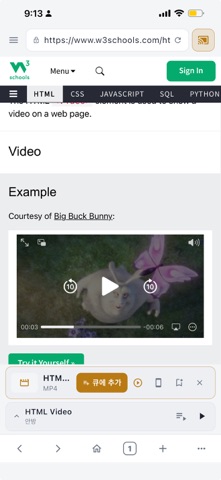
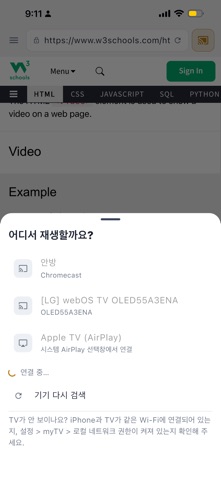
Watch the video you found on the web — on your TV, with one tap. myTV is a web browser with built-in casting. Unlike screen mirroring, it sends the actual video stream directly to your TV, so playback stays in original quality and your phone becomes the remote. Lock your phone or switch apps — the TV keeps playing. ◆ Works with • Google Cast TVs and dongles • DLNA-enabled smart TVs • AirPlay devices ◆ Free features • Auto video detection — play a video on any page and the cast button lights up • Connect first — pair your TV in advance and detected videos play instantly; reconnects to your last TV • Full remote — play/pause, seek, volume, even from the lock screen • Ad blocking, a sponsor-skip button and next-episode playback • Multi-tab browsing, private tabs, dark/light themes ◆ myTV Premium (optional one-time purchase, not a subscription) • Playback queue — line up videos and they play one after another • Subtitle search • Automatic sponsor-segment skipping • Desktop website view • Saved video bookmarks Casting is always free. If you used myTV before Premium existed, Premium features stay free for you. ◆ Good to know • Your iPhone and TV must be on the same Wi-Fi network • DRM-protected content (OTT services, etc.) cannot be cast • myTV does not host, recommend, or index any content. It simply moves playback of a web page you visit to your own TV Terms of Use (EULA): https://www.apple.com/legal/internet-services/itunes/dev/stdeula/ Privacy Policy: https://creativelab-lee.github.io/mytv-privacy/
What's new · 1.3.0
myTV Premium is here as a one-time purchase, not a subscription. • Casting, the remote, ad blocking, auto-reconnect to your last TV, next-episode playback and the sponsor-skip button stay free • Premium adds the playback queue, subtitle search, automatic sponsor-segment skipping, desktop view and saved video bookmarks • If you used myTV before this update, Premium features stay free for you
Details