

OneMarkup: File Viewer
Freedom Dimension (shenzhen) Technology Co., Ltd · Productivity
Independent analytics for this App Store listing. AppTracker is not affiliated with Freedom Dimension (shenzhen) Technology Co., Ltd.
Chart standing · US
What changed · US
Listing changes AppTracker has observed for this app in this storefront — new versions, price moves, rating shifts, and store copy.
• Browse and extract ZIP, 7Z, RAR, TAR, GZ, BZ2 and XZ files and TAR combinations. Open or share individual files and save extracted folders to Files. Includes 15 real archive examples. Encrypted and split archives are unsupported; solid RAR requires RAR5. • Added offline DWG 2D drawing previews with zoom, pan, Fit and layer controls. Drawing content that cannot be displayed is disclosed; CAD editing and engineering measurements are not included. • A refreshed imperial reading style, compact Recents and file categories make browsing easier. Return from a sample to the same supported-format list, keeping your search and place. • Improved opening from other apps, including .cer certificates, with clearer app and quick-preview entries and readable certificate information. Explore real samples covering eleven CAD file extensions. • Sharing guidance now uses six-step real iOS screenshots. Circles mark exactly where to tap, and arrows show how to drag OneOpen and OneOpen Preview toward the front. Skip the guide during onboarding or revisit it in Settings.
In-app purchases · US
What this app sells inside itself, grouped by kind and priced for this storefront.
Screenshots


About
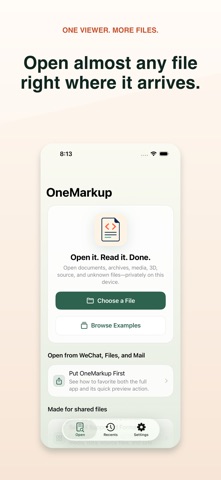
OneOpen opens the files you receive from Files, Mail, and other apps. Everyday viewing stays free and local. FREE FILE VIEWING Open HTML and ZIP website packages as isolated mini apps. Read Markdown, PDF, Office and iWork documents, common images, audio, video, JSON, YAML, XML, CSV, source code, and text. Search and edit common text formats in a separate copy; your original remains untouched. Recents and widgets put your files within reach. ADVANCED FORMATS Advanced Access unlocks specialized previews: 3D models, RAW and design images, fonts, certificates, property lists, email, subtitles, contacts, calendars, specialist archives and data, CAD and circuit files, and the binary inspector. Choose an annual subscription or a one-time lifetime purchase; both unlock the same features. ARCHIVES AND EXTRACTION Browse ZIP, 7Z, RAR, TAR, GZ, BZ2 and XZ files, including TGZ/TAR.GZ, TBZ/TBZ2/TAR.BZ2 and TXZ/TAR.XZ. Inspect folders, open or share supported files, and save extracted files to Files. ZIP and EPUB stay free; 7Z, RAR, TAR and the other compressed formats require Advanced Access. Includes 15 small, real archive examples. Encrypted archives and split volumes are not supported. Solid RAR3 archives are not supported; solid RAR5 archives are supported. SHARING GUIDE Follow a six-step guide built from real iOS screenshots. Circles mark the buttons to tap, and arrows show how to drag. Learn to move OneOpen and OneOpen Preview toward the front of the share sheet. Skip it during onboarding or revisit it in Settings. PRIVACY AND HTML SAFETY OneOpen has no account, ads, analytics, or document uploads. Non-HTML previews stay offline. Imported HTML and ZIP websites may run JavaScript and connect to HTTPS/WSS servers in an isolated WebKit store. Switch to offline mode or Safe Preview at any time; HTTP, embedded frames, unexpected navigation, and access to other local files remain blocked. Webpage code may contact third-party servers when you allow network access. Terms of Use: https://oneapps.studio/terms Privacy Policy: https://oneapps.studio/privacy Advanced Access includes offline DWG/DXF 2D drawings and STEP/STP, IGES/IGS, BREP/BRP, STL, OBJ and PLY geometry previews. DWG shows supported 2D model-space content; drawing content that cannot be displayed is disclosed. External OBJ materials and textures are not loaded. This is a viewer, without CAD editing or engineering measurements.
What's new · 1.9.0
• Browse and extract ZIP, 7Z, RAR, TAR, GZ, BZ2 and XZ files and TAR combinations. Open or share individual files and save extracted folders to Files. Includes 15 real archive examples. Encrypted and split archives are unsupported; solid RAR requires RAR5. • Added offline DWG 2D drawing previews with zoom, pan, Fit and layer controls. Drawing content that cannot be displayed is disclosed; CAD editing and engineering measurements are not included. • A refreshed imperial reading style, compact Recents and file categories make browsing easier. Return from a sample to the same supported-format list, keeping your search and place. • Improved opening from other apps, including .cer certificates, with clearer app and quick-preview entries and readable certificate information. Explore real samples covering eleven CAD file extensions. • Sharing guidance now uses six-step real iOS screenshots. Circles mark exactly where to tap, and arrows show how to drag OneOpen and OneOpen Preview toward the front. Skip the guide during onboarding or revisit it in Settings.
Details