

SB3 Game Player
文军 崔 · Utilities
Independent analytics for this App Store listing. AppTracker is not affiliated with 文军 崔.
Chart standing · US
What changed · US
Listing changes AppTracker has observed for this app in this storefront — new versions, price moves, rating shifts, and store copy.
All features are now included with the app. This update removes the previous Pro upgrade and in-app purchase flow. Virtual controls, project layouts, resource export, favorites and full recent project history are now available without any additional purchase. Also includes general improvements and compatibility updates.
Price & rating history · US
Reconstructed from the listing changes AppTracker has observed in this storefront. A field is charted once it has changed more than once, and each line starts at the value it moved from.
Price · 4.99 USD now · 3 changes on record
Screenshots


About
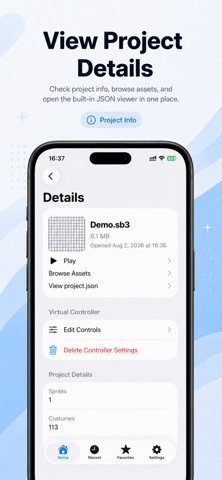
SB3 File Opener & Player lets you open, inspect and play local SB3 project files directly on your iPhone or iPad. Open SB3 Projects Import SB3 files from the Files app and browse project information and resources. Play Projects Run supported SB3 projects directly on your device. Virtual Controls Use and customize virtual controls for projects that work better with touch input. Project Layouts Save portrait or landscape control layouts for individual projects. Browse and Export Resources Inspect project assets and export supported resources when needed. Favorites and Recent Projects Keep frequently used projects easy to access and view your full recent project history. Offline and Local Your project files are handled locally on your device. No account is required. One Purchase, Complete App All features are included with the app. There are no additional feature-unlock purchases required. SB3 File Opener & Player is an independent utility and is not affiliated with or endorsed by the Scratch Foundation.
What's new · 1.2.0
All features are now included with the app. This update removes the previous Pro upgrade and in-app purchase flow. Virtual controls, project layouts, resource export, favorites and full recent project history are now available without any additional purchase. Also includes general improvements and compatibility updates.
Details