

Unelog - Allotment Garden Log
YANGLI CHEN · Lifestyle
Independent analytics for this App Store listing. AppTracker is not affiliated with YANGLI CHEN.
Chart standing · US
What changed · US
Listing changes AppTracker has observed for this app in this storefront — new versions, price moves, rating shifts, and store copy.
Built from the requests of people who run working farms. • Orchards for olives, almonds and fruit trees: pruning and soil work, tree count, tree and row spacing, irrigation system, missing, dead and replaced trees, yield per tree • Journal with filters by work type and tree label • Period summary (today, this week, month, year) and year comparison • Farm map with points such as gates, wells and charging spots • Import and export fields and points as GPX, KML or CSV • Machine service by days and distance, not just hours. Energy use (kWh) for electric machines • Photo locations • Ask Unelog: summaries built from your own records • Job tracking with GPS: route, distance, time and area worked, shown on the Lock Screen while recording • Area worked on the field map, plus what is left • AB line: straight guide lines with the next passes and headlands • Can you finish this field? An estimate from past jobs and remaining battery • Offline map: save an aerial photo of each field; the last weather stays visible without signal • Electric machine records in the PDF report • Apple Watch: start and stop jobs, log work and observations, today’s tasks, save spots • Weather alerts by type: on the day or the day before at your own time, or shortly before rain, frost or wind starts (hourly forecast). Daily summary, rain totals and notification history • Weather diary: actual weather vs. the day-before forecast, with charts and PDF • Farm map: your own point IDs, several photos, 14 new point types such as trees, tanks and pumps, All points list, vertex editing, walk a boundary with GPS, PDF area with preview, landscape • Work records with location, map point, GPS job and before/during/after photos. Work map, and coordinates, weather and photos in the field report • Water tanks & wells with refill reminders, and Inspections with a PDF log • Farm status on Today, new Ask Unelog questions, Siri and Shortcuts Most of the new features live in Farm Mode. Some farm-wide totals and exports are part of a one-time purchase.
Screenshots




About
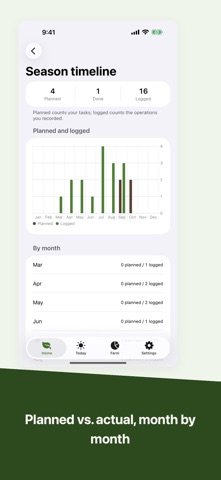
Unelog is a cultivation log built for people who rent a plot at a community or allotment garden. It brings everything from your contract to your harvest into one place, and your records stay on your device. A rented plot you travel to has needs that ordinary kitchen-garden apps ignore. - Plots and ridges Manage your plot and the ridges within it as a simple bar list. See at a glance which ridges are growing and which are empty. - Planting records For each ridge, record the crop, sowing / transplanting / harvest dates, a photo, and notes. - Visit log Log a visit with one tap. The home screen always shows days since your last visit. - Contract and reminders Record your contract period and rent, and get a local notification when renewal or lottery deadlines approach. - Rotation check Unelog maps each crop to its family and warns you, using general guideline intervals, when the same family is planted again too soon on the same ridge. Full access also suggests rotations. - Profitability dashboard (full access) Estimate your net from harvest values, materials, and rent. - Planting calendar See typical sowing and harvest months for common crops. - Weather & frost (full access, opt-in) Apple Weather shows conditions and frost risk at your plot's location. - Season PDF & summary (full access) Export a year of records as a PDF and generate a season summary. Your data No account required. Your records stay on your device. Only if you turn on iCloud sync in Settings, your records and photos sync to your own iCloud so the same content appears on devices signed in to the same Apple Account — the developer cannot see any of it. Sync is off by default. No third-party analytics SDKs. Only if you turn on weather, your plot's coordinates are sent to Apple's weather service (your records are never sent). Pricing Core features are free. Full access is a one-time purchase (not a subscription): unlimited plots and ridges, unlimited reminders, rotation history plus suggestions, the profitability dashboard, weather, and PDF export plus summary. Buy once, use forever. - Backup (v1.1) Export your records and photos to a single file and read it back on a new phone. CSV export too. - Harvest summary (full access) Totals your harvested amount and value by crop and by unit. - Farm Mode (separate one-time purchase) Turn it on in Settings and plots become fields, with areas in hectares or acres. Leave it off and the app stays exactly as it was. Fields and orchards: a farm-wide balance with per-hectare figures, charts for yield and cost, a year of planned vs. actual work, tasks, machine service and a PDF report per field. Orchards for olives, almonds and fruit trees, with tree count, spacing and yield per tree. Map and GPS: a farm map with your own point IDs and photos (trees, wells, tanks, pumps, gates and more), field boundaries you can edit or walk with GPS, job tracking with route, time and area worked, and an AB line that shows the area already worked. Weather: alerts for rain, frost, wind and more, on the day, the day before or shortly before they start, and a weather diary that compares the forecast with what actually happened. Also: work records with location and photos, water tanks and wells with refill reminders, inspections, Ask Unelog, Apple Watch and Shortcuts. Recording is free. Farm-wide totals, charts, reports, area worked, the AB line and weather are paid features. Distances and areas are GPS estimates. Rotation intervals are general guidelines and vary by variety and soil. They do not guarantee results.
What's new · 1.3
Built from the requests of people who run working farms. • Orchards for olives, almonds and fruit trees: pruning and soil work, tree count, tree and row spacing, irrigation system, missing, dead and replaced trees, yield per tree • Journal with filters by work type and tree label • Period summary (today, this week, month, year) and year comparison • Farm map with points such as gates, wells and charging spots • Import and export fields and points as GPX, KML or CSV • Machine service by days and distance, not just hours. Energy use (kWh) for electric machines • Photo locations • Ask Unelog: summaries built from your own records • Job tracking with GPS: route, distance, time and area worked, shown on the Lock Screen while recording • Area worked on the field map, plus what is left • AB line: straight guide lines with the next passes and headlands • Can you finish this field? An estimate from past jobs and remaining battery • Offline map: save an aerial photo of each field; the last weather stays visible without signal • Electric machine records in the PDF report • Apple Watch: start and stop jobs, log work and observations, today’s tasks, save spots • Weather alerts by type: on the day or the day before at your own time, or shortly before rain, frost or wind starts (hourly forecast). Daily summary, rain totals and notification history • Weather diary: actual weather vs. the day-before forecast, with charts and PDF • Farm map: your own point IDs, several photos, 14 new point types such as trees, tanks and pumps, All points list, vertex editing, walk a boundary with GPS, PDF area with preview, landscape • Work records with location, map point, GPS job and before/during/after photos. Work map, and coordinates, weather and photos in the field report • Water tanks & wells with refill reminders, and Inspections with a PDF log • Farm status on Today, new Ask Unelog questions, Siri and Shortcuts Most of the new features live in Farm Mode. Some farm-wide totals and exports are part of a one-time purchase.
Details